Your workflow is unique 👨💻 - tell us how you use Dropbox here.
Forum Discussion

SGalbraith
6 years agoExplorer | Level 4
Dropbox options no longer showing when right clicking in macOS Finder (Mojave)
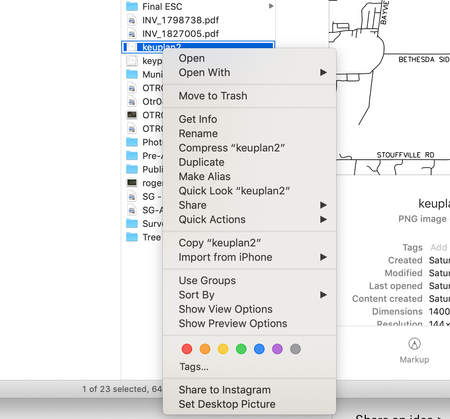
Similar to the other user who is having this problem on windows, sometime ago (I don't remember when), the dropbox options that appear when you right click a file (of particular use for me was Create...
- 6 years ago
Hey there SGalbraith - sorry to hear about this; could you provide a screenshot of the app's exact status as shown on the app at the moment?
In the meantime, you can try relaunching Finder by using the following steps:
-Save any files that you have open and close any applications
-Click on the Apple icon in the top left of your screen
-Click on "force quit"
-Relaunch the Finder.Let me know how it goes!

Walter Dropbox Community Moderator
6 years agoDropbox Community ModeratorHey there SGalbraith - sorry to hear about this; could you provide a screenshot of the app's exact status as shown on the app at the moment?
In the meantime, you can try relaunching Finder by using the following steps:
-Save any files that you have open and close any applications
-Click on the Apple icon in the top left of your screen
-Click on "force quit"
-Relaunch the Finder.
Let me know how it goes!
- SGalbraith6 years agoExplorer | Level 4
Thanks! Relaunching finder solved it!
Much appreciated.
- visualhaus6 years agoNew member | Level 2
I have the same issue but relauncing the finder didnt fix it. any other ideas?
- Walter6 years ago
Sorry to hear that visualhaus!
To get these options, the desktop app must be up and running. If it is indeed running and you're not seeing these options, could you forward me a screenshot of its exact status as shown on the affected computer?
This will help me investigate further if needed.
Thank you!
- MWREsq6 years agoNew member | Level 2
I had this issue and found the answer in System Preferences >> Extensions >> All. There I checked the box next to Dropbox > __ Finder Extensions.
- Rafe6 years agoExplorer | Level 4
I can't find the extension for dropbox, but only a checkbox for OneDrive, other than reinstall the Dropbox( not working), any suggestion? I use the Mojave and the latest version of Dropbox and the iMac is a brand new setup.
- JOfE6 years agoExperienced | Level 11
True, 'relaunching the finder' solves the issue. The dropbox menus reappears. But this is hardly a resolution becasue you have to do this constantly. The menus disappear again.
- Walter6 years ago
If that's indeed the case, you might want to consider rebuilding your Finder's Spotlight index JOfE. This would fall outside our remit but feel free to give it a go and report back with your results.
Thanks!

About Apps and Installations
Have a question about a Dropbox app or installation? Reach out to the Dropbox Community and get solutions, help, and advice from members.
The Dropbox Community team is active from Monday to Friday. We try to respond to you as soon as we can, usually within 2 hours.
If you need more help you can view your support options (expected response time for an email or ticket is 24 hours), or contact us on X, Facebook or Instagram.
For more info on available support options for your Dropbox plan, see this article.
If you found the answer to your question in this Community thread, please 'like' the post to say thanks and to let us know it was useful!


