We're making some changes to the Dropbox Community 👩💻 - Find out more here.
Forum Discussion

SGalbraith
6 years agoExplorer | Level 4
Dropbox options no longer showing when right clicking in macOS Finder (Mojave)
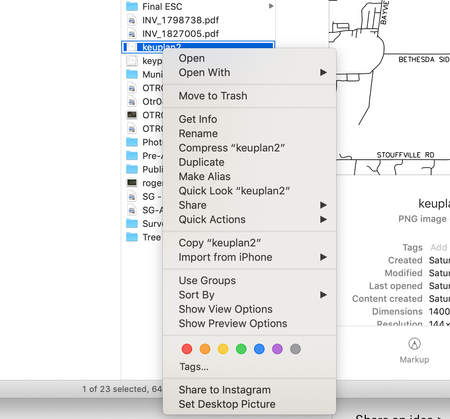
Similar to the other user who is having this problem on windows, sometime ago (I don't remember when), the dropbox options that appear when you right click a file (of particular use for me was Create...
- 6 years ago
Hey there SGalbraith - sorry to hear about this; could you provide a screenshot of the app's exact status as shown on the app at the moment?
In the meantime, you can try relaunching Finder by using the following steps:
-Save any files that you have open and close any applications
-Click on the Apple icon in the top left of your screen
-Click on "force quit"
-Relaunch the Finder.Let me know how it goes!

Rafe
6 years agoExplorer | Level 4
Thanks Lusil,
The screen is same as SGalbraith
Missing share option with right click.
Dropbox Finder Integration option is missing, but I can see OneDrive Finder Integration option at the same place.
Can I manually add this extension?
Reinstall ,not clean install, or force quit finder won't help.
I have a MacBook Air have no problem with my same account.
The screen is same as SGalbraith
Missing share option with right click.
Dropbox Finder Integration option is missing, but I can see OneDrive Finder Integration option at the same place.
Can I manually add this extension?
Reinstall ,not clean install, or force quit finder won't help.
I have a MacBook Air have no problem with my same account.

Daphne Dropbox Community Moderator
6 years agoDropbox Community ModeratorThanks for getting back to us with your update Rafe!
Can you please just let me know what the current sync status of your desktop app is showing?
Let me know what you find - cheers!
- Rafe6 years agoExplorer | Level 4
Sorry about late reply, the sync status was normal.
The problem was solved at the early of JAN 2020 after update of Dropbox apps and MacOS. I noticed the Dropbox extension studently appear and the share function work.
About Apps and Installations
Have a question about a Dropbox app or installation? Reach out to the Dropbox Community and get solutions, help, and advice from members.
The Dropbox Community team is active from Monday to Friday. We try to respond to you as soon as we can, usually within 2 hours.
If you need more help you can view your support options (expected response time for an email or ticket is 24 hours), or contact us on X, Facebook or Instagram.
For more info on available support options for your Dropbox plan, see this article.
If you found the answer to your question in this Community thread, please 'like' the post to say thanks and to let us know it was useful!


