Your workflow is unique 👨💻 - tell us how you use Dropbox here.
Forum Discussion

ned666
3 years agoHelpful | Level 6
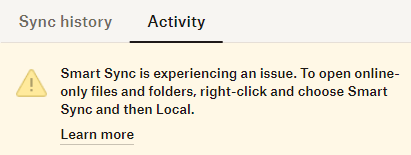
Dropbox tells me to right click on folder and choose Smart Sync but I don't have this option
Smart Sync is broken for me, but the hint that Dropbox gives me to right-click on a folder and choose "Smart Sync" makes no sense:
I don't have this option when I right-click in Wind...
- 3 years ago
Hi ned666, happy Monday!
Let's see what we can find on this together!
Have you tried re-starting your device? I'd also try re-installing the app real quick, to see if this changes things.
Keep me posted on the results.


ned666
3 years agoHelpful | Level 6
Hi, yes, reinstalling helped regarding SmartSync, but now I'm struggling with other problem.
1. Dropbox is stuck at "Dowloading 3 files" since Monday
2. I cannot figure out which 3 files, because the syncing icon overlays are not visible anymore in Windows Explorer
Will try to figure it out myself first, if it doesn't help I will open a new thread.

About Apps and Installations
Have a question about a Dropbox app or installation? Reach out to the Dropbox Community and get solutions, help, and advice from members.
The Dropbox Community team is active from Monday to Friday. We try to respond to you as soon as we can, usually within 2 hours.
If you need more help you can view your support options (expected response time for an email or ticket is 24 hours), or contact us on X, Facebook or Instagram.
For more info on available support options for your Dropbox plan, see this article.
If you found the answer to your question in this Community thread, please 'like' the post to say thanks and to let us know it was useful!


