Our Community is in read-only mode until April 8th, learn more here. You can still search existing threads or get help via Dropbox Support, the Dropbox Help Center, or Learn.
Forum Discussion

Rob N.
1 year agoExplorer | Level 4
How can I disable the "Welcome to Dropbox" prompt on Windows?
I manage several clients using Windows Remote Desktop Services (RDS), i.e. multi-user Windows where many people login to the same server. A few months ago, Dropbox updated the client so that this box...
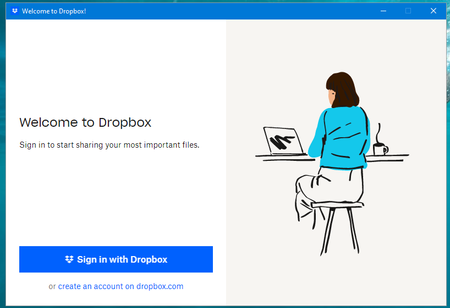
- 1 year ago
Rob N. wrote:
... on RDS only a couple of users use Dropbox and therefore everyone else is annoyed by this prompt every day.
Disable the automatic start-up of Dropbox (which is system-wide), then create your own shortcut to Dropbox for the users that need it and place it in their personal Start Up folder.


Walter Dropbox Community Moderator
1 year agoDropbox Community ModeratorHi there Rob N. - thanks for bringing this to our attention.
Are you referring to individual Dropbox accounts or team accounts?
Can you please clarify the OS version of the affected devices?
Also, at what point are you presented with this error exactly?
Any additional information is more than welcome!

Rob N.
1 year agoExplorer | Level 4
>Are you referring to individual Dropbox accounts or team accounts?
Those users who do use Dropbox are using individual accounts.
>Can you please clarify the OS version of the affected devices?
Windows Server 2019 and Windows Server 2022.
>Also, at what point are you presented with this error exactly?
When any user logs on. The suggestion below makes sense - disable the global starting of Dropbox and add it individually for users who do use Dropbox.
About Apps and Installations
Have a question about a Dropbox app or installation? Reach out to the Dropbox Community and get solutions, help, and advice from members.
The Dropbox Community team is active from Monday to Friday. We try to respond to you as soon as we can, usually within 2 hours.
If you need more help you can view your support options (expected response time for an email or ticket is 24 hours), or contact us on X, Facebook or Instagram.
For more info on available support options for your Dropbox plan, see this article.
If you found the answer to your question in this Community thread, please 'like' the post to say thanks and to let us know it was useful!


