Our Community is in read-only mode until April 8th, learn more here. You can still search existing threads or get help via Dropbox Support, the Dropbox Help Center, or Learn.
Forum Discussion

hgreatrex
3 months agoExplorer | Level 4
How do I re-link the File Provider Dropbox folder?
Hi,
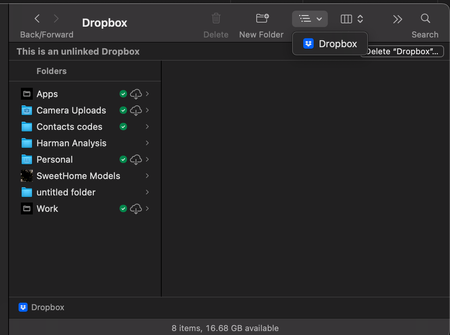
I upgraded to the new file provider dropbox a few months ago. In the last few weeks, dropbox didn't seem to be syncing, even after I clicked move to online only and my hard-drive suddenly fil...

Nancy Dropbox Community Moderator
3 months agoDropbox Community ModeratorHi Helen! Apologies for the late reply; it looks like we missed your latest post.
Since you mention not having enough hard drive space on your computer, you can try creating a new Dropbox folder and avoid re-syncing everything at once with the use of selective sync.
Once the desktop app is up to date, you can start gradually re-syncing your folders and comparing the files you already have in the old Dropbox folder, so that you can make sure that there’s no content that hadn’t been previously synced to your Dropbox account online (if there is, you can move it over to the new Dropbox folder, as well).
If you see that there isn’t enough space to sync some of your files in the meantime, you can try deleting content from your old Dropbox folder, but only after you’ve made sure that it’s available on www.dropbox.com.
 jnelken2 months agoExplorer | Level 4
That is a ridiculous answer. No customer should need to completely re-sync their hard drive because you're not allowed to re-download the dropbox app and have it start in File Provider mode. Absolutely stupid. I have half a million files. You want me to dual-sync and audit every one of them because you have a broken product?? All while operating on near zero remaining disk space in order to have my old Dropbox available for the process? Really?
About Apps and Installations
Have a question about a Dropbox app or installation? Reach out to the Dropbox Community and get solutions, help, and advice from members.
The Dropbox Community team is active from Monday to Friday. We try to respond to you as soon as we can, usually within 2 hours.
If you need more help you can view your support options (expected response time for an email or ticket is 24 hours), or contact us on X, Facebook or Instagram.
For more info on available support options for your Dropbox plan, see this article.
If you found the answer to your question in this Community thread, please 'like' the post to say thanks and to let us know it was useful!


