Our Community is in read-only mode until April 8th, learn more here. You can still search existing threads or get help via Dropbox Support, the Dropbox Help Center, or Learn.
Forum Discussion

Sage4
2 years agoNew member | Level 2
How to link an Unlinked Backup?
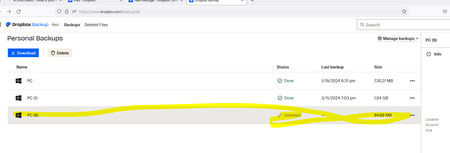
I have a backup that is shows as "Unlinked" under status (see PC (9) on the screen shot). This back up does not show up when I navigate to Manage Backups via the desktop app. It does show up in fil...
 2 years ago
Three screenshots attached: The online Backup tab (that shows PC (9) Unlinked), the Backup tab on my computer (that doesn't show PC (9), the File Explorer portion of Dropbox (that shows PC (9)).

Megan Dropbox Community Moderator
2 years agoDropbox Community ModeratorHi Sage4, welcome to our Community!
You mentioned that when you visit your Backup tab on the app's preferences, you don't see it there.
Do you have the option to re-enable Backup when you're there?
Let me know more!
- Sage42 years agoNew member | Level 2
No, I don't have that option. PC (9) is not listed - that's the one that should be syncing. There's no way to add a new backup.
- Megan2 years ago
Hi Sage4, I'd definitely love to have a visual of what you see on your end when visiting your Backup tab on the device.
If you could send a few screenshots, that'd be most helpful. While you're at it, feel free to also send me a screenshot of the Backup that you see in your File Explorer, please.
- Sage42 years agoNew member | Level 2
Three screenshots attached: The online Backup tab (that shows PC (9) Unlinked), the Backup tab on my computer (that doesn't show PC (9), the File Explorer portion of Dropbox (that shows PC (9)).
About Apps and Installations
Have a question about a Dropbox app or installation? Reach out to the Dropbox Community and get solutions, help, and advice from members.
The Dropbox Community team is active from Monday to Friday. We try to respond to you as soon as we can, usually within 2 hours.
If you need more help you can view your support options (expected response time for an email or ticket is 24 hours), or contact us on X, Facebook or Instagram.
For more info on available support options for your Dropbox plan, see this article.
If you found the answer to your question in this Community thread, please 'like' the post to say thanks and to let us know it was useful!


