Your workflow is unique 👨💻 - tell us how you use Dropbox here.
Forum Discussion

nuwen
7 years agoNew member | Level 2
iOS Siri Shortcuts, Using “Get File” With Dropbox
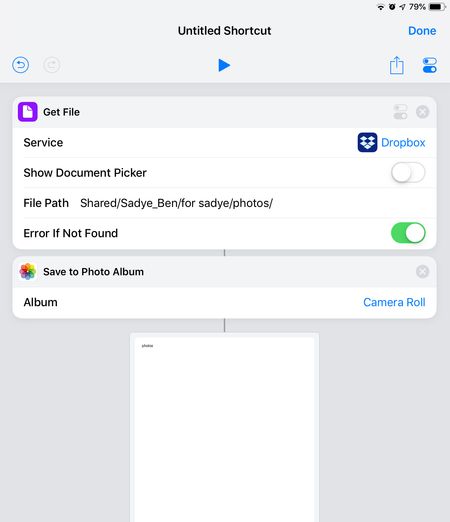
I’m trying to use Siri Shortcuts on iOS 12 to share photos using a shared Dropbox folder. I’ve written a workflow that successfully saves selected photos from the iOS Photos app (or elsewhere) to a s...
- 7 years ago
As we expected, IOS 12.1 update has solved the issue.
Now, in Shortcus app, the action “Get File” with Dropbox, woks fine, as it dit in Workflow app in IOS 11.
Great!!

Thomas M.67
5 years agoNew member | Level 2
Same for me ... issue is still there with the 14.3 ... super frustrating, breaking my workflow here :(
I don't know if it is a Dropbox or an Apple issue.
Any aknowledgment here?
Thx
Thomas
Thomas M.67
5 years agoNew member | Level 2
..and the same with my pro paid account of course
 AlanWd5 years agoExplorer | Level 3
Given up with Dropbox as a result of this - am using the Ninox iCloud instead, which works fine. Had a number of Ninox scripts using Dropbox but have rewritten everything to avoid Dropbox from now on as this seems to be a recurring issue with every major iOS upgrade. Previous ones have been fixed rapidly, but this one has gone on far too long.
- Thomas M.675 years agoNew member | Level 2
I'll probabky move to iCloud too because of this
- palcaide5 years agoHelpful | Level 7
Yes, it's a pity. I did the same (moving to icloud drive) last year.
 RichTack5 years agoExplorer | Level 3
I agree. I am unfortunately on a yearly plan with Dropbox, but I will not renew. Their lack of communication on this has been exceedingly frustrating for a subscription service. it is amazing what I am willing to put up with, if the company clearly communicates with me along the way.
About Apps and Installations
Have a question about a Dropbox app or installation? Reach out to the Dropbox Community and get solutions, help, and advice from members.
The Dropbox Community team is active from Monday to Friday. We try to respond to you as soon as we can, usually within 2 hours.
If you need more help you can view your support options (expected response time for an email or ticket is 24 hours), or contact us on X, Facebook or Instagram.
For more info on available support options for your Dropbox plan, see this article.
If you found the answer to your question in this Community thread, please 'like' the post to say thanks and to let us know it was useful!


