Our Community is in read-only mode until April 8th, learn more here. You can still search existing threads or get help via Dropbox Support, the Dropbox Help Center, or Learn.
Forum Discussion

alanon
4 months agoExplorer | Level 3
Moving the Dropbox folder on Linux Mint 22.2 using the Dropbox desktop app won't work
I've gone over to Linux Mint 22.2, have dropbox installed. I want to move it to my data drive...no problem. I made the move using the dropbox app, pointing it to my data drive. It did the sync fin...

alanon
4 months agoExplorer | Level 3
Application Affected
Dropbox
Device
Sager Laptop
Operating System/Browser (if using the web)
Linux Mint 22.2
Dropbox App Version (if using the app)
Uninstalled.
Question or Issue
No matter what I try, including AI, I cannot get Dropbox to move the folder of my data, or install where I want the data, from my local OS drive. I want it on my local data drive also installed on my laptop. Is this is a bug? Is this a limitation? How do I fix this? Thank you. Leaving it uninstalled for now as I can't seem to get this to work properly.
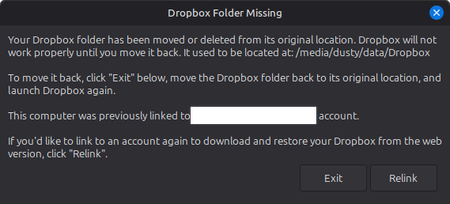
When I used the preferences menu and used the app to select the data drive, it seems to work, but when I restart the computer, I get an error message:
AI gave me a whole bunch of different coding to use, including initiating symlinks, which were ignored by the dropbox installer/preferences.
Thank you in advance.


About Apps and Installations
Have a question about a Dropbox app or installation? Reach out to the Dropbox Community and get solutions, help, and advice from members.
The Dropbox Community team is active from Monday to Friday. We try to respond to you as soon as we can, usually within 2 hours.
If you need more help you can view your support options (expected response time for an email or ticket is 24 hours), or contact us on X, Facebook or Instagram.
For more info on available support options for your Dropbox plan, see this article.
If you found the answer to your question in this Community thread, please 'like' the post to say thanks and to let us know it was useful!


