Our Community is in read-only mode until April 8th, learn more here. You can still search existing threads or get help via Dropbox Support, the Dropbox Help Center, or Learn.
Forum Discussion

alanon
4 months agoExplorer | Level 3
Moving the Dropbox folder on Linux Mint 22.2 using the Dropbox desktop app won't work
I've gone over to Linux Mint 22.2, have dropbox installed. I want to move it to my data drive...no problem. I made the move using the dropbox app, pointing it to my data drive. It did the sync fin...
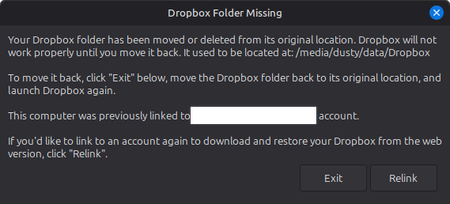

alanon
4 months agoExplorer | Level 3
thank you for combining them Walter!
Back to the issue: the laptop has 16GB RAM, a 1TB HDD, a 500GB SSD for the OS. Uninstalled/reinstalled the dropbox app about 4 times now. A couple restarts, etc. Each time the same issue.
- Walter4 months ago
Dropbox Community Moderator
I see, thanks for the clarifications alanon.
Can you try an advanced reinstall and try to point your Dropbox folder to your desired location using the 'advanced' settings?
- alanon4 months agoExplorer | Level 3
I followed the directions on the link you gave. The reinstall isn't allowing me any "advanced" options. It's proceeding to install at the default SSD location without asking me for a location. One thing I noticed, in regards to the direction to "rm /etc/apt/source.d/dropbox", that directory does not exist. It's not being created by the installer.
- Walter4 months ago
I see, thanks for giving that a go for me alanon. Can you send me a screenshot of the options you get since you should be seeing an 'Advanced settings' option upon reinstalling the app?
Also, can you clarify the format of the drive you're trying to move your Dropbox folder to?
I'm asking because a Dropbox folder can be located on a hard drive or partition, formatted with one of the following file system types:
- ext4
- zfs
- eCryptFS (back by ext4)
- xfs
- btrfs

About Apps and Installations
Have a question about a Dropbox app or installation? Reach out to the Dropbox Community and get solutions, help, and advice from members.
The Dropbox Community team is active from Monday to Friday. We try to respond to you as soon as we can, usually within 2 hours.
If you need more help you can view your support options (expected response time for an email or ticket is 24 hours), or contact us on X, Facebook or Instagram.
For more info on available support options for your Dropbox plan, see this article.
If you found the answer to your question in this Community thread, please 'like' the post to say thanks and to let us know it was useful!


