We’re Still Here to Help (Even Over the Holidays!) - find out more here.
Forum Discussion

Cerebro
5 years agoHelpful | Level 6
Notification Badge in Menubar Icon - How Do I Make It Go Away?
Hi. I'm running Dropbox v121.4.4267 on Mac OS High Sierra. I don't if something happened with an automatic update. Now, I'm getting something I haven't seen before. I, suddenly, have a red badge ...
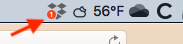

Koorbloh
3 years agoExplorer | Level 3

Jay Dropbox Community Moderator
3 years agoDropbox Community ModeratorThanks for the images, I've removed the second one due to private information on it.
I was referring to the syncing tab in the desktop app, similar to where you got the notifications, the window that shows your files that were syncing.
- Koorbloh3 years agoExplorer | Level 3
Hi Jay,
i am unclear as to what you are asking me. i've sent screen shots of the only two "syncing tabs" that i can find.....do you mean "selective sync?" i can't send that because it has my actual files.....be more precise as to what you want, please...and forgive me if i am being dense...the easiest thing here i think would be to get in email contact, as one of your colleagues suggested recently...
thanks!
koorbloh
- Koorbloh3 years agoExplorer | Level 3
Hi Meghan,
this is getting a bit crazy....i got your email but when i started to type "above the line" (which turned out to be impossible, since i could only type ON the line) the email disappeared from my inbox and i can't answer it! why are such things so difficult??? can you try again? and thanks for your continuing help...
koorbloh

About Apps and Installations
Have a question about a Dropbox app or installation? Reach out to the Dropbox Community and get solutions, help, and advice from members.
The Dropbox Community team is active from Monday to Friday. We try to respond to you as soon as we can, usually within 2 hours.
If you need more help you can view your support options (expected response time for an email or ticket is 24 hours), or contact us on X, Facebook or Instagram.
For more info on available support options for your Dropbox plan, see this article.
If you found the answer to your question in this Community thread, please 'like' the post to say thanks and to let us know it was useful!


