Your workflow is unique 👨💻 - tell us how you use Dropbox here.
Forum Discussion

LoveMyslf
7 years agoHelpful | Level 5
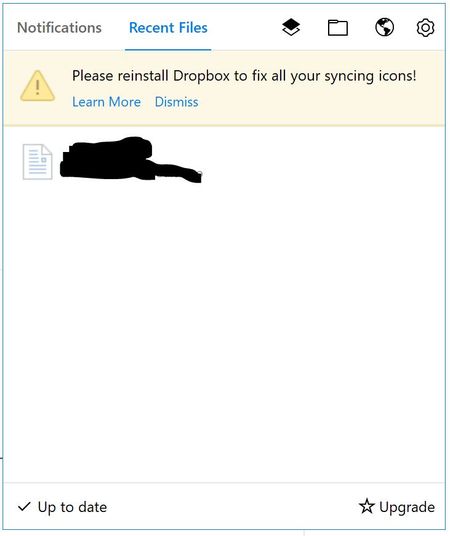
Please reinstall Dropbox to fix all your syncing icons!
This has been an issue for a while now. It's an issue on both my Windows 10 devices. I have tried different solutions from this forum, without luck. I'm running version 50.4.71, from the offline inst...
 7 years ago
Hey, I'm good now! The problem was the ShellIconOverlayIdentifiers as you describe it here: https://help.dropbox.com/syncing-uploads/icon-overlays-not-appearing
I hadn't seen the "dropdown" for Windows when I was first reading that page. Windows must have updated something or whatever Dropbox ended up on rank 16 ...
That's really annoying digging around in the registry. :(
Anyway, they are back.
karnerkreativ
7 years agoHelpful | Level 6
Hey, I'm good now! The problem was the ShellIconOverlayIdentifiers as you describe it here: https://help.dropbox.com/syncing-uploads/icon-overlays-not-appearing
I hadn't seen the "dropdown" for Windows when I was first reading that page. Windows must have updated something or whatever Dropbox ended up on rank 16 ...
That's really annoying digging around in the registry. :(
Anyway, they are back.

Jane Dropbox Staff
7 years agoDropbox StaffThanks a lot for circling back to me with this feedback & keeping me updated on the progress karnerkreativ!
I was glad to hear that it all works fine for you now & the issue with your overlay icons has been mended. As the behavior & the error message you received wasn’t fixed after resetting all previous permissions, I’ve made sure to Accept your last comment as the Best Answer, so as to surface to other users who may have the same question.
Thanks again for your cooperation & valuable contribution to this discussion & please don’t hesitate to post us again on our Community in the future in case you have more thoughts or questions. Happy syncing :white_check_mark: & I hope you have a wonderful rest of your day ahead!
 VictorH7 years agoNew member | Level 2Same issue after I deleted Dropbox app and reinstalled 58.4.92 version... forever stuck in the indexing step :(
- Jane7 years agoHey VictorH, as you’ve mentioned that you’ve already tried some initial troubleshooting on your own, let me have a closer look on your setup through our Official channel. In order to investigate having all our tools available, I’ve made sure to reach out to you directly via email on my end.Whenever you find some time, please check your inbox for my email & I’ll make sure to promptly get back in touch with you asap. Thanks for reaching out on our Community & I’ll be awaiting your next reply!
 K B.7 years agoNew member | Level 2
Hi, I noticed I'm no longer seeing files that I upload from my phone. It just 'happened' apparently a few days ago and I have no clue WHY it happened. I know that I don't like it because I often upload images or videos that I then go edit on the PC (windows 10).
I do not have enough space on C: so I installed it on D: and maybe that's the issue.HOWEVER, I have the same message to reinstall to fix all my syncing icons. But that is very, very overwhelming to me.
First - if reinstalled, does that mean it could take another week to sync like it did before?
Second - all this stuff about %AppData% and whatever all that code means is very overwhelming. I can't do that stuff. I'm clueless. I can use stuff but don't expect me to fix stuff.... ???
Lastly - if I have to do all this, I will probably just move everything over to my Google Drive and not purchase dropbox again (I believe renewal is only a month away) because I just don't have the time, knowledge, or inclination. SO, is there anybody there who can help me and make me a really happy customer again?
And while I'm at it, I'd like to know if there's an easier way on my Android to get to the dropbox files, too. I have it installed on the phone but when I want to download or play a video, etc., that I have stored there, it gets cumbersome. Might as well fix all my issues while we are at it. :)
Thanks- Jane7 years agoHey there (K B.), rest assured that I’m here to help you on both the issues you’re facing as much as I can!Now, as an initial troubleshooting step, I’d recommend following the steps outlined here to uninstall & re-install our application anew & I’ll follow-up from the results you’re getting on your end. It would be worth noting that your folderstructure will remain intact in your pc & you will not need to re-sync your Dropbox directory form scratch.When it comes to the issue you’re facing on your android phone, I’m wondering if there are any pending updates. Can you check that you’ve installed the latest Dropbox app through the Play Store (120.2.4) & you’ve also updated your OS to the latest available version?Please take your time to try my suggestions & let me know how you get on with these steps on this discussion. Thanks again & I’m looking forward to hearing back from you!
About Apps and Installations
Have a question about a Dropbox app or installation? Reach out to the Dropbox Community and get solutions, help, and advice from members.
The Dropbox Community team is active from Monday to Friday. We try to respond to you as soon as we can, usually within 2 hours.
If you need more help you can view your support options (expected response time for an email or ticket is 24 hours), or contact us on X, Facebook or Instagram.
For more info on available support options for your Dropbox plan, see this article.
If you found the answer to your question in this Community thread, please 'like' the post to say thanks and to let us know it was useful!


