Our Community is in read-only mode until April 8th, learn more here. You can still search existing threads or get help via Dropbox Support, the Dropbox Help Center, or Learn.
Forum Discussion

yurisobral
2 years agoExplorer | Level 3
Problem in Ubuntu 22.04.3 LTS - Dropbox stopped working
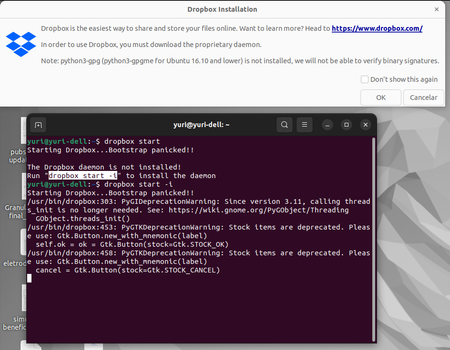
My Dropbox folder is no longer syncing. I used to run smoothly, so I am guessing a recent Ubuntu update broke something. This is what I get when I run Dropbox on the command line:
yuri@yuri-del...
 1 year ago
I've found ensuring the the ~/.dropbox and ~/.dropbox-dist are fully owned by my user account solved this issue for me.

yurisobral
2 years agoExplorer | Level 3
Dear Здравко,
Thanks for your comments.
Please note that linux and dropbox are both installed on the sda6 partition, which is an ext4 partition. Please note that Dropbox was running perfectly (for the last 5 years or so) until a couple of weeks ago.
I do not recall changing the python version on my ubuntu. This is the version that I have installed right now:
Your workaround did not work, unfortunately. It seems to do something:
But when I run dropbox I still get the "bootstrap panicked" message.
Cheers,
Yuri

Walter Dropbox Community Moderator
2 years agoDropbox Community ModeratorHey yurisobral, sorry to jump in here, but have you tried creating a new OS profile and installing the desktop app there?
About Apps and Installations
Have a question about a Dropbox app or installation? Reach out to the Dropbox Community and get solutions, help, and advice from members.
The Dropbox Community team is active from Monday to Friday. We try to respond to you as soon as we can, usually within 2 hours.
If you need more help you can view your support options (expected response time for an email or ticket is 24 hours), or contact us on X, Facebook or Instagram.
For more info on available support options for your Dropbox plan, see this article.
If you found the answer to your question in this Community thread, please 'like' the post to say thanks and to let us know it was useful!


