Our Community is in read-only mode until April 8th, learn more here. You can still search existing threads or get help via Dropbox Support, the Dropbox Help Center, or Learn.
Forum Discussion

VasilyD
4 years agoHelpful | Level 5
Red box on the Dropbox tray icon
Hello everyone!
Why is the red box on my dropbox Windows taskbar icon?
I've read in another thread that it's not a big deal and it's about some notification problem.
But I have all notification...
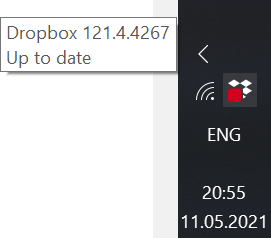
 4 years ago
Hello all!
I have a laptop 1ith 1920x1200 resolution. When I clicked on that Dropbox icon which has the red square on it, I only was getting the Dropbox file explorer window. But then, after two days of frustration, I realized when I clicked on the Dropbox icon, to the extreme right hand side of my screen it looked like there was the edge of some other window appearing. But I couldn't grab and move that window to see it. I my display at 150% size so things are not too tiny, but I changed that to 100% and then I could see that other window (in tiny size), and it was the Dropbox user screen. There was a notification at the top about choosing to turn on automatic backup or not, and when I declined that, the red square on my Dropbox icon disappeared. So the answer is that the Dropbox user screen doesn't resize itself for high resolution screens and when we use 150% or so magnification on our computers so things aren't too tiny, that Dropbox user screen is displaced to the right, nearly (or totally) off of our desktop.
So, reduce you screen magnification, click on the Dropbox icon, answer that query Dropbox is showing about letting it automatically back up folders, and the red square on the icon is gone. So that red square IS Dropbox telling us there is an "important" message for us from Dropbox, but we can't see it with our modern, high resolution screens set up with magnification on.

Rich Super User II
4 years agoSuper User II
VasilyD wrote:
I specifically selected notification icon so you could see that there're no unread notifications (as I wrote before I read all of them).
Wrong notifications. You clicked the Windows 10 Notifications, but Dropbox has it's own. You click the Dropbox icon once for the menu to appear, then click on the Bell icon to view your Notifications panel.

VasilyD
4 years agoHelpful | Level 5
When I click on the dropbox icon nothing happens, nether left nor right click don't work. The menu like on your screenshot doesn't appear. I reinstalled the newest version but nothing changed. I guess my only option is to just live with that )
- Walter4 years ago
Dropbox Community Moderator
If this persists after reinstalling, you may need to perform a clean, advanced reinstall as well VasilyD.
Let us know of any updates!
- VasilyD4 years agoHelpful | Level 5
Thanks for the link, but clean reinstall according to the instruction didn't work either. The red box appears immediately after I enter my account credentials. Tried to install on another computer instead, everything works fine, no red box, the proper menu by clicking on tray icon etc. Also no problem on my iPad and Android smartphone. So there's obviously some problem on my laptop (maybe some flag in the registry, I don't know). I guess it's time to give up 😞
 djbbartman4 years agoExplorer | Level 4
Hi Dropbox People, you need to be more on top of this Red Box issue and provide professionally relevant feedback instead of general gibberish that gets people running around in circles. I first encountered this issue spring 2020 on Surface Book 1. I engaged Dropbox Help (DH) for an extended period of time and advice with no solution to the matter. Finally, reluctantly, at the advice of DH I uninstalled and reinstalled Dropbox. No difference, still the Red Box, just a whole bunch of time wasted, that's all. Then one day, fall 2020 I believe, the Red Box suddenly disappeared, and not because of anything I did or didn't do, because I had come to the point of living with it. Spring 2021 I bought a Surface Book 3. Summer 2021 the Red Box suddenly appeared on the task bar Dropbox icon again, not because of anything I did or didn't do. And on my Surface Book 1 too, which I seldom use, the Red Box Was Back, and so far this being mid October now, the Red Box is still there on both computers. My hunch is it's related to Dropbox version updates. So please DH, don't advise people that it's maybe related to notifications or to do an uninstall and reinstall and all that other useless stuff, do acknowledge this is Dropbox related - and figure it out and fix it. Please! In the mean, I (frustratingly) simply continue to live with it until one day, I'm fairly confident based on past experience, it will suddenly disappear again.

About Apps and Installations
Have a question about a Dropbox app or installation? Reach out to the Dropbox Community and get solutions, help, and advice from members.
The Dropbox Community team is active from Monday to Friday. We try to respond to you as soon as we can, usually within 2 hours.
If you need more help you can view your support options (expected response time for an email or ticket is 24 hours), or contact us on X, Facebook or Instagram.
For more info on available support options for your Dropbox plan, see this article.
If you found the answer to your question in this Community thread, please 'like' the post to say thanks and to let us know it was useful!


