Your workflow is unique 👨💻 - tell us how you use Dropbox here.
Forum Discussion

irisss
1 year agoHelpful | Level 6
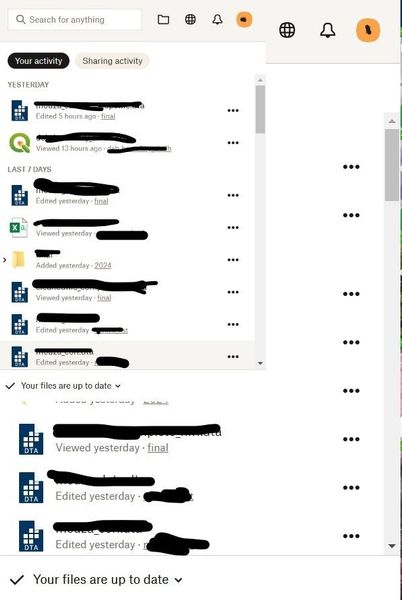
The Dropbox tray gets duplicated every time I click on the Dropbox icon (bugged)
Hi, I have started getting this bizarre issue all of a sudden where whenever I open the dropbox tray, it becomes a mini version of itself within the tray (see picture). Anyone have any idea why thi...
 1 year ago
Thank you for the details about what you're seeing. Based on the screenshots, this looks like it could potentially be a graphics compatibility issue.
One thing you could try is to disable hardware acceleration. This will cause Dropbox to use "software rendering" which can work around compatibility issues with specific GPU or driver versions. To disable hardware acceleration, you can Control + Click on the Dropbox icon in the notification area, and uncheck the "Hardware Acceleration (GPU)" item. This will prompt you to restart Dropbox to apply the setting.
Please let us know if it has any impact.
Could you also share a screenshot of your Windows "Display" settings? This might help us understand whether this issue is specific to a certain display resolution, monitor layout, or "DPI scaling" configuration.
From the "Display" settings screen, there's also an "Advanced display settings" link. Could you click that link and also share a screenshot of those settings?

irisss
1 year agoHelpful | Level 6
This is the scale and layout (forgot to add them before).

Okaro
1 year agoNew member | Level 2
I have also 150% and exactly the same symptom. It appeared some months ago even though I have used 150% for years.
- irisss1 year agoHelpful | Level 6
If you're running dropbox on compatibility mode for windows 8, I would try turning that off. It fixed the issue for me. If that doesn't work then try disabling hardware acceleration.
About Apps and Installations
Have a question about a Dropbox app or installation? Reach out to the Dropbox Community and get solutions, help, and advice from members.
The Dropbox Community team is active from Monday to Friday. We try to respond to you as soon as we can, usually within 2 hours.
If you need more help you can view your support options (expected response time for an email or ticket is 24 hours), or contact us on X, Facebook or Instagram.
For more info on available support options for your Dropbox plan, see this article.
If you found the answer to your question in this Community thread, please 'like' the post to say thanks and to let us know it was useful!


