We’re Still Here to Help (Even Over the Holidays!) - find out more here.
Forum Discussion

Dave111
12 months agoExplorer | Level 4
The mobile app isn't uploading or indexing photos in the background.
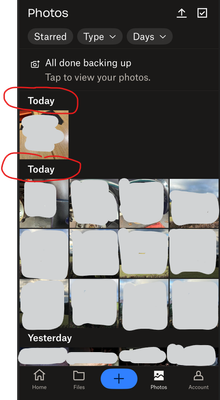
Hi ... I've noticed that the DropBox IOS Mobile App isn't uploading or indexing photos in the background. To be perfectly honest the App isn't doing anything at all whilst minimised.
The screen sho...

Megan Dropbox Community Moderator
12 months agoDropbox Community ModeratorHey Dave111, let's jump right into this!
When did you first notice this behavior?
You mentioned that you tried uninstalling, and reinstalling the app. Have you tried clearing the app's cache through its settings, by any chance? If I were you, I'd give it a go. You can follow these steps:
- Navigate to the “Account” tab.
- Tap the gear icon in the upper-left corner of the screen.
- Scroll to the bottom of the screen.
-Select "Clear Cache."
Also, keep in mind that camera uploads on iOS devices no longer use location services to keep the Dropbox app active in the background. You can see more about this here.
Keep me posted, and we'll take it from there!
About Apps and Installations
Have a question about a Dropbox app or installation? Reach out to the Dropbox Community and get solutions, help, and advice from members.
The Dropbox Community team is active from Monday to Friday. We try to respond to you as soon as we can, usually within 2 hours.
If you need more help you can view your support options (expected response time for an email or ticket is 24 hours), or contact us on X, Facebook or Instagram.
For more info on available support options for your Dropbox plan, see this article.
If you found the answer to your question in this Community thread, please 'like' the post to say thanks and to let us know it was useful!


