Your workflow is unique 👨💻 - tell us how you use Dropbox here.
Forum Discussion

Capellmeister
2 years agoExplorer | Level 4
The top of my iPad screen disappears when opening Dropbox
Hi. When I open Dropbox on my iPad, the iPad top menu with the date, hour and battery level disappears. Is this a known issue? Google wasn't very helpful. I'm on the latest version of iOS and Dro...
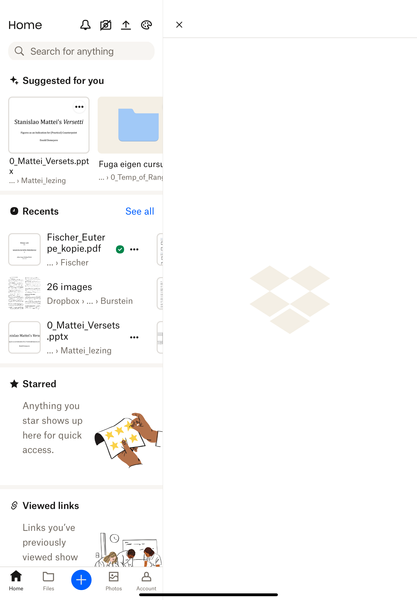
- 2 years ago
Thanks for the additional info, Capellmeister.
It might be an iOS issue, but just to check, can you also delete the Dropbox app, restart the device and then reinstall it and let me know what you find?

Hannah Dropbox Community Moderator
2 years agoDropbox Community ModeratorThanks for the additional info, Capellmeister.
It might be an iOS issue, but just to check, can you also delete the Dropbox app, restart the device and then reinstall it and let me know what you find?

Capellmeister
2 years agoExplorer | Level 4
And now the problem reoccurs even with an internet connection.
- Walter2 years ago
Hey Capellmeister - sorry to jump in here, but could you clarify your device's OS version and the version of the mobile app installed there as well?
Could you try using another network or cellular data perhaps?
While we're at it, have you tried adjusting your home screen via the palette icon to see if that helps improve matters?
- Capellmeister2 years agoExplorer | Level 4Dear Walter. Thanks for your suggestions. I’ve done all that and nothing helps. However, when I go back to the Home Screen without closing Dropbox and then go back to DB, the top bar reappears. So, I guess this is a DB issue instead of in iOS issue? For both, I’m on the last version.
- Nancy2 years ago
Capellmeister, can we log a ticket for you instead, and message you to this email address?


About Apps and Installations
Have a question about a Dropbox app or installation? Reach out to the Dropbox Community and get solutions, help, and advice from members.
The Dropbox Community team is active from Monday to Friday. We try to respond to you as soon as we can, usually within 2 hours.
If you need more help you can view your support options (expected response time for an email or ticket is 24 hours), or contact us on X, Facebook or Instagram.
For more info on available support options for your Dropbox plan, see this article.
If you found the answer to your question in this Community thread, please 'like' the post to say thanks and to let us know it was useful!


