Our Community is in read-only mode until April 8th, learn more here. You can still search existing threads or get help via Dropbox Support, the Dropbox Help Center, or Learn.
Forum Discussion

danielstarrason
3 years agoExplorer | Level 4
Dropbox Backup can't find external hard drives - Mac Ventura 13.0.1
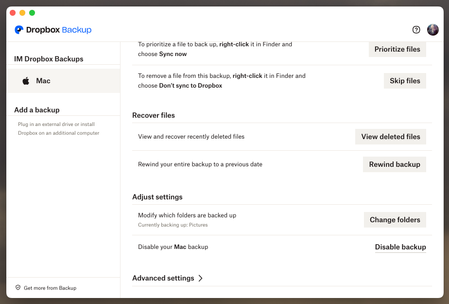
Hi everyone, I've seen people have a similar issue but haven't found a workaround. I'm planning to backup a couple of hard drives using the Dropbox backup option. But when I use the desktop app (...

danielstarrason
3 years agoExplorer | Level 4
They are all Mac OS Extended.
Since I've been meaning to set up my backup I haven't seen a drive connected to DropBox, now I remember though when I connected to my personal account it saw the hard drives. But I have to use my Advanced account for this.

Megan Dropbox Community Moderator
3 years agoDropbox Community ModeratorHi danielstarrason, sorry to jump in here!
Just keep in mind that this feature only supports external drives with filesystem type APFS or HFS+ for Macs. There's no chance the drives are formatted differently, right?
Also, can you check for a .dbxignore and .dropbox.device, which are in the root folder of your external drive, and delete them?
Afterwards, disconnect the drive and reconnect it.
- danielstarrason3 years agoExplorer | Level 4
Thanks Megan, now we're getting somewhere!
Plugged in an old drive, formatted as APFS and it's working like it should! Is DropBox not equipped to make a backup of MacOS Extended formatted disks?- Megan3 years ago
Hi danielstarrason, it depends on the format they use.
Usually, Mac OS extended drives use the Mac format HFS+, isn't that the case for your drives?
- danielstarrason3 years agoExplorer | Level 4
Hi Megan and thans, yes some are and some work great while some don't.
Is this an error on the FAQ site?
About Integrations
Get help with third-party integrations from the Dropbox Community.
The Dropbox Community team is active from Monday to Friday. We try to respond to you as soon as we can, usually within 2 hours.
If you need more help you can view your support options (expected response time for an email or ticket is 24 hours), or contact us on X, Facebook or Instagram.
For more info on available support options for your Dropbox plan, see this article.
If you found the answer to your question in this Community thread, please 'like' the post to say thanks and to let us know it was useful!


