Our Community is in read-only mode until April 8th, learn more here. You can still search existing threads or get help via Dropbox Support, the Dropbox Help Center, or Learn.
Dropbox Backup
24 Topics
Boxifier Status
Hi All, I've been following the Boxifier threads as I'm not having much luck emailing the support team directly. Christine at Boxifier has been helping me on and off since June of last year but Boxifier has not worked for me since then, yes I have the new cloud sync problem. Last I heard from Christine was right before the new year and I have reached out a few times since then with no response. They have been very helpful when active and even helped me with a license problem. But I'd like to have some response when I ask a question and some status on when this is going to be finally fixed so I don't keep losing valuable files from a broken syncing process. My regular Dropbox folder isn't synching either because of this. Any help and update would be greatly appreciated. Razvan Boxifier do you have any update? Thanks208Views0likes6Comments
Unlimited cloud backup on Dropbox with a Synology NAS. Is this possible?
Hello all, Apologies for the repost if so but I need help understanding the functionality of the cloud tech and services. My goal is to have an unlimited cloud backup on Dropbox of my Synology NAS archive. Does Dropbox Back-Up support that? Details: I have a Synology NAS 4-bay. I use it for personal archives and some client collaboration (photo and video). I want to use Dropbox for client collaboration instead and reserve Synology for personal archive and backblaze as cloud back-up for the archive (which also includes client work). Mostly because the Synology is currently via wifi and is too slow for collaborating but okay for archive. While making a personal Dropbox account I saw Dropbox Back-up allows unlimited space for backing up. I thought this might be useful and perhaps an alternative to backblaze for the back-ups need (in addition to the personal account for collaboration needs) Then I saw this, "Files on your PC or Mac are continuously backed up to the cloud." Does Dropbox Back-Up support syncing all Synology NAS files with unlimited space or only the local computer and external drive? Is this how this works or am I thinking about this wrong? Edit: Synology has Hyper Backup where you can sync to Dropbox. Do I start there and work back to Dropbox Backup unlimited plan?Solved20KViews0likes5Comments
Unable to update the folders being backed up for External SSD backup
Device MacBook Air 15' Operating System/Browser (if using the web) macOS Tahoe 26.1 Dropbox App Version/Browser Version 238.4.6075 Question or Issue I've been backing up a 2 TB Extreme Pro External SSD that has roughly 1.2 TB of Data on it via Dropbox Backup. The data primarily consists of previous computer and other device backups. Because there is a large number of files between all the data ~2,000,000 , I've been incrementally adding folders for Dropbox to backup from the external drive so it doesn't get overwhelmed with files. I've been able to upload all but one major folder from the drive into the cloud as dropbox is stuck "updating" or "indexing" the same five files on repeat. When I try and update which folders should be updated, no change is made. Thus far, I've restarted the computer, restarted the dropbox application, logged out and logged in to the dropbox application, manually cleared the dropbox cache, and disconnected/replugged the external SSD.178Views0likes5CommentsI'm trying to restore my backup on a new device, but nothing happens.
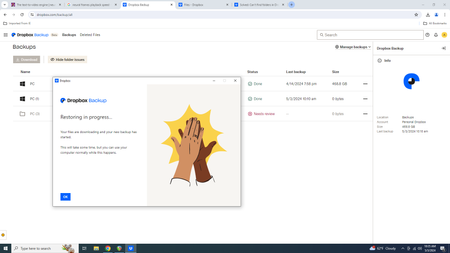
Device Macbook Pro M2 Operating System/Browser (if using the web) macOS 26.0 Dropbox App Version (if using the app) v233.4.4938 Question or Issue I used dropbox backup to backup the Documents and Desktop folders of my Mac before it went in for repair and I now want to restore the backup to my machine (which has a totally fresh macOS install). I am able to start the restoration in the dropbox app, which creates a new backup but does not seem to actually download the backed up folders - even though I can see them in the backup file in my online account. I've tried changing the folder permissions etc but it doesn't seem to make a difference, the download doesn't happen.297Views0likes8Comments
Why can't I restore my Dropbox Backup?
Why can I not restore my backup on to my computer? I have to download individual folders and in some cases it will cry and complain and say it cannot download because a folder may have too many files. Is there no better way or am I stuck downloading folder by folder. I like the feature but if the restoration process is like this, then wow. Its tough. I hope someone has some insight on how to proceed.204Views0likes7Comments
How can I use Dropbox Backup to backup a folder located on my machine?
The Dropbox Backup overview says: "Dropbox Backup lets you back up any file or folder on your computer or device to the cloud. ". But the PC backup only allows specific folders to be selected. How to I backup the folder "c:\ImportantFolder"? What am I missing? Thanks.Solved3.3KViews0likes13CommentsSyncing issues between my Dell XPS17 laptop and my mobile and tablet devices
Hi, This is the first time I’m posting and really need some help please regarding synching issues between my Dell XPS17 and my smartphone, Samsung Galaxy. The problem is that the entire Dell XPS17 backup does not show up anywhere in my mobile Dropbox app....so since the Dell XPS17 backup does not appear on any of the mobile Dropbox apps.... I am completely unable to access any of the files of my laptop backup (using Dropbox Backup desktop app) on any of my mobile devices. And I need to be able to access all the files backed up on Dell XPS17 on my mobile apps (i.e. phone and tablet) so I can continue to do all my work when I am not in front of my desk. So I need everything from Dell XPS17 (that is backed up on Dropbox desktop app and Dropbox Backup desktop app) to sync with my Dropbox account (so I can access that backup on my phone and tablet when I use Dropbox to access the files on my pc (which is called Dell XPS17) when I use Dropbox mobile app on my phone. So it might be some sort of sync issue where Dropbox Backup properly syncs everything on my PC (aka Dell XPS17) but does not sync properly so that when I use Dropbox mobile app I cannot access Dell XPS17 files at all on my mobile device. Thank you for anyone that can please point me in the right direction or provide any help.Solved1.6KViews1like1CommentAuto backup not working on my windows pc
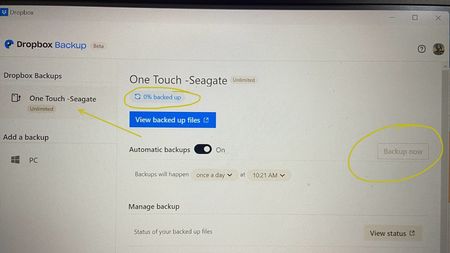
Hi, I just bought a Seagate HDD and I wanted to backup on dropbox. it has unlimited storage offer but when I connect, its stuck on 0%. Its 11am here and the backup should start 10:21am as activated. further it dont allow me to click BACKUP NOW. Whats the issue? Please help me find a solution.Solved3.2KViews0likes14Comments