We're making some changes to the Dropbox Community 👩💻 - Find out more here.
Forum Discussion

ckmueller
4 years agoExplorer | Level 3
Dropbox requiring google workspace to edit
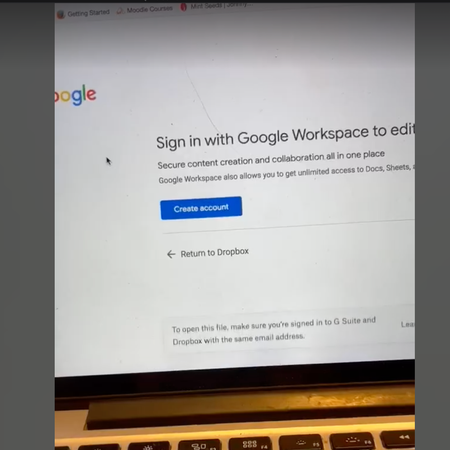
We have a contractor who is unable to access a google sheet for Dropbox. When they click the link, they are redirected to this page. They do have gmail and are logged in. No one else is having this i...
 3 years ago
Hi Hannah, I figured it out. The issue was using Duck Duck Go. While I've been using DDG for some time, they must have updated their software about a week ago, and something in the update was stopping data from communicating between Dropbox and Google Workspace appropriately. I turned off the DDG browser, and then the connection worked again. So far, so good!
Angela Peacor
3 years agoHelpful | Level 5
Hi Hannah, I figured it out. The issue was using Duck Duck Go. While I've been using DDG for some time, they must have updated their software about a week ago, and something in the update was stopping data from communicating between Dropbox and Google Workspace appropriately. I turned off the DDG browser, and then the connection worked again. So far, so good!

killianadv
3 years agoNew member | Level 2
I have this problem using Chrome. I'm caught in an endless loop: I have both G Workspace and Business Dropbox but cannot connect Mac oS12.4 to blame? Solution?
- Nancy3 years ago
Dropbox Community Moderator
Hey killianadv, I’m sorry to hear you’re having the same issue.
Just to clarify, are you being asked to create an account with Google Workspace or are you being asked to sign in to your existing account?
Do you mind sending over a screenshot of what you see, so that I can take a look?
Thanks!
 Lisa_Vermilion3 years agoExplorer | Level 3
I am having this same issue. Here's a screenshot of the message. I am logged into Dropbox and Google with the same email, which is my work email. We have a Google Workspace account (and I'm an admin on both that and our Dropbox account). No one else at my company (all the same domain name, using the same Dropbox and GSuite accounts) is having this issue except me. I am on Firefox, but it looks like people are having this issue on Chrome and other browsers too. When I click "sign in" or "Return to Dropbox" the same page reloads. Would love some help on this! Thanks.
- Walter3 years ago
Hey Lisa_Vermilion, sorry to hear you're having issues with this.
Have you tried clearing your browser's cache or another browser, preferably with no plugins or extensions running?
Also, do you see the Google integration under your Connected Apps tab?


About Integrations
Get help with third-party integrations from the Dropbox Community.
The Dropbox Community team is active from Monday to Friday. We try to respond to you as soon as we can, usually within 2 hours.
If you need more help you can view your support options (expected response time for an email or ticket is 24 hours), or contact us on X, Facebook or Instagram.
For more info on available support options for your Dropbox plan, see this article.
If you found the answer to your question in this Community thread, please 'like' the post to say thanks and to let us know it was useful!


