Your workflow is unique 👨💻 - tell us how you use Dropbox here.
Third Party Integrations
414 Topics
Dropbox app crashes and won't work with the Microsoft Word app on Android
Dropbox files will not open, except occasionally, in word on my s25ultra phone. Got a message from phone. "dropbox app keeps crashing. put to sleep to avoid excess battery use.' I need to use the dropbox app. When the docment in dropbox does occasionally open in word after an eternity, then it will not close and you have to clear all active apps to get it too close. Word works perfectly with my one drive files.129Views0likes19Comments
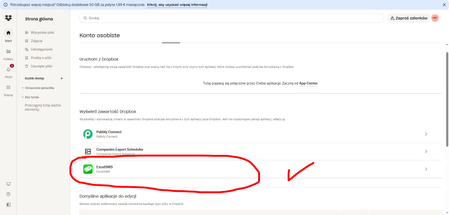
Issue connecting Dropbox to Excel SMS (consent loop during login)
Hello, I’m trying to connect Dropbox in the Excel SMS app on my smartphone. During the Dropbox sign-in process, the app keeps asking me to grant access permissions. After I accept, it returns me to the same consent screen again and again, so I can’t complete the connection. This happens every time I try to link my Dropbox account within the app. I’m attaching a screenshot showing the issue. Here is the app link: https://play.google.com/store/apps/details?id=com.samapp.excelsms.excelsmsfull&hl=pl Could you please advise what I should check or how to complete the authorization properly? Thank you in advance for your help. Best regards, Michał16Views0likes3Comments
1Password not syncing to Dropbox
Integration Affected 1Password version 7.9.4 Device Google Pixel 9 Pro Operating System/Browser (if using the web) Android 16.6.3.855170483-release-arm64-v8a175632286 Dropbox App Version (if using the app) 458.2.4 Question or Issue I recently noticed that when I open the 1Password app on my Google Pixel phone I get an error message saying the following: Sync error There may be a temporary problem with your network or the Dropbox server. Please check your connection and try again after some time. The version of 1Password I'm using is old and is no longer supported by them. The new version requires a subscription service. Also, the Dropbox account I have is the basic account, and is not the subscription service. Could the fact that I'm using an older version of 1Password and my Dropbox account is the basic one, and not the subscription service be part of the problem. I'm thinking of dropping 1Passwpord and using a difference password database. Has anyone else come across this issue recently?Solved348Views1like8Comments
Integration with Handy Diary, backup does not work
Hello! I've been using the Handy Diary app for 6 years, and I've been constantly backing up my data. However, yesterday I ran out of storage space, so I purchased a 2 TB plan and deleted all my old backups. However, the backup process is not working. There are no errors, but the app displays a message saying "Try again later," and my personal account information is no longer visible in the app. I've tried restarting my phone, backing up to empty accounts, and all the permissions are correct. I made my last backup about three weeks ago, and this issue occurred yesterday. Please help me resolve this problem. My internet connection is also working properly, and I haven't encountered any issues in the past. I'm performing the same operation that I've been doing for the past six years, but this time, I'm encountering this problem.23Views0likes1Comment
Uninstalling Dropbox in Salesforce
Hi, I am attempting to uninstall Dropbox, which is a managed package, from our Salesforce org because Dropbox will no longer support its Salesforce integration. I was able to successfully uninstall the package in a sandbox environment; however, I am unable to do so in Production due to an Apex class dependency. After further investigation, I believe the issue is caused by the Apex trigger DropboxServiceFile, which references the Dropbox package. I contacted HomeKeeper, which manages the Service File functionality in our org, and was advised to either contact Dropbox directly or reach out to Salesforce. Has anyone successfully found a way to uninstall this package from a Salesforce org? Since it is a managed package, Salesforce admins are unable to make changes to it. Please let me know.35Views0likes2Comments
Access Code for m3u4u doesn't seem to work properly.
Application Affected m3u4u Device Dell OptiPlex 3080 Tower Operating System/Browser (if using the web) Windows 11 Pro Question or Issue Hello everyone I am having issues I am trying to use Dropbox with m3u4u. Everything works fine when setting Dropbox up in m3u4u except when I get to the section to enter the access code. The code it generates is way over 256 characters. What should I do?62Views0likes3Comments
I've connected Dropbox with CSEntry, but my apps don't appear.
Hello, dear community, I need help to finish something. I try to connect CSEntry and Dropbox. First I succeed the deployement CSPro to Dropbox. Now when I try to connect Centry and Dropbox, it works, but my apps don't appear. So I'd like some help to fix it. Thanks in advance.84Views0likes8CommentsSynology Cloud Sync is only uploading small files
I have a Synology NAS (DS418Play). I want to use Cloud Sync to back up some folders. I'm running DSM 7.2.2, Cloud Sync 2.7.2 (Newest). I have 2 test folders, one encrypted, one clear. The folders contain 2 files. Small.txt (21 bytes) and Big.jpg (3.9 M/b). Small uploads, Big does not. Synology support checked my config (OK) and found these error in the log: Curl error: curl(28), http(0), proto(-210), msg(Operation too slow. Less than 1 bytes/sec transferred the last 300 seconds) HandleError: Connection timeout. What I have tried: Deleting all folders and tasks and recreating. Stopping/Starting the service. Deleting and reinstalling Cloud Sync and database. Changing the upload bandwidth on the desktop app. Checked firewall rules and looked for any throttling. From the desktop app I can sync Gigabyte files, so the problem seems to lie with the Dropbox API. I know I could set up folders on a PC and copy from the NAS to sync, but that is clumsy and Cloud Sync SHOULD work. Any suggestions gratefully received.63Views0likes5Comments
User unable to access Dropbox files when using InDesign.
Question or Issue We are experiencing a problem where a user is unable to access a Dropbox file through Adobe InDesign. The project folder contains two directories — one with the content files and another with the InCopy file. Dropbox shows that all data is fully synced. However, when the user attempts to open the content folder file directly from Dropbox in Adobe InDesign, the image frame loads but the linked text content does not, and an error message appears This issue does not occur when the files are downloaded locally. in that case, everything opens correctly. We have already verified that the files are synced and that the user has the necessary permissions. Could you please confirm whether this is a Dropbox-related issue and advise on how to resolve it?276Views0likes11Comments