Your workflow is unique 👨💻 - tell us how you use Dropbox here.
Forum Discussion

ckmueller
3 years agoExplorer | Level 3
Dropbox requiring google workspace to edit
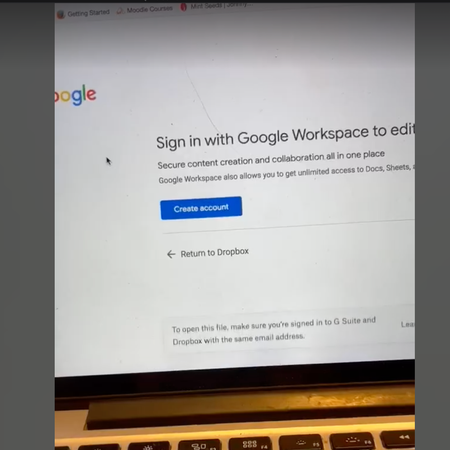
We have a contractor who is unable to access a google sheet for Dropbox. When they click the link, they are redirected to this page. They do have gmail and are logged in. No one else is having this i...
 3 years ago
Hi Hannah, I figured it out. The issue was using Duck Duck Go. While I've been using DDG for some time, they must have updated their software about a week ago, and something in the update was stopping data from communicating between Dropbox and Google Workspace appropriately. I turned off the DDG browser, and then the connection worked again. So far, so good!

Lisa_Vermilion
3 years agoExplorer | Level 3
Thanks Walter, that looked promising after I cleared the cache - the Dropbox file link it took me to a sign in page for Google and I was able to enter my email, it was loading... and then back to the same "Sign in to continue" page.
But, I didn't have Google suite listed under connected apps - are there instructions on how to add it somewhere? (I also by mistake deleted my connection to MS Office in the connected apps, so I have to readd that one too!)

Hannah Dropbox Community Moderator
3 years agoDropbox Community ModeratorThanks for the info, Lisa_Vermilion and sorry to jump in.
Would you mind if we sent you an email, so we can investigate this internally?
- Lisa_Vermilion3 years agoExplorer | Level 3That would be great Hannah. I appreciate the help.
- Hannah3 years ago
No worries, Lisa, I just sent you an email, so make sure you get back to me when you get a chance!
 EmilyCityCast3 years agoNew member | Level 2
Hi! I'm having the exact same issue. Have followed along and tried all these steps. Can you send me the same email you sent Lisa? 🙂 or share how you solved it? Many thanks, Emily
- Megan3 years ago
Hi EmilyCityCast, I hope you're doing well!
I just reached out to your Community linked email address, and I'll be happy to work with you there.
Reply back to me as soon as you possibly can.
Thanks!
 Todd3 years agoExplorer | Level 3
This bug has now hit my Dropbox account. I have followed all of the steps. I cannot get to Google Docs from Dropbox, which more or less means that I cannot work. It won't let me sign in at all. At first, if I hit "return to Dropbox" it would go to Google Docs. Now, it does not even do that.
I am on a chromebook.
I don't have DDG.
I have cleared my cache.
I am allowing Dropbox cookies.
I have a Workspace account that has been connected to Dropbox for years. I have been editing in Google Docs straight from Dropbox for years.
If you send me an email I can send a video of how this endless loop progresses. Please let me know what I need to do to fix this.
- Megan3 years ago
Hey Todd, thanks for posting here today!
Have you followed the previous troubleshooting steps mentioned in the thread? Feel free to also have a look into this Help Center article.
Also, my colleague's suggestion here, might do the trick for you.
Keep me posted, and we'll take it from there!
- Todd3 years agoExplorer | Level 3
As I said in my original post, I tried all the steps in this thread, including clearing the cache, which I have now done twice.
Your colleague's suggestion was to try running a browser with no extensions. Is it now Dropbox's position that users have to shut down all extensions to use Dropbox? That seems a little extreme. I have several extensions I use on a daily basis and do not wish to rework my entire workflow because of a bug in Dropbox. Despite this, I tried it. It did not work.
The real problem is that when I get to the sign in page (see below), I press sign in, and then it loops back to the exact same page without letting me sign in.
Wonder of wonders, I was able to go right into the Google doc when using a Windows computer, using Google Chrome, all extensions enabled. However, I get a permanent sign in loop when I try it on my Chromebook. I have been editing documents stored in Dropbox on my Chromebook for a year without issue. The Chrome browsers on the two devices are set up identically.
How do I get this escalated to someone who can help?
- Todd3 years agoExplorer | Level 3
Yes. Thanks

About Integrations
Get help with third-party integrations from the Dropbox Community.
The Dropbox Community team is active from Monday to Friday. We try to respond to you as soon as we can, usually within 2 hours.
If you need more help you can view your support options (expected response time for an email or ticket is 24 hours), or contact us on X, Facebook or Instagram.
For more info on available support options for your Dropbox plan, see this article.
If you found the answer to your question in this Community thread, please 'like' the post to say thanks and to let us know it was useful!


