We’re Still Here to Help (Even Over the Holidays!) - find out more here.
Forum Discussion

danny099
2 years agoExplorer | Level 3
Dropbox Sign does not work in web view, it gives me an error.
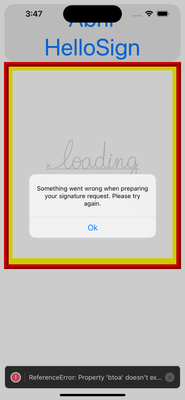
I have a problem and it is that when loading the document to be signed in a web view, it first loads and appears loading but then an error appears that says (something went wrong when preparing your ...

u_ua
11 months agoNew member | Level 1
I am having the same issue loading the embedded sign url in React Native with a WebView. danny099 did you manage to find a solution?

Megan Dropbox Community Moderator
11 months agoDropbox Community ModeratorHey u_ua, no worries let's jump right into this.
Could you clarify when you first noticed this behavior? I'd also appreciate a step-by-step on how you produce this error.
Also, what OS do you use on your end? Based on the screenshot it looks like you're using an Apple device, right?
- u_ua11 months agoNew member | Level 1
Hi,
I'm simply calling `client.open()` with test mode and skip domain verification. I was able to display the page by rendering the iframe instead of using the client.
I'll revisit this another time.
Thanks
About Dropbox Sign

Ask your Dropbox Sign questions here.
The Dropbox Community team is active from Monday to Friday. We try to respond to you as soon as we can, usually within 2 hours.
If you need more help you can view your support options (expected response time for an email or ticket is 24 hours), or contact us on X, Facebook or Instagram.
For more info on available support options for your Dropbox plan, see this article.
If you found the answer to your question in this Community thread, please 'like' the post to say thanks and to let us know it was useful!


