Our Community is in read-only mode until April 8th, learn more here. You can still search existing threads or get help via Dropbox Support, the Dropbox Help Center, or Learn.
Forum Discussion

dianalmark
1 year agoNew member | Level 1
How do I get Dropbox Sign to autopopulate e-mails for signature?
How do I get it to autopopulate e-mails for signature after I've sent an initial document out for signature? So far I'm having to type in the full name and e-mail each time

Jay Dropbox Community Moderator
1 year agoDropbox Community ModeratorAre you sending out a template for signatures, or a custom signed document to which each user has a specific field to sign in the document?

dianalmark
1 year agoNew member | Level 1
No, when I'm in dropbox and want to send a document out for signature, every time I have to type in the recipient's name and e-mail address. The first time I expect to do that, but after that I expect it to autopopulate when I start typing the person's name or e-mail. Surely it can do that?
- Jay1 year ago
When you send a file for signature to specific individuals, who are added to the document, when you add the auto-fill fields, like full name, date signed and email (and each user is assigned a field) then when the document is sent, those fields would automatically be filled out for the user.
Are the people you're sending the signature requests not getting the details filled in automatically?
- dianalmark1 year agoNew member | Level 1
I understand that and that is not the problem. It's the VERY first step. I choose the document, and then I need to enter who I am e-mailing it to to have them sign. Previously if I would start to type in their name or e-mail, it would autofill the balance. Now I am having to type in the full name and e-mail of every person I am sending to. If you don't understand, perhaps call me?
- Hannah1 year ago
Hey dianalmark, I hope it's okay to jump in!
I think you're referring to this window, right?
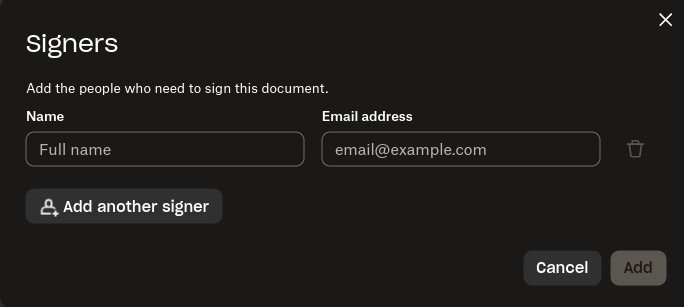
You mentioned that previously the emails would auto-populate; when did you notice that this changed?
Do you see the same behavior with other browsers or in private browsing?

About Dropbox Sign

Ask questions and get help with Dropbox Sign here.
The Dropbox Community team is active from Monday to Friday. We try to respond to you as soon as we can, usually within 2 hours.
If you need more help you can view your support options (expected response time for an email or ticket is 24 hours), or contact us on X, Facebook or Instagram.
For more info on available support options for your Dropbox plan, see this article.
If you found the answer to your question in this Community thread, please 'like' the post to say thanks and to let us know it was useful!


