Our Community is in read-only mode until April 8th, learn more here. You can still search existing threads or get help via Dropbox Support, the Dropbox Help Center, or Learn.
Forum Discussion

Cameron Knott
5 months agoNew member | Level 2
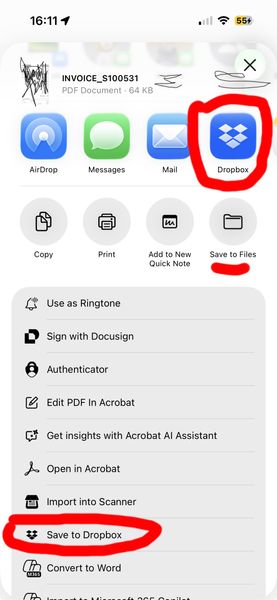
Unable to save PDFs from iOS 26.0.1 to Dropbox (via buttons in Mail or other PDF viewers)
Integration Affected iOS 26.0.1 Mail and other PDF viewers to Dropbox
Device iPhone 15 Pro Operating System/Browser (if using the web) iOS 26.0.1 Mail Dropbox App Version (if using the app) 4...

Hannah Dropbox Community Moderator
5 months agoDropbox Community ModeratorHi there, Cameron Knott, thanks for bringing this to our attention.
Just so I have a clear understanding of the issue, can you please guide me through the exact steps you're following for this process?
If you open the Dropbox app and choose to upload the file, are you having an issues?
And do you see this behavior only with PDF files?
Let me know and we'll go from there!

Cameron Knott
5 months agoNew member | Level 2
Thanks Hannah,
When using my phone I open a PDF. I then use the Share icon to move my PDF to Dropbox. The options that then appear are the Drop box logo with the Save to Dropbox button. Either of those would allow me to access to Dropbox to save my PDF in a Dropbox folder of my choosing. Neither of these buttons works now when pressed - i.e. no animation or response to the next steps occurs when pressed.
- Megan5 months ago
Hey Cameron Knott, let me jump in here!
If you follow these steps, do you notice the same behavior?
-Open the Dropbox mobile app.
-Navigate to the folder where you want to save your file.
-Tap the "+" (plus sign) at the bottom of your screen.
-Choose "Create or Upload File".
-Select the files you want to upload from your device or SD card, then tap "Upload."Provided that you notice the same thing, can you try to uninstall the Dropbox mobile app, and reinstall it again?
 forguse5 months agoNew member | Level 2
I faced the same problem. I reinstalled dropbox and the function comes back.


About Integrations
Get help with third-party integrations from the Dropbox Community.
The Dropbox Community team is active from Monday to Friday. We try to respond to you as soon as we can, usually within 2 hours.
If you need more help you can view your support options (expected response time for an email or ticket is 24 hours), or contact us on X, Facebook or Instagram.
For more info on available support options for your Dropbox plan, see this article.
If you found the answer to your question in this Community thread, please 'like' the post to say thanks and to let us know it was useful!


