Our Community is in read-only mode until April 8th, learn more here. You can still search existing threads or get help via Dropbox Support, the Dropbox Help Center, or Learn.
Forum Discussion

Synology_Sync_Guy
1 year agoNew member | Level 2
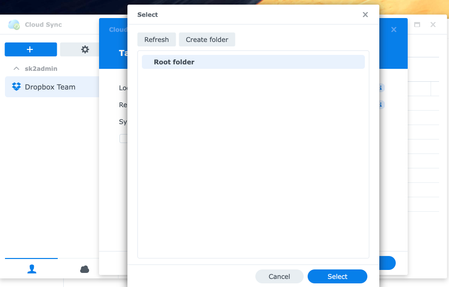
We're using synology but I can't see a list of Dropbox folders to sync.
We have several clients who utilize Synology NAS servers running DSM 7.2.1-69057 Update 3 & Cloud Sync configured to sync to their Dropbox Teams accounts. All were working great up until the end of ...

Rich Super User II
1 year agoSuper User II
Synology_Sync_Guy wrote:
So I am guessing we are waiting on Cloud Sync to be updated to support the API changes.
Synology has already updated their app. Refer to the following thread:

vjurjen
1 year agoExplorer | Level 3
Unfortunately, the latest version of Cloud Sync still does not support Dropbox's latest API changes. I've manually installed the 2.5.3-2531 version of Cloud Sync, but our Synology Cloud Sync backup still freezes. I've also checked the Cloud Sync logs, and it's giving constant errors since the minute of the DB system update.
Now, I am not sure if I need to re-configure everything and prepare for another 2-3 week upload...
About Integrations
Get help with third-party integrations from the Dropbox Community.
The Dropbox Community team is active from Monday to Friday. We try to respond to you as soon as we can, usually within 2 hours.
If you need more help you can view your support options (expected response time for an email or ticket is 24 hours), or contact us on X, Facebook or Instagram.
For more info on available support options for your Dropbox plan, see this article.
If you found the answer to your question in this Community thread, please 'like' the post to say thanks and to let us know it was useful!


