Need to see if your shared folder is taking up space on your dropbox 👨💻? Find out how to check here.
Forum Discussion

Yousri
6 months agoExplorer | Level 4
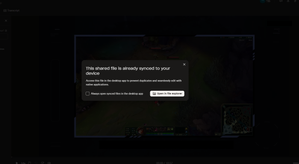
How to stop "This shared file already synced" pop-up when opening synced files from a shared link
Hey! This is a very recent issue for me, it was fine before
Every time I open a Dropbox link to a file that's already synced on my computer, I get this annoying popup saying the file is already syn...


Hsciortino
3 months agoNew member | Level 2
I have clicked the check box many times and the message still shows up. Any recommendations to stop this permanently?
This is in regards to the pop up question asking "Are you sure you want to permanently delete this share file for everyone?"

Megan Dropbox Community Moderator
3 months agoDropbox Community ModeratorHey Hsciortino, thanks for posting here!
The confirmation prompt 'Are you sure you want to permanently delete this share file for everyone' is a built-in safety feature in Dropbox to help prevent accidental deletions.
While these warnings should be dismissed if you check the 'Don't show me this again' option, there is no setting to completely remove or disable the prompt for all future deletions. This extra step is designed to protect your files and ensure you don't delete important content unintentionally.
I hope this clarifies!
About Create, upload, and share
Find help to solve issues with creating, uploading, and sharing files and folders in Dropbox. Get support and advice from the Dropbox Community.
The Dropbox Community team is active from Monday to Friday. We try to respond to you as soon as we can, usually within 2 hours.
If you need more help you can view your support options (expected response time for an email or ticket is 24 hours), or contact us on X, Facebook or Instagram.
For more info on available support options for your Dropbox plan, see this article.
If you found the answer to your question in this Community thread, please 'like' the post to say thanks and to let us know it was useful!


