Your workflow is unique 👨💻 - tell us how you use Dropbox here.
Forum Discussion

D P
8 months agoCollaborator | Level 8
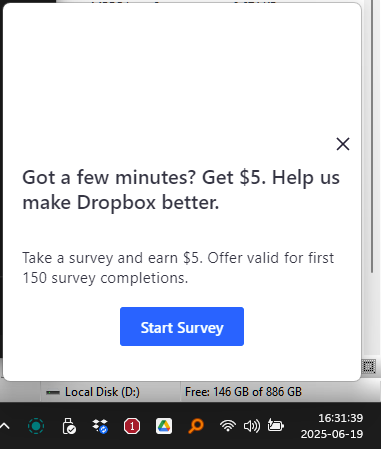
I received a Dropbox survey invitation on the desktop app, that looks suspicious. Is this real?
"Got a few minutes? Get $5. Help us make Dropbox better".
The window name is "Sprig electron view" (so it's not even using the standard Windows notification service). Anyway, the only notifica...

D P
8 months agoCollaborator | Level 8
I believe I've seen a similar popup a few months ago but closed it mindlessly. Seeing it again today made me decide to make the post.
Of course clicking x closes the window. Why would I restart if I'm in the middle of my work? 🙄
The questions are:
- Why did it appear in the first place if it's not one of the enabled notifications (listed above)? (And, of course, all of the website settings under "News - Email me about: New features and updates, Tips for using Dropbox, Tips for using Dropbox Paper, Dropbox feedback surveys" are all off already)
- Why is it not using the correct notification channel? (this means that do-not-disturb mode would not prevent it from appearing during, say, a presentation).

Neal Community Manager
8 months agoCommunity ManagerHi D P,
Thanks for reaching out about this. I've confirmed with our team internally that this is a legitimate survey from Dropbox and that Sprig is our product which does in product pop-ups like this. It should only pop up within Dropbox products and should not interfere with other applications.
- D P7 months agoCollaborator | Level 8
Interesting. So which channel of notifications should be turned off to ensure this doesn't happen?
(I would have thought it's something like "New features and updates", which I've already opted out of). Or are surveys an essential type of notification that can't be turned off 🤔
About Security and Permissions
Find answers to your questions about Dropbox account security and permissions.
The Dropbox Community team is active from Monday to Friday. We try to respond to you as soon as we can, usually within 2 hours.
If you need more help you can view your support options (expected response time for an email or ticket is 24 hours), or contact us on X, Facebook or Instagram.
For more info on available support options for your Dropbox plan, see this article.
If you found the answer to your question in this Community thread, please 'like' the post to say thanks and to let us know it was useful!


