Our Community is in read-only mode until April 8th, learn more here. You can still search existing threads or get help via Dropbox Support, the Dropbox Help Center, or Learn.
Forum Discussion

JacobRusso
4 years agoCollaborator | Level 8
Dropbox Smart Sync Icons Missing on Windows 10 - SOLVED
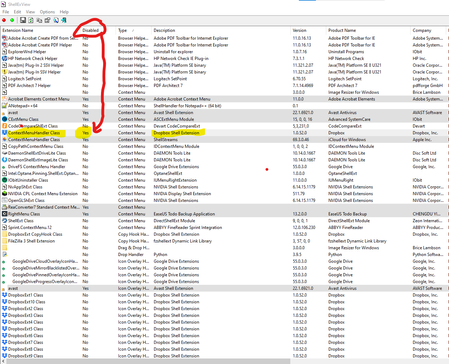
After spending almost an entire week with Dropbox tech support, uninstalling, re-installing, cleaning registries, running command scripts, MULTIPLE TIMES... We were getting nowhere. So, I did some ...

emilytimor
3 years agoExplorer | Level 3
Context menu is not disabled, but does say 'file missing'. No idea if that's relevant or not.

Walter Dropbox Community Moderator
3 years agoDropbox Community ModeratorHey emilytimor, could you try the offline installer from this page and let us know if this persists after you've installed that?
Note that you may also need to verify that the Windows UAC levels are set to default levels.
This can be changed in your Security settings in the control panel. For more information about UAC levels on Windows please see this link.
Let me know of any updates!
- emilytimor3 years agoExplorer | Level 3
Waaaaaaaaaaaaaa..... that actually worked! - EDIT: To be clear, that was the installation that worked, didn't need to do anything with the UAC.
Thank you so much, I've wasted so much time today having to go online.
Thank you!- Walter3 years ago
No biggie, Emily - I'm just glad I could help. Thanks for keeping me in the loop too!
See you around the Community and enjoy the remainder of your week!
- emilytimor3 years agoExplorer | Level 3
So just to check - that means it was an issue with the previous version? I have a company and my whole team use drobpox - so I'll need to anticipate and know how to resolve it for them.
Thanks!
About Dropbox Tips and Tricks
Find helpful advice and smart ways to get more out of Dropbox.473 PostsLatest Activity: 2 years ago
The Dropbox Community team is active from Monday to Friday. We try to respond to you as soon as we can, usually within 2 hours.
If you need more help you can view your support options (expected response time for an email or ticket is 24 hours), or contact us on X, Facebook or Instagram.
For more info on available support options for your Dropbox plan, see this article.
If you found the answer to your question in this Community thread, please 'like' the post to say thanks and to let us know it was useful!


