Your workflow is unique 👨💻 - tell us how you use Dropbox here.
Forum Discussion

marogur
5 months agoHelpful | Level 5
バックアップファイル削除できない
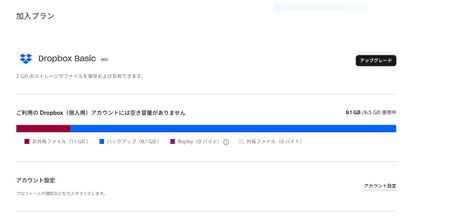
Basic Plan を利用しています。 Dropbox の使用容量が上限に達したため、ファイル同期が停止したというメッセージが出ています。 Dropboxに保存しているファイルを減らしても、メッセージは消えません。使用中ストレージを確認したら1.05GBです。Dropboxアプリを開いて容量を確認しても、バックアップフォルダが表示されなかったので8GBのファイルがどこにあるかどうしてエラー...
 5 months ago
えっ、そんなに簡単でしたか。ありがとうございました。
バックアップの外付けドライブフォルダ、削除できました!

Hinano Maeta Dropbox Community Moderator
5 months agoDropbox Community Moderatormarogur
5 months agoHelpful | Level 5
えっ、そんなに簡単でしたか。ありがとうございました。
バックアップの外付けドライブフォルダ、削除できました!
- Hinano Maeta5 months ago
marogur さん、ご対応ありがとうございます!
引き続きよろしくお願いいたします。
About 質問する

他のユーザーのディスカッションで回答が見つかる場合があります。回答が見つからない場合は、新しく質問してください。
The Dropbox Community team is active from Monday to Friday. We try to respond to you as soon as we can, usually within 2 hours.
If you need more help you can view your support options (expected response time for an email or ticket is 24 hours), or contact us on X, Facebook or Instagram.
For more info on available support options for your Dropbox plan, see this article.
If you found the answer to your question in this Community thread, please 'like' the post to say thanks and to let us know it was useful!


