Your workflow is unique 👨💻 - tell us how you use Dropbox here.
Forum Discussion

reiko888
3 years agoExplorer | Level 3
Dropbox Backupを無効にしたい
こんにちは。 少しのデータを2台のマシン間で共有するためだけに
Dropboxをインストールしたつもりでしたが
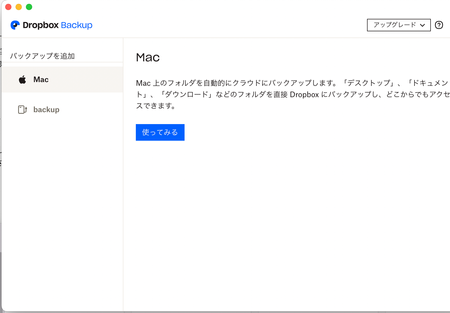
勝手にバックアップされてしまい、容量オーバーとなってしまいました。 https://help.dropbox.com/ja-jp/installs-integrations/desktop/how-to-use-dropbox-backup#disable バック...

reiko888
3 years agoExplorer | Level 3
はじめまして。
件名の通りですが、わたしの環境では、バックアップを解除するための
[設定を調整]が見当たりません。
どうすれば、バックアップを解除し、必要なファイルのみ共有できるのか
ご教示いただきたく、お願いいたします。
(ちなみに、同様の投稿を昨日行ったのですが、なぜか承認されないので再々チャレンジです。)
環境:Mac OS 12.5、Dropbox 155.4.5493
About 質問する

他のユーザーのディスカッションで回答が見つかる場合があります。回答が見つからない場合は、新しく質問してください。
The Dropbox Community team is active from Monday to Friday. We try to respond to you as soon as we can, usually within 2 hours.
If you need more help you can view your support options (expected response time for an email or ticket is 24 hours), or contact us on X, Facebook or Instagram.
For more info on available support options for your Dropbox plan, see this article.
If you found the answer to your question in this Community thread, please 'like' the post to say thanks and to let us know it was useful!


