Your workflow is unique 👨💻 - tell us how you use Dropbox here.
Forum Discussion

guitarplayer1969
1 year agoNew member | Level 1
Dropbox Sign missing Template Links option
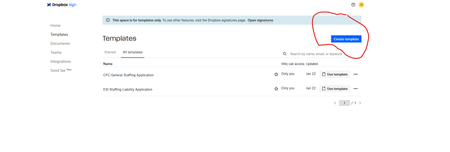
Hello: I am a new Business Team plan Admin member (3 user), and creating new templates in Dropbox Sign (Dropbox signatures redirects me automatically), but I do not have an option to "create templa...

guitarplayer1969
1 year agoNew member | Level 1
Yes- Step #4 of those instructions does not exist on my Dropbox Sign portal. I should also clarify that those steps are not the same for me. For example on Step #3 after picking Templates from Left side(#2), I have only "Starred" and "All Templates" and its not a dropdown menu, as my previous screenshot shows.
I have tried multiple browsers, made sure pop up blocker was disabled, cleared cache etc. Could the Dropbox Sign feature I have included with Dropbox Business be a scaled down version that does not include that feature anymore? The Signatures and Templates feature of Dropbox Business feature moved on Jan 5 2025 from the main Dropbox. Maybe they removed some features and haven't told everyone, but everything else seems to be there.

Hannah Dropbox Community Moderator
1 year agoDropbox Community ModeratorWhen you say "Dropbox portal", would you mind clarifying, guitarplayer1969?
Are you doing this while logged in to your Dropbox Sign account?
Which plan do you have exactly?
About Dropbox Sign

Ask questions and get help with Dropbox Sign here.
The Dropbox Community team is active from Monday to Friday. We try to respond to you as soon as we can, usually within 2 hours.
If you need more help you can view your support options (expected response time for an email or ticket is 24 hours), or contact us on X, Facebook or Instagram.
For more info on available support options for your Dropbox plan, see this article.
If you found the answer to your question in this Community thread, please 'like' the post to say thanks and to let us know it was useful!


