Our Community is in read-only mode until April 8th, learn more here. You can still search existing threads or get help via Dropbox Support, the Dropbox Help Center, or Learn.
Forum Discussion

dianalmark
1 year agoNew member | Level 1
How do I get Dropbox Sign to autopopulate e-mails for signature?
How do I get it to autopopulate e-mails for signature after I've sent an initial document out for signature? So far I'm having to type in the full name and e-mail each time

Hannah Dropbox Community Moderator
1 year agoDropbox Community ModeratorHey dianalmark, I hope it's okay to jump in!
I think you're referring to this window, right?
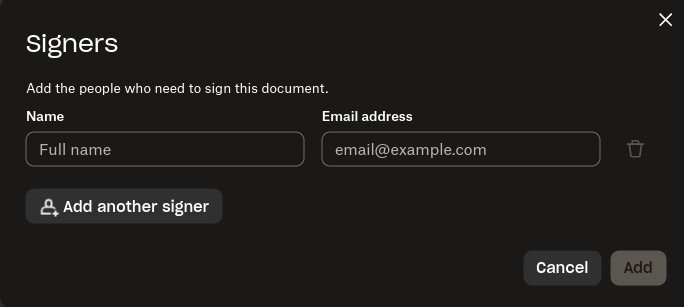
You mentioned that previously the emails would auto-populate; when did you notice that this changed?
Do you see the same behavior with other browsers or in private browsing?

dianalmark
1 year agoNew member | Level 1
Every time I need to send a document, in that window above, I have to type in the full name and e-mail. Previously it would auto-populate once I began typing the name
- Megan1 year ago
Hey dianalmark, I'd like to clarify one more thing, please.
Are you talking about Signatures on our website, or while using Dropbox Sign?
Provided you're talking about Singatures, then this is how it should work (the email address/ name fields are not auto-filled). Is it possible that you're looking at something different?
- dianalmark1 year agoNew member | Level 1
This may be the issue - I was sending them directly out of DropBox on the web, rather than DropBox sign. I thought the two were fully integrated, so thought it would work the same. I LOVE the way Dropbox automatically drops the signed docs into the folder, but it sounds like, from what you're saying, that I can't autofill the e-mails from there, that I have to specifically be signed into DropBox Sign??? Appreciate your help. This would be a great future upgrade if I can't do it this way.
- Megan1 year ago
Hey dianalmark!
Yes, correct. When using Dropbox Signatures you can't auto-populate email addresses.
In any case, I'll forward your feedback to the appropriate areas so we can continue to improve.
If you need something else, please let me know and I will be more than happy to help every step of the way. - dianalmark1 year agoNew member | Level 1
Thanks for helping me to figure this out. Too bad, as I loved working from DropBox directly!

About Dropbox Sign

Ask questions and get help with Dropbox Sign here.
The Dropbox Community team is active from Monday to Friday. We try to respond to you as soon as we can, usually within 2 hours.
If you need more help you can view your support options (expected response time for an email or ticket is 24 hours), or contact us on X, Facebook or Instagram.
For more info on available support options for your Dropbox plan, see this article.
If you found the answer to your question in this Community thread, please 'like' the post to say thanks and to let us know it was useful!


