We're making some changes to the Dropbox Community 👩💻 - Find out more here.



Group Content

We're making some changes to the Dropbox Community
Hi everyone, Over the past few years, Community members have shared feedback, ideas, and questions that help shape how this community supports you. We’ve been listening closely, and as a result, we’ll soon be moving the Dropbox Community to a new platform designed to deliver a better, more seamless experience. 😍 We’re just a few days away from launching an updated Dropbox Community experience, and we wanted to help you feel ready for what’s coming. To facilitate this move, the Dropbox Community Forum will be available as read-only from Monday, March 30, through Wednesday, April 8. This means that you will not be able to start new discussions, reply to threads, like posts, accept solutions or add or vote for ideas for one week. You will still be able to read discussions and find solutions during this time. Here’s what to know ahead of the move: This update is all about improving usability, performance, and helping you to get the answers you need. In addition to some tweaks to make the experience easier to use, we also are moving to a new home on community.dropbox.com. The heart of the Dropbox Community isn’t changing - we’re still here to help and you’ll continue to be able to connect, learn, and get help from fellow community members, experts and our product teams. Some sections, buttons and settings might have moved around or work slightly differently, but everything should still be here, so let us know if you can’t find something or it’s not working as you expect! Thanks for your flexibility as we take this next step together. We’re excited to continue building a space that’s helpful, welcoming, and easy to use. Thank you for being part of what makes the Dropbox Community special. Stay tuned for more updates as construction gets underway! 👷 ~ Angie14Views0likes0CommentsHow We Use Dash: Kate Heuter
You’ve seen us share How We Use Dropbox, and we’re continuing our How We Use Dash series - where our team show how Dash fits into their everyday workflows. Today, we’re featuring Kate Hueter, a Content Manager at Dropbox, who shares how Dash helps her move faster, stay creative, and get great stories in front of the right audience. As a content manager, Kate is constantly juggling creative assets, drafts, feedback, and timelines. Instead of digging through folders or switching between tools, she uses Dash as a central place to find what she needs, right when she needs it — so she can focus on creating, not searching. In the video, Kate shares how Dash helps her work smarter by: Quickly finding creative assets and customer stories in one searchable place Generating and refining copy to speed up her content creation process Publishing customer stories faster, without getting stuck in manual busywork Boosting visibility by sharing polished content across platforms like LinkedIn With Dash handling the heavy lifting behind the scenes, Kate can spend more time shaping compelling stories and less time tracking things down — helping her get high-quality content out into the world, faster. Share Your Dash Tips What’s the Dash feature that saves you the most time when you’re creating, sharing, or shipping work? Watch Kate’s video, then tell us how Dash fits into your workflow in the comments. Your tip might be exactly what helps someone else work a little smarter this week 19Views3likes0Comments
Recap: 3/17 Practical lessons with Dash customer Georgie-Ann Getton
For all Dash users (and lovers of AI), I had an amazing chat yesterday with a customer, operations expert Georgie-Ann Getton, who walked through how she pressure-tested Dash in her own business and features she found helpful in her day-to-day work! You can watch on demand here. Wondering what else we covered? We discussed how to: Spot the difference between solutions that sound impressive and tools that drive effective, repeatable work. Onboard and adopt new tools to fit into your day instead of disrupting it. Run simple audits to see whether a tool is improving your team’s work or quietly creating more of it. Have any questions? Drop me a comment, let's chat! ~Angie20Views1like0Comments
If I cancel Dropbox Dash, will it affect my account or users on my team?
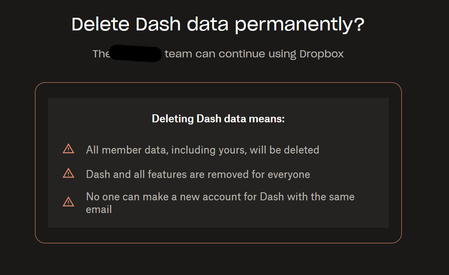
I have Dropbox For Business Teams Account (Dropbox Advanced) with 5 users. I installed the Dash Trial to try it out. I did not assign to any other users. Just me. I don't find it useful so do not want to continue. I already removed the Dropbox App from the Dash Settings. Now I need to cancel Dash. I get this popup and just want to make it does not impact my Dropbox Accounts or users.88Views0likes1Comment
How do I remove Dropbox Dash from my computer?
I use my company Dropbox for work, but I work from my personal computer. Recently my company began using Dropbox Dash, and now Dropbox Dash has automatically been installed (if that's the accurate term) on my computer. This causes Dropbox to randomly open and attempt to give itself a permanent place on my Mac's dock; it's very intrusive. I have no interest in using Dropbox Dash. How can I remove Dash from my personal computer without removing it for the whole company? Additional information: Dropbox Dash does not appear as a separate app on my computer, so it cannot be independently uninstalled. I have never downloaded the Dash extension. I am currently on version 244.3.6471 (244.3.6471). I believe these issues began with the most recent update. I already tried disconnecting Dash at https://www.dropbox.com/account/connected_apps, but I believe this disconnected Dash for the whole company—it was reconnected within hours. I would be glad to share screenshots if appropriate, but I'm not sure what I would take a screenshot of—the Dropbox icon in my dock? :) Regardless, glad to provide any additional materials or information necessary to get this addressed.154Views0likes5CommentsA Token of Appreciation
Hi there! Michael here from the Dash Customer Success team. As I write I’m currently sipping my coffee on a breezy morning in Austin, Texas. March is right around the corner, which means rodeo season is about to kick into full swing, so yes, I’m dusting off the old cowboy boots. But boots aren’t the only thing I’ve been dusting off lately. I’ve also been brushing up on something a little more technical: AI tokens. And before you think, “Hold on… based on the title… this isn’t the blog post I expected,” just stay with me. (Clever, right? AI could never 🤣) The truth is, over the past few weeks we’ve heard more and more customers asking about AI tokens, what they are, how many they’re using, and most importantly, how that ties back to cost. So let’s talk about it. In the AI world, a token is basically a chunk of text, sometimes a word, sometimes part of a word, sometimes even punctuation, that a model reads and processes. When you type a prompt, the model doesn’t see “sentences” the way we do. It sees tokens. The size of your prompt and the length of the response are measured in tokens, and that measurement directly impacts cost, speed, and performance. For example one prompt could be : “Create a structured end-to-end project plan for [PROJECT NAME], including timeline, milestones, task breakdown, ownership, risks, and success metrics. Present it in a clean, leadership-friendly format.” How many tokens was that? That’s about 30 to 40 tokens. However, this is where it gets tricky. The more you add sources or content, the more tokens are used. And as AI evolves, a prompt you used today could be a different amount of tokens in the future. Does your head hurt yet? Me too. So why is this coming up now? Hearing from customers, we think it’s because AI products are being priced based on token usage per user. For example, someone in Engineering might need 10K tokens per week, while someone in Marketing may only need 5K. That difference starts to matter when pricing and budgets are tied directly to consumption. As a result, admins are now trying to forecast token usage by role, estimating how many tokens marketing versus engineering will realistically need. There is growing anxiety around what happens if users exceed their limits, particularly whether overages will unexpectedly drive up costs. In some cases, this could mean closely monitoring token usage, potentially even daily, just to avoid budget surprises. That level of oversight is not something most teams want to manage long term. So what does this all mean? Tokens are not something to fear, but they are something to understand. The more intentional you are with prompts, context, and usage, the more control you have over cost and performance. You do not need to count every token, but you should know that they are the currency powering everything behind the scenes. As AI pricing continues to evolve, you can: Ask questions and understand how your platform measures usage Ask teams how they are using AI today Make sure your teams are trained on writing efficient prompts At the end of the day, tokens are just the meter running in the background. The real focus should be on outcomes. If the value outweighs the cost, you are doing it right. How is your team approaching token usage today? I’d love to hear what’s working, what’s confusing, and what questions you’re still trying to answer. PS - No tokens harmed in the writing of this blog post😉 - Michael T.131Views6likes0CommentsUpcoming Dash Chat Webinar 02.25.26
Hi everyone! Quick reminder that our next Dash user series session is coming up this Wednesday, Feb 25, and we’ll be covering Dash Chat. If you’ve ever been like “I know this exists somewhere…” or “can someone remind me what we decided on this?” this will be a good one. Register here On Wednesday, we’ll cover how you can use Dash to: Summarize docs, decks, and long threads Ask questions in regular language and get correct answers from your content Create first drafts in your brand voice based on past, approved work Hope to see you there! ~ Angie23Views1like0CommentsHow is Dash helping YOU in 2026?
Hi everyone, As we are now well settled into 2026, I’m curious…what’s one thing you’re intentionally improving in your workflow right now? 👩💻 For me, I’m focusing on using Dropbox Dash more consistently as my starting point… especially Stacks. I’m using Stacks to group related files and links for active projects, so everything I need is in one place and easy to pick back up without losing context. It has been a game-changer for maintaining momentum and reducing the mental load of switching between tasks. I’d love to hear from you - what’s one workflow habit you’re improving this year using Dropbox Dash? Whether it’s organising work with Stacks, finding files faster, or cutting down on context switching, share it below and let’s learn from each other!107Views1like0CommentsRecap: Jan 28 Dash user series session
Thanks to everyone who joined this week’s Dash user series session on universal search! If you missed it or want to rewatch, here’s the recording (it’s only 20 minutes, but if you listen on 2x, you can listen to me sound like a chipmunk as a bonus). Here’s some quick takeaways: Get answers and content faster by searching with natural language and partial context (like for when you can’t remember the file name in any way, shape or form) Quickly pull together everything related to a project (files, links, and chats included) Reduce rework and context loss by keeping project knowledge connected over time (ideal for anyone collaborating on a project with a team) See you at the next session on Feb 25! ~ Angie92Views2likes2Comments




About Dropbox Dash

Connect with the Dash team and customers, to get answers, share knowledge, and get the most out of Dropbox Dash.Latest Activity: 5 days ago
Open Group