2025 sparked some incredible conversations across our community 👩💻. Discover the highlights and see what’s ahead in 2026.
Dropbox
46 Topics
Ubuntu Plucky - Policy will reject signature within a year
warning: https://linux.dropbox.com/ubuntu/dists/plucky/Release.gpg: Policy will reject signature within a year, see --audit for details Control: https://linux.dropbox.com/ubuntu/dists/plucky/Release.gpg: Sub-process /usr/bin/sqv returned an error code (1), error message is: Signing key on 1C61A2656FB57B7E4DE0F4C1FC918B335044912E is not bound: No binding signature at time 2025-05-30T19:08:44Z because: Policy rejected non-revocation signature (PositiveCertification) requiring second pre-image resistance because: SHA1 is not considered secure since 2026-02-01T00:00:00Z -- Ubuntu Plucky is stable enough to support Dropbox, update signature PLEASE!!!!!! André11Views0likes0Comments
Please add parent_id to the Meta
Please add parent_id to the Meta information. Including parent_id in FileMetadata/FolderMetadata/deletedMetadata would make it easier to manage within the app. When maintaining the Meta DB within the app and handling changes made via the /list_folder/continue request, including parent id information would also make it easier to handle changes or moves. If only the path is provided, it's difficult to determine whether the folder is a deleted and then added folder with the same name. I previously suggested that deletedMetadata require id information. Thank you35Views0likes1Comment
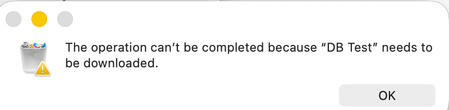
I get an error that my folder needs to be downloaded before deleting it from the desktop app.
Device M1 iMac Operating System/Browser (if using the web) MacOS Tahoe Dropbox App Version (if using the app) 238.4.6305 Question or Issue I attempted to copy the contents of my local Dropbox folder and paste them into another folder. My Dropbox folder remains intact. The files in the folder are available off line and online. I no longer needed the files to be copied and tried to delete the destination folder. When I did I got the following message. I think the issue may be related to the fact that the files are in some Dropbox database. Does anyone know how I can either end what ever process is running or down load the files so I can delete them? Thanks!79Views0likes8CommentsOffer More Membership Plan Options!!
I am presently using the Dropbox "Basic Plan" which as you know, provides 2GB of free storage. I am presently looking for options that provide a larger amount of storage. 2GB clearly is not enough! Why doesn't Dropbox offer any mid-range storage between 2GB and 2000GB??? 🤷♀️ I am sure other people would agree, that is an EXTREME DIFFERENCE! 😣🙄 Why has Dropbox chosen to not include mid-range plan options like 250GB, 500GB or 1TB?? 2GB isn't enough for me BUT, 2000GB is more than I could ever possibly use in my entire life time! I am single with no dependents. So 2000GB for me, would be like me buying a Tractor-trailer to drive only myself back and forth to my office job everyday with my only cargo in the back being my LUNCHBOX!! I just don't know how I could make this any clearer?🤷♀️ Your marketing team has really dropped the ball!!🤦♀️ Your company is missing out on MILLIONS of revenue by choosing to not include a storage plan option for mid-range needs. Not everyone consists of a family of four or more! I'll be searching elsewhere for a storage plan that better suits my needs and I'll be deleting my Dropbox account here shortly. ***The sales department for Dropbox is ignorant to not recognize that I am millions of people too!***51Views0likes1CommentLinux install - do not add "dropbox.list" to apt... (deb)
Linux install - do not add "dropbox.list" to apt... (deb install) latest Linux versions use DEB822 Source Format now (.sources) or replace "dropbox.list" with "dropbox.surces" example: Types: deb URIs: http://linux.dropbox.com/ubuntu/ Suites: questing Components: main Signed-By: /etc/apt/trusted.gpg.d/dropbox.ascSolved98Views1like6CommentsIs there a way to see the number of files in a folder?
Good day fellow Drop Boxers :) I have a unique situation - I have let's call it a two sided folder collection - one side is used for Prospective Clients and the other Active clients, I have some subfolders that are called "Random Things" to be Filed, there are 6 of them, on the prospect side similar folders with Client names. I then injected a "Short cut" into said folders so once they are done and can be placed in the Active side of things they simply add to short cut and it comes into my sub-folders. What I am wondering very similar to text or emails - can a folder show how many files are within it at a glance or some kind of indicator? Does that make sense, just don't want to waste time over the day wondering if something is in any of these sub-folders to take action on. Thanks in advance for your input - Pat34Views0likes1CommentA Year of Conversations: 2025 Community Wrap-Up
Hey everyone! What a year! I’ve loved chatting with you all throughout 2025 - hearing your favourite Dropbox features, clever hacks and the all the ways you use Dropbox to keep life running smoothly. This community is really pure magic. Every week, you jumped in to help each other, share tips and celebrate wins. We had loads of Community Members of the Month, plenty of Mighty Answer badges and so many “aha!” moments. And the stories! From photographers sharing galleries, to coders syncing across Windows and Linux, to the person who who said syncing across threes computers and two homes was “beautiful” - you all really kept the forums lively, helpful and fun! One iPhone user was especially happy with the 2025 Live Photos update, which finally let them migrate their whole collection smoothly. It was made even sweeter knowing the feature came directly from an idea shared right here in the community. And, I adored hearing how Dropbox helps in everyday life, like the member who said: We’ve had our fair share of community adventures this year, but we made it through together and every time I got to say “I am glad to see your issue was resolved”, it honestly made my day. Last year we gave the Community a fresh new look and glow-up, and we really appreciate everyone’s patience with the changes throughout 2025. It’s amazing to see how far we’ve come, and we’re even more excited for what’s ahead. There are some fab new updates and improvements coming in 2026… so stay tuned! A huge, heartfelt thank you to everyone who got involved in conversations this year. Those who asked questions, those who answered them, and those who felt comfortable sharing ideas, frustrations, clever workarounds, and even honest feelings about Dropbox. And of course, a special shout-out to our amazing Super Users …you’re absolute stars and this community wouldn’t be the same without you. So that’s it from us for 2025! Have a safe and happy time over the holiday period, and I’ll see you all in 2026316Views2likes0Comments
Getting 'This app can't run on your PC' error on my Windows computer
Application Affected Dropbox desktop app Device Asus T100TA Operating System/Browser (if using the web) Windows 10 Home 22H2 19045.6691/Microsoft Edge Dropbox App Version (if using the app) Question or Issue I can download the desktop app but can't install it, getting the message that the app can't run on my PC. I think my device and OS are too old for the latest version of the Dropbox app. Where can I find a compatible, older version?Solved35Views0likes3Comments