2025 sparked some incredible conversations across our community 👩💻. Discover the highlights and see what’s ahead in 2026.
Sync
4493 Topics
I reinstalled the Dropbox desktop app on my macOS Tahoe and have two questions.
Device iMac (M1, 2021) Operating System/Browser (if using the web) MacOS Tahoe Dropbox App Version (if using the app) 238.4.6305 Question or Issue My Dropbox folder is on an external 4 TB SSD. Yesterday I deleted the Desktop app and erased and reformatted the external drive. I reinstalled the Desktop app and reinitiated the sync via the web portal. Everything seemed to progress well. All of my folders appeared on the drive. and after indexing my files populated the folders. I have access to all of my files from the external drive. I have 2 questions. Prior to yesterday's reinstallation my files occupied 2.76 TB on the external drive. As of this morning they occupy .33 TB. What could account for the size discrepancy? Are my file really on the external drive? I completed the reinstallation, and all files were present on the external drive, at noon yesterday. Since that time the Desktop app has been updating. My sense is that something is wrong. It shouldn't take this long to update the files. I have purposely stayed away from making any changes to the files. Should it take this long to update? ThanksSolved49Views0likes11Comments
I can't see any syncing icons or right-click Dropbox menu options on my macOS Sonoma.
App: Dropbox (latest version) 239.4.8301 Devide: MAC book PRO 14 inch, 2023 Operating system: Sonoma 14.7.5 I can't see both syncing icons and right-click menu options on my laptop. This happens after remove an old account and sign-in into a new profile (part of Dropbox Teams) I try everything that was suggested, like re-installing, restart, log-out etc.etc. Currently the only way to sync file on dekstop is to open them and this make me lose a tremendous amount of time (link packages of indesign with more than 500 files, just to make an example). Can you help me with that? Thanks37Views0likes5Comments
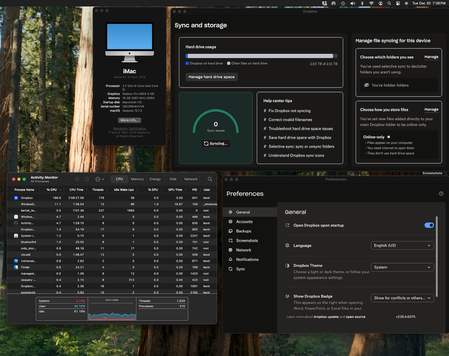
Dropbox is stuck syncing 60K files or 118GB and taking ~200% CPU
Device iMac 2019 27-inch Retina 5K Operating System/Browser (if using the web) Sequoia 15.7.2 Dropbox App Version (if using the app) v238.4.6075 Syncing Status "Syncing 60,850 files " Question or Issue I recently updated my mac OS to Sequoia 15.7.2. Since that update my dropbox has been stuck at syncing thousands of files and has severely slowed my computer to the point that I can't use it (painfully slow and chugging along for a simple task). As you can see in the screenshots, it's no wonder since it is taking up so much CPU power (180-200%). For the first few days I've tried to let it run but the number of files had jumped up to double what it is with nothing actually going down. Important things to note: 1. new files are getting synched despite it syncing all these other files. I can see the updates in my other computer. 2. at around the same time I updated I attempted to have dropbox backup my photos as well which is the largest files and it could also be related to this slowing. I did this right after I updated my OS. As a result, I changed the dropbox settings and turned photo backup and syncing off (I had never synced my photos to Dropbox before). I also deleted any previous backups just to be sure and paused backups entirely. Please help!! My iMac is unusable and I need it for work. I almost attempted to delete everything and do a fresh sync but I'm worried it will just aggravate the issue and cause a full file sync even larger than what it is now. I can't tell if this is in some stuck problematic state or if it is in fact synching so many files because of some recent change (FYI I did not update that many files on dropbox that would warrant that large sync) .49Views0likes5CommentsLarger folder refuse to become available offline on my PC.
Hi all, I have a Dropbox Plus account and wish to save files for offline access. I can do this by toggling Offline Access in Preferences with some folders but for the larger folders Dropbox refuses to let the files download and all is only available online. There is plenty of storage on my PC or external drives that I have tried with. Does Dropbox have a limit on folder size that it will sync like this? Any tips as to what I am doing wrong? /steve50Views0likes4Comments
Same folder but different access methods for two group teams
Hi I want to set a folder to be online-only files for one of team group, but offline files for another group when they install Dropbox desktop app on their Windows computers. is this possible in DropBox business? Thanks CharlesSolved36Views0likes5Comments
How do I quit the Dropbox app?
Issue: What happened to the button that allowed us to quit Dropbox? The button was definitely there in Dec 2025, but now it's gone. I need it because I'm working with large files that can only reliably sync over my work/home wifi network. Device: Desktop & Laptop Operating System: Windows 10/11 Dropbox App Version/Browser Version: Latest as of 9 January 202619Views0likes1Comment
I'm having sync issues since renewing my subscription
[Removed as per Community Guidelines] I have been a long-time user of Dropbox without any issues until recently. However, since my subscription renewal on November 27, 2025, I have been facing critical problems. Due to a credit card issue during the renewal process, I updated my payment method to a new card, and the renewal was successfully processed. Unfortunately, immediately after the renewal, Dropbox stopped syncing properly, and I have been unable to use the service ever since. As shown in the attached image, I have reached out to your support team dozens of times. Despite my repeated requests, the issue remains unresolved, and your team has stopped responding to me after the first few initial replies. I am deeply disappointed that a company of Dropbox’s stature is providing this level of service. I urgently request that you prioritize and resolve these technical synchronization issues immediately. I need to regain access to my files and the service I am paying for.16Views0likes1CommentMy macOS desktop app has been stuck syncing 10MB for 3 days.
Application Affected Dropbox Device MacBook Air Operating System/Browser (if using the web) OS 15.7.3 Dropbox App Version (if using the app) 238.4.6305 Question or Issue Three days ago I noticed an error message at the top of the finder window which was open to my Dropbox folder (stored in "locations"). The message said something to the effect that my Dropbox app couldn't be found. I thought that was strange, because Dropbox was open. So I quit the app and then reopened it, and that's when things really started getting strange. Now, day three, Dropbox is constantly in sync mode. The icon up in the task bar shows the circle of arrows, and when I click on it says syncing down at the bottom. But for most of the last two days there was no progress bar and no information about what was syncing. Now I'm getting "syncing [x number of files]." When I first looked this morning it was at 500+ 10 MB. Now it's down to 444 files, 9 MB. Progress! The thing is, I only use Dropbox for syncing one particular application, Scrivener. My entire storage on Dropbox is only 275 MB. It usually takes seconds to sync the updated files. The other strange thing is that on the activity monitor Dropbox never rises above 4% CPU. It's been going for more than 48 hours at a snail's pace to sync relatively tiny files. Possibly relevant, or just coincidental: about two weeks ago I cleared the data from the MacBook and reinstalled everything. After that, everything appeared to be in place and working just fine. This problem appeared after I returned from about 10 days travel over the holidays in which I was rarely on the computer. I've quit and reopened Dropbox multiples times. I've restarted the computer. None of it has helped.33Views0likes3Comments
The desktop app is creating many log files on Linux
Application Affected cloud synchronization engine - CLI and Nautilus extension Device Thinkpad Operating System/Browser (if using the web) Ubuntu 24.04 Dropbox App Version (if using the app) 2024.04.17 or v238.4.6305 Question or Issue Currently, a sync never ends and is creating log files like 160 GB. Dropbox has to sync around 25,000 files. I have already deleted the logs and restarted the client. But it looks like that the issue still persists. > dropbox status Syncing 23,915 files • 10 secs Indexing 23,904 files... Uploading 11 files (149.6 KB/sec, 10 secs) > du -chs .dropbox/logs/ 25G .dropbox/logs/ 25G total PS: A discussion gets deleted when you create one and try to edit it afterwards.Solved45Views0likes3Comments