2025 sparked some incredible conversations across our community 👩💻. Discover the highlights and see what’s ahead in 2026.
Windows
1410 Topics
"This file does not have an app associated with it for performing this action."
Dropbox Desktop App installs fine on my Win 11 PC. Unfortunately, I'm unable to sign in to it. The error message reads: "This file does not have an app associated with it for performing this action. Please install an app or, if one is already installed, create an association in the Default Apps Settings page" and the 'link' appears to point to something that includes dropbox-client://o-auth2/?code=........ I've tried several 'clean installs' as detailed on the Dropbox site, but without success. Dunno if I'm doing something wrong, or need to install/modify an app. Any advice much appreciated...;-)Solved61Views0likes8Comments
How do I quit the Dropbox app?
Issue: What happened to the button that allowed us to quit Dropbox? The button was definitely there in Dec 2025, but now it's gone. I need it because I'm working with large files that can only reliably sync over my work/home wifi network. Device: Desktop & Laptop Operating System: Windows 10/11 Dropbox App Version/Browser Version: Latest as of 9 January 2026Solved50Views0likes3Comments
Old Dropbox folders displayed in Windows File Explorer. How to remove them?
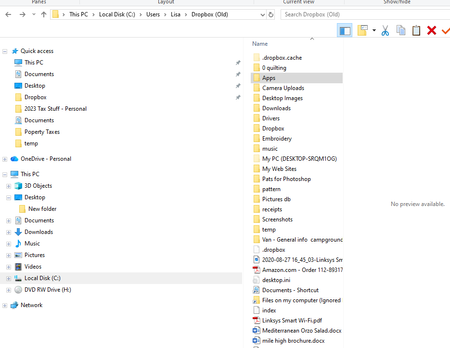
I have several DropBox folders on my desktop computer - Dropbox, Dropbox (Old), Dropbox (Old (1)), Dropbox (Old (2)). I don't know how this happened. I tried deleting some but lost my desktop icons and had to resore them all back to square one! With all these duplicate folders I don't know where my files are being copied to. How can I rationalise my DropBox setup, please?74Views0likes7Comments
Dropbox folder displayed twice in Windows File Explorer. How to remove 1 of them?
Application Affected Dropbox for Windows Device Microsoft Surface Pro9 Operating System/Browser (if using the web) Windows 11 Dropbox App Version (if using the app) 238.4.6075 Question or Issue The Dropbox folder is presented twice in File Explorer in Windows. Both instances are directly under Desktop in the folder tree. Both instances represent the same folder, i.e. D:\Dropbox\. Both show the same synced content when I click them. So they are really just two copies of the same, expected, Dropbox folder. Is there a way to get rid of one of them?Solved130Views0likes8Comments
Larger folder refuse to become available offline on my PC.
Hi all, I have a Dropbox Plus account and wish to save files for offline access. I can do this by toggling Offline Access in Preferences with some folders but for the larger folders Dropbox refuses to let the files download and all is only available online. There is plenty of storage on my PC or external drives that I have tried with. Does Dropbox have a limit on folder size that it will sync like this? Any tips as to what I am doing wrong? /steve53Views0likes4Comments
I'm getting an error when loading Paper documents on the Dropbox site
Is anyone else having trouble opening documents in Paper? I just wanted to review a couple to determine if I was scrapping the associated projects or saving them, but the site keeps giving me errors when I try to open them. :/ I know the general... everything around Paper has been declining over the last couple years, but this is a new one for me. The error states: "How embarrassing… We experienced an error trying to load the current page." I've already emailed support, but curious how widespread it is and if it's just one more sign to abandon ship.30Views0likes2Comments
Dropbox created a new folder after reinstalling and I can't access my Downloads folder.
Application Affected Drobox Device Operating System/Browser (if using the web) Windows 10 Dropbox App Version (if using the app) Trying to reinstall Question or Issue I let CCleaner clean my Windows 10 desktop registry (I know.... big mistake). Afterward Dropbox did not work. I uninstalled and tried to reinstall (regular - not advanced) The reinstall renamed my Dropbox folder to DropboxOld, created a new dropbox folder and started downloading all my files again resulting in a full hard-drive. Next, I uninstalled it again and tried an advanced reinstall. Same problem. So I uninstalled it again and restarted. Next, I did some more research and found the page https://help.dropbox.com/installs/advanced-reinstall which contained directions for what to do before an advanced reinstall. The only place I found any Dropbox folders was in the PROGRAMFILES. There are Dropbox and DropboxOld folders there. The Old folder seems to have my stuff. The Drobox folder only has a dowloads folder and I get a message saying location is not available. Neither folder has a Client folder. Not sure how to proceed. Thanks!52Views0likes3Comments
The desktop app suddenly "downloading" 500 files forever and not making any progress
Device Ryzen 7 5800 CPU, 32 GB DDR4 RAM, Dropbox folder is on a 1TB SSD, 26 GB of Dropbox storage. Operating System/Browser (if using the web) Windows 10 Dropbox App Version (if using the app) 238.4.6305 Syncing Status "Downloading" Question or Issue Since yesterday, my dropbox desktop app has been stuck "downloading" 580 files, making no progress at all and using 10-20% CPU usage indefinitely. I have tried pausing, unpausing, restarting the app, and rebooting my computer, to no avail. The diagnostics from clicking "Sync & Storage" shows 0 sync issues. Is there something wrong with the servers?Solved51Views0likes9Comments