Your workflow is unique 👨💻 - tell us how you use Dropbox here.
Windows
1202 Topics
I changed computers and now my files are missing. How can I restore them?
I purchased a new Dell laptop in December. We transferred everything over from the new one. I now noticed many of my dropbox files are missing. The folder structure is there but the files are missing. I see dropbox offers a way to create a back up but I have made changes in some of my current dropbox folders since December. Will a back up override my current folders? Bottomline, I am trying to recover my missing files.21Views0likes2CommentsAfter uninstalling the Dropbox desktop app many Dropbox driver files remain on system
Application Affected Uninstall Device Asus H670-PRO MB Operating System/Browser (if using the web) Windows 11 Dropbox App Version (if using the app) (Unknown) Question or Issue While examining the system log I see two errors related to DbxSvc which I've found is a DropBox service. To troubleshoot the issue, I uninstalled DropBox. But to my surprise, the DbxSvc service is still installed and running. I have stopped and removed the service but the drives still reside on my system. I want a complete uninstall so I can perform a clean install. What is the cause and solution to these errors? What is the supported way to remove this leftover debris from my system, including all registry junk? The errors I am encountering are: The DbxSvc service failed to start due to the following error: The service did not respond to the start or control request in a timely fashion. A timeout was reached (45000 milliseconds) while waiting for the DbxSvc service to connect. The driver files are residing in the following folders: C:\Windows\System32 C:\Windows\System32\drivers C:\Windows\System32\SecureBootUpdates C:\Windows\System32\DriverStore\FileRepository\ C:\Windows\WinSXS Plus a huge number of Registry Keys.56Views0likes3Comments
The Dropbox desktop app on my Windows 11 is stuck "indexing" files.
Application Affected Dropbox app Device Generic gamer computer Operating System/Browser (if using the web) Windows 11 Dropbox App Version (if using the app) 242.4.5815 Question or Issue After Dropbox made me loose a large amount of relevant files, it started to sync files which took overnight. Now it's being the entire day "indexing". After the whole "we keep your files safe" fiasco, I need to know what's wrong with Dropbox and why it keeps indexing files infinitely. Any ideas-solutions?49Views0likes5CommentsRemoving Dropbox Context Menu Entries on Windows - Persistent Fix
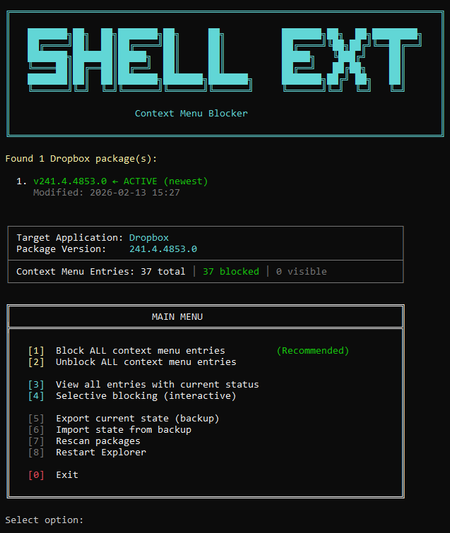
I've seen dozens of threads here from people trying to get rid of the Dropbox right-click context menu entries on Windows. There is no official toggle for this. The common advice involves manually editing registry keys, but people report those changes revert after Dropbox updates. Here is my solution: The linked script solves that differently. Instead of modifying Dropbox's own registry entries (which Dropbox overwrites on update), it uses Windows' built-in Shell Extensions Blocked mechanism — a per-user registry key (`HKCU:\...\Shell Extensions\Blocked`) that Windows itself respects. Dropbox updates don't touch this key because it's not theirs. What it does: Reads Dropbox's AppxManifest to find all context menu CLSIDs automatically Blocks them using Windows' own sanctioned blocking method Fully reversible — unblock everything with one click Interactive menu or silent command-line mode for automation Tested for 2+ months across three machines via PowerShell 7, through multiple Dropbox updates. The entries have never come back. The script is open, readable, and modifies nothing outside that single user-scoped registry key. If you want an independent safety assessment, paste it into any AI assistant and ask. Here is the script + AI safety assessment: https://grok.com/share/bGVnYWN5_e1f2cac5-5e0f-4731-bbbe-63fd72af7a7b44Views0likes1Comment
Syncing does not proceed on my fast W10 PC
I have DB 241.4.4853 on Win10 PC. Dropbox keeps Uploading 203,163 files and downloading 5 files, but no progress for days. I do not see any updated DB content on my laptop (my other computer, W11) Dropbox folders. I have very fast PC and light fiber connection 500 MB up and down. What may be the problem and solution? I have >700 MB on Dropbox, ca. 130 locally on my PC.55Views0likes5Comments
The desktop app on Windows 11 isn't connecting to the internet
Application Affected DropBox Windows App Device HP OmniBook Operating System/Browser (if using the web) Windows 11 Dropbox App Version (if using the app) 241.4.4853 Question or Issue I just purchased a new Windows 11 machine and downloaded the DropBox app. In the system tray, when I hover over the greyed-out app, it says "Dropbox 241.4.4853 Connecting..." and it never changes. I have a similar issue on another Windows 11 machine. Can someone help me get this connected?199Views2likes19CommentsEvery time I open my Dropbox folder the tray window pops open
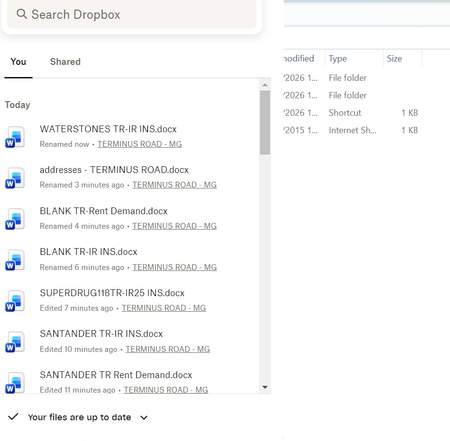
Question or Issue I am using an HP laptop running windows 11 with the Dropbox app downloaded Recently, every time I open Dropbox, a box with my history pops up - SEE BELOW This is REALLY annoying, as I can't access my folders list which is hidden behind it. I have to keep tapping things until it disappears! How do I stop it appearing please?32Views0likes1Comment
Dropbox icon not showing, although set to show
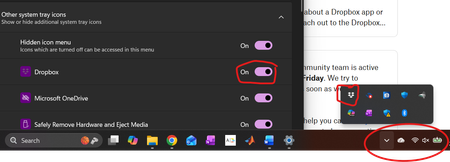
Application Affected Dropbox Desktop Device Thinkpad E15 Operating System/Browser (if using the web) Windows 11 Dropbox App Version (if using the app) 241.4.4853 Question or Issue I am running the latest version of Dropbox Desktop on Windows 11 (25H2 version, build 26200.7840). I set the system tray manager to show the Dropbox icon, and everything worked as expected. With the most recent Windows update to 25H2, the icon no longer shows, although the program is running and can be accessed by clicking the "expand hidden icon" buttons. You can see from the screenshot below that the Dropbox is set to display in the Windows -> Settings -> Taskbar -> Other System Tray Icons menu, yet is not shown in the (circled) home icon area, although it can be accessed by expanding hidden icons. Doing the obvious things have not helped (shutting down Dropbox and restarting it, rebooting, turning off the "Show Dropbox on System Tray" option, rebooting, then turning the option back on). Anything I can do short of uninstalling the entire desktop program, rebooting, and then reinstalling it from scratch?Solved89Views0likes7Comments
My Dropbox app on Windows is stuck indexing for 2-3 days now.
Hello, I am facing an issue with my Dropbox desktop app on Windows where it has been stuck on indexing for the past 2–3 days and no files are syncing. The Dropbox web version is working normally and uploads, transfers, and syncing through the browser are fine. The problem is only in the desktop app, which also does not show indexing progress or remaining files. I have restarted my laptop, uninstalled and reinstalled the app multiple times, cleared the cache, changed the Dropbox folder location, and checked antivirus and security settings, but the issue still continues. Any help or suggestions would be appreciated.119Views0likes12Comments