Our Community is in read-only mode until April 8th, learn more here. You can still search existing threads or get help via Dropbox Support, the Dropbox Help Center, or Learn.
Collaboration
10 TopicsA Year of Conversations: 2025 Community Wrap-Up
Hey everyone! What a year! I’ve loved chatting with you all throughout 2025 - hearing your favourite Dropbox features, clever hacks and the all the ways you use Dropbox to keep life running smoothly. This community is really pure magic. Every week, you jumped in to help each other, share tips and celebrate wins. We had loads of Community Members of the Month, plenty of Mighty Answer badges and so many “aha!” moments. And the stories! From photographers sharing galleries, to coders syncing across Windows and Linux, to the person who who said syncing across threes computers and two homes was “beautiful” - you all really kept the forums lively, helpful and fun! One iPhone user was especially happy with the 2025 Live Photos update, which finally let them migrate their whole collection smoothly. It was made even sweeter knowing the feature came directly from an idea shared right here in the community. And, I adored hearing how Dropbox helps in everyday life, like the member who said: We’ve had our fair share of community adventures this year, but we made it through together and every time I got to say “I am glad to see your issue was resolved”, it honestly made my day. Last year we gave the Community a fresh new look and glow-up, and we really appreciate everyone’s patience with the changes throughout 2025. It’s amazing to see how far we’ve come, and we’re even more excited for what’s ahead. There are some fab new updates and improvements coming in 2026… so stay tuned! A huge, heartfelt thank you to everyone who got involved in conversations this year. Those who asked questions, those who answered them, and those who felt comfortable sharing ideas, frustrations, clever workarounds, and even honest feelings about Dropbox. And of course, a special shout-out to our amazing Super Users …you’re absolute stars and this community wouldn’t be the same without you. So that’s it from us for 2025! Have a safe and happy time over the holiday period, and I’ll see you all in 2026858Views3likes0CommentsHow To Check If Your Space Is Being Used By A Shared Folder and How To Leave A Shared Folder
Shared folders are one of the easiest ways to collaborate with others while using Dropbox. Having a shared space makes everything simpler when you’re working on a project, sharing family photos or keeping your teams files all organised. But you might be wondering: Does this shared folder take up space in my Dropbox account? And what if I no longer need access - how do I leave it? Does a Shared Dropbox Folder Count Toward My Storage? It depends on how the folder was share with you and what level of access you have. Here’s how to check: Sign in to dropbox.com and click All files. Look for folders with a two-person icon 👥 - these are shared folders. Hover over the folder name and click the “…” (More) menu. Choose Share → then Settings. You’ll see one of these options: Can edit → the folders contents do take up space in your Dropbox account Can view → the folders contents don’t count toward your space Tip: You can also check shared folders directly from the Dropbox desktop app - the 2 person icon works the same way there too. How to Leave a Shared Dropbox Folder I No Longer Need If you see “Can edit” and you no longer need access, it’s really easy to remove yourself from the folder. Here’s how: Go to dropbox.com and sign in. Click Shared in the left sidebar. Find the folder you want to leave. Click the “…” (More) button next to it. Select Leave folder → and confirm. Once you leave: The shared folder and its files are removed from your Dropbox. They’ll no longer count toward your storage. Other members will still have access as usual. If you originally created the shared folder, you’ll need to transfer ownership before leaving. To do that: Open the folder’s Share settings. Click the dropdown beside another member’s name. Select Make owner → then leave the folder. That way, everyone who needs it still has access and the ownership transfers smoothly. And that’s it! Keeping your Dropbox account organised is a simple way to make more room for what matters most - your ideas, projects and memories. If you ever change your mind and want back into a folder in the future, just ask the owner to share it with you again. Got questions about shared folders? Drop them in the comments below or visit our shared folders FAQs. How do you organise and manage your shared folders? Join the conversation and let us know!1.4KViews5likes0CommentsCommunity Member of the Month - September 2025
Can you believe we’re already in October? Before we dive into cozy Autumn days, it’s time to celebrate another star in the Dropbox Community. ⭐ Say hello to our September Community Member of the Month… calmfrog 👋 This month, calmfrog impressed us with a response that was not only helpful but also a model of clarity and care. Check out this post here about duplicate sync icons. They broke down the issue step by step, making it easy for anyone - whether new to Dropbox or a seasoned user - to follow along if they had the same issue as them ✅ . That kind of thoughtfulness makes the Community a more welcoming, supportive, and valuable space for everyone 🤗 . It’s contributions like calmfrog's that remind us how powerful this Community is when members share knowledge with care. Thank you, calmfrog ! We’ve got a little surprise for you! Just reply to this message and we’ll make sure your well-earned token of appreciation is on its way 🎁🚀. Think someone else deserves the spotlight next month? Drop their name in the comments below 💬 Want to be our next Community Member of the Month? Get involved, share what you know, start a convo, and spread the love with likes and comments ❤️ You never know... you could be next! 😎106Views0likes1CommentHey Creatives! How Do You Make the Most of Dropbox?
Hey Dropbox Community, I wanted to share a delightful story that really highlights the creative ways people use Dropbox in their everyday lives, and it’s all about a business called Pound Cake Makeup💄. Imagine turning your passion into a thriving business, all while juggling the chaos of life. That’s exactly what the founder of Pound Cake Makeup, Camille Bell, did. Using Dropbox, she keeps her business organized - from managing product photos to sharing marketing materials and collaborating with her team, all seamlessly and from anywhere 🌍. It’s a perfect example of how Dropbox is a tool that empowers creativity and entrepreneurship 💡, no matter the size of your venture. Read more about Camille’s Dropbox Story here. What really struck me about this story is how technology can be a game-changer for small businesses and creatives. It’s not just about storage - it’s about connection, flexibility, and making sure your ideas and hard work can flow smoothly, even when life gets hectic. I’d love to hear from you all: 💬 How has Dropbox helped you bring your creative projects or side hustles to life? 💡 What unexpected ways have you found to use Dropbox that made your work or personal life easier? ✨ If you could add one feature to Dropbox to better support your creative or business needs, what would it be? Let’s get the conversation going and inspire each other with the many ways Dropbox can support our passions and projects 🎨🚀. Looking forward to hearing your stories and ideas.342Views2likes0CommentsCommunity Member of the Month - July 2025
We blinked and July was over! 🎉 But before we get too far into August, it’s time to celebrate someone who’s been making waves in the Dropbox Community. 🌟 Say hello to our Community Member of the Month for July … Shelladmin 👋 This month, Shelladmin stood out in a big way. As only a new member, they’ve set the bar high with their thoughtful and clear use of our brand new thread templates (you may have seen them when you are going to post something within our Help section). ✨ Their super helpful thread How can I see every folder in my Dropbox account in my macOS Finder? really grabbed our attention. Not only did they break down a tricky issue with clarity and care, but I know this thread will for sure help a bunch of future users tackle the same challenge with confidence. 💡📂 Thank you, Shelladmin! 😁 We’ve got a little surprise for you! Just reply to this message and we’ll make sure your well-earned token of appreciation is on its way 🎁🚀. Think someone else deserves the spotlight next month? Drop their name in the comments below 💬 Want to be our next Community Member of the Month? Get involved, share what you know, start a convo, and spread the love with likes and comments ❤️ You never know... you could be next! 😎116Views0likes0CommentsCommunity Member of the Month - June 2025
We’re halfway through 2025 (how did that happen?!), and it's the perfect time to shine a spotlight on someone who's been absolutely rocking it in the Dropbox Community 🎉 Say hello to our Community Member of the Month for June... DoctorBashir 🤩👏! Since joining us two years ago, DoctorBashir has been a friendly, knowledgeable, and all-around awesome presence in the Community. With 18 posts and 3 accepted solutions under their belt, they’ve been quietly (and consistently!) helping others and spreading good vibes. June, however, was a standout month. From sharing crystal-clear tips to troubleshoot pesky problems, to offering invaluable advice - DoctorBashir has been on fire 🔥. One of their most helpful contributions was a super insightful post on stopping the Dropbox folder from opening on startup. Not only did they break down the fix in simple steps, but they also added thoughtful feedback that helps make Dropbox even better💡. Their passion for Dropbox and helping others really shone through and that’s exactly why they’re our star of the month 🌟 Thank you, DoctorBashir, for being such a rockstar in the Dropbox Community! Your time, wisdom, and kindness truly make a difference 🙏 🎁 We’ve got a little surprise for you! Just reply to this message and we’ll make sure your well-earned token of appreciation is on its way 🚀 Think someone else deserves the spotlight next month? Drop their name in the comments below 💬 Want to be our next Community Member of the Month? Get involved, share what you know, start a convo, and spread the love with likes and comments ❤️ You never know... you could be next! 🎯160Views0likes0CommentsCommunity Member of the Month - April 2025
April has come and gone, and as we ease into the longer, brighter days of summer ☀️, it's of course that time to shine a light on our Community Member of the Month for April. Just like springtime, our Community has been blooming 🌼 with support and good vibes ✨. This month was so brilliant, we've decided to celebrate not one, but two Community Members of the Month 🎉. Please join us in congratulating itahoki and mcmeloni 🙌 These two have gone above and beyond, showing what true Community spirit looks like 💙. Their kindness, insight, and eagerness to help others haven’t gone unnoticed 👏. itahoki shared thoughtful advice and steady encouragement throughout April. Always positive and engaged, their contributions have made a real difference. Just have a look at this helpful post from the 4th of April: mcmeloni jumped into a conversation and shared their experiences and how they fixed an issue. This interaction was also top-tier Community spirit and vibes: We’ve got a special surprise for the both of you! 🎁 Simply reply to this message and we’ll make sure your token of appreciation is on its way to you ASAP 🚀. Think someone else deserves to be next month’s Community Member of the Month? 🌟 Let us know in the comments below ⬇️. And if you want to snag the spotlight yourself, jump into the fun, share your knowledge, start conversations, and spread the love by liking and commenting 💙.100Views5likes0CommentsCommunity Member of The Month - March 2025
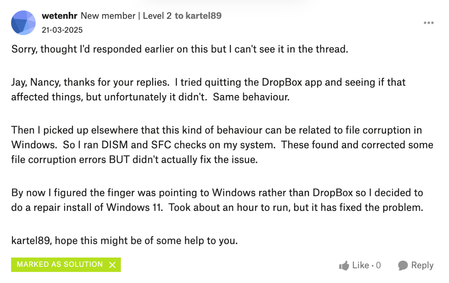
Wow how are we 3 months into 2025 already? Here (in Ireland), March brought longer days, the first hints of spring and of course, St. Patrick’s Day celebrations. While the weather might still be unpredictable, one minute sunshine, the next a sudden downpour, one thing that remains constant is the kindness and support within our Community. This month, we are especially excited as we introduce our very first Community Member of the Month for 2025! And that honour goes to wetenhr Despite only joining last month, wetenhr has already embraced the true spirit of the Community. A perfect example of this was when they returned to a thread to update another user who had the same issue, letting them know that while it might take some time depending on their device, it worked for them. Their genuine enthusiasm and helpful nature embody what makes this Community so special, and we are incredibly grateful for all the support they have provided . By providing a solution on the Community, they have not only helped others but demonstrated their passion for Dropbox. Congratulations, wetenhr thank you for making our Community a better place. We have got a special surprise just for you! Simply reply to this message and we will make sure your token of appreciation is on its way to you ASAP. Think someone else deserves to be next month’s Community Member of the Month? Let us know in the comments below. And if you want to snag the spotlight yourself, jump into the fun, share your knowledge, start conversations and spread the love by liking and commenting. You could be the next to shine!332Views4likes3Comments