We're making some changes to the Dropbox Community 👩💻 - Find out more here.
Dropbox Basic
409 Topics
How to create Dropbox Image URL for hosting purposes.
Hi, basically I am trying to mass upload product images to various marketplace platforms. So, I'd like to know the right way on how to generate the link to those particular images so that the marketplace server can grab images directly from dropbox. I have tried the "share" and "copy url" way but it doesn't work. Please help!Solved92KViews1like6Comments
I can't open Word/Excel files on iPad/iPhone
Hi. I've searched the forum/web and can't seem to find any answer to this problem. Until a couple of weeks ago I could edit in all Office-files in Dropbox via both iPad and iPhone. Then earlier this week I suddenly can't do this, and I'm asked to log-in with a 365 subscription. Has there been a change I haven'r been awere of, and do I now have to have an active 365 subscription? I use Dropbox basic, and the files are .docx and .xlsx. Thank you for your time. Regards /Mogens Østergaard, DenmarkSolved53KViews0likes12CommentsHow to share photos from Dropbox
How to Share Pictures using Dropbox Hey Community Friends! 📷 Karina here, and I’m happy to be sharing with you the different ways you can share your pictures using Dropbox (on the web & your mobile devices), on various Social Media platforms (ie. Facebook Messenger & Instagram), as well as how you can display your images on websites as a workaround to how Public Links were once displayed on websites, and through Dropbox Paper. Let’s start off with the basic and most common way to share your photos:Solved52KViews2likes4Comments
Uploading photos from phone
I basically got Dropbox in order to move my enormous collection of pictures and videos from my iPhone to somewhere else...The transfer went fine for a while, but then it has stopped and I keep seeing a message saying "waiting to upload". I have quit the application and relaunched, which does nothing. I have even upgraded Dropbox, as I suspect I will need the extra space... There is still over 400 pictures which are "waiting to upload" plus a few videos. And did I mention I started this process 13th of December...?Solved38KViews0likes37CommentsCan you password protect folders in Dropbox?
Hi folks, The Dropbox website at https://www.dropbox.com/features/share/password-protection clearly states that it is possible to password protect a folder in Dropbox, and has an animation on the page that seems to show this happening in a couple of simple steps. However, my version of Dropbox (the basic personal free version) looks nothing like that, and this Dropbox forum has a number of (possibly out of date) posts stating it's not possible to password protect a folder. Can this be done, or do I need to look for a different product? The options I seem to have around sharing and security seem to have are very limited. Even in a free version, I'd expect to be able to add layers of good security! Thanks, GlenSolved35KViews1like13Comments
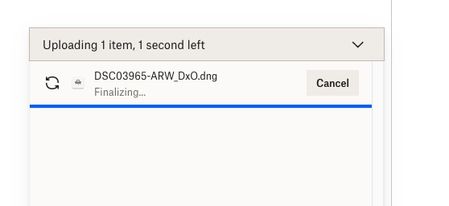
I'm trying to upload a small file, but finalizing is taking forever when using the desktop app.
Trying to upload a dng file that is about 90MB in size to my gallery - fter taking the 3 minutes indicated it has been 15 minutes with the screen saying 1 second left and "finalizing"...what is going on?Solved25KViews3likes38CommentsDropbox location change on MacOS 12.6
DropBox location was moved by installer to ~/library/CloudStorage and alias moved from "Favorites" to "Locations" in sidebar. DropBox support doc "https://help.dropbox.com/installs/macos-faqs" says new location due to change in MacOS. HOWEVER, installed same DropBox version on an iMac 18,3 running MacOS 12.6 and the location did not change! DropBox alias remains in "Favorites". Anyone else run across this discrepancy? Anyone have an idea as to cause of this discrepancy?Solved20KViews0likes72CommentsDropbox not showing in Mac finder sidebar after a restore from Time Machine
I had to do a restore of some of my Dropbox folders from time Machine. Dropbox is no longer showing in the Finder sidebar and its lo longer an option in sidebar preferences. I can view Dropbox in my user section, but it is greyed out and shows a green dot with a checkmark. I can open Dropbox by clicking the folder icon on the menu bar, it opens in finder and shows all my folders. How can I solve this?Solved20KViews0likes10Comments