We're making some changes to the Dropbox Community 👩💻 - Find out more here.
Dropbox Basic
409 Topics
Did you know... you can search for images using just text?
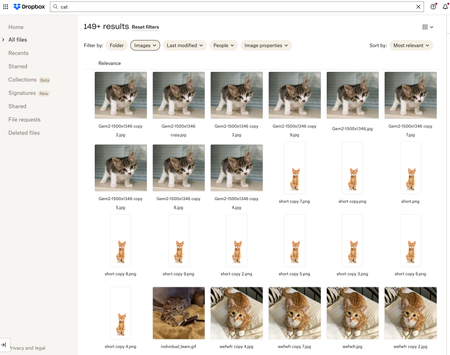
Hello Dropbox Community! My name is Lainie and I'm a Product Manager at Dropbox. Every now and again, I am going to post a "Did you know..." to 1) keep you informed of all of the cool technology that exists at Dropbox and 2) gather your feedback on how the features are performing. In today's, "Did you know..." I'll be talking about Image Search! Image search is allows you to use the Search Bar to search for the contents of the image using words to describe the image. For example, if you search for "cat" your search results will show files that 1) contain the word "cat" in the file name or body, AND 2) files that contain images of cat. No mention of the word "cat" is necessary! Pretty cool! If you haven't yet, I recommend that you check it out. Please respond to this thread and let me know... A) Did you know this feature existed? Do you use it? B) How can we make this even more useful for you? Have a great day! Lainie For more information, check out our Help Center Article on Image Search!9.5KViews9likes3CommentsWeb Videos now supports auto-generated Video Transcriptions + Closed Captioning
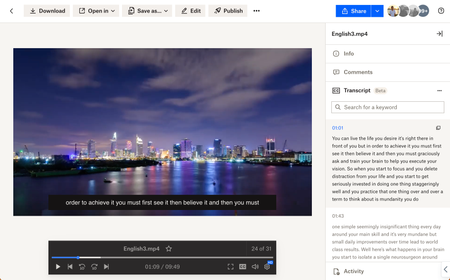
Hey folks! My name is Derrick and I work on a team that improves the file preview and viewing experience at Dropbox. We are excited to announce two features on Dropbox.com to enhance your video viewing experience: video transcriptions and closed captioning. Here’s how to use: Simply upload your video to Dropbox and voila! Your videos will have auto-generated transcripts and closed captioning at your disposal with a click of a button. Even more so - watch videos shared from your colleagues - and copy transcribed segments to instantly quote them in a presentation. Tell me about your experience with our new features! We are all ears. Help Center Article URL: https://help.dropbox.com/view-edit/transcript-closed-captions12KViews9likes9CommentsTake Your Search Game to the Next Level with Dropbox Dash 🚀✨
Hi Everyone, Are you ready to take your search game to the next level with Dropbox Dash? Dash is designed to help you find what you need, faster. Whether it’s a doc 📄, a link 🔗 you just cannot seem to find, or a message buried in one of your (many) apps 📱, Dash really makes searching feel effortless. I am sure you will have some questions… So, what are you curious about? 🤔 What would you like to learn more about? 🤗 Drop your question in the comments and we will be happy to help 👩💻 😊.4.9KViews8likes10CommentsMac OS Sequoia is arriving. Is DropBox ready?
Hi everyone, who remembers the chaos that happened last year with the Mac OS Sonoma update and all the issues we had with DropBox? There was a particular version that caused syncing to go haywire. I remember it all too well, as it took us almost a month to figure out how to fix the problem. What will happen with Mac OS Sequoia? I admit, I'm quite anxious and would appreciate some reassurance from the DropBox team. Thanks.Solved13KViews8likes69Comments
How to expand left sidebar width on the website?
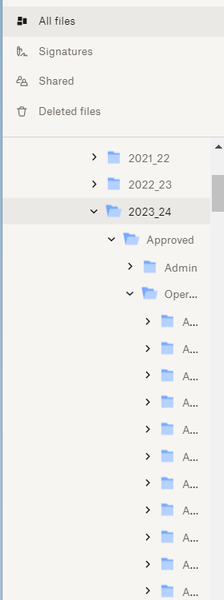
How can I expand the left sidebar width. I have many levels of files and I can not see the names of folders that I want to move files into. As you can see below, all I can see is the first letter of the folder "A" and there are several of them. I want to be able to expand the left sidebar so I can see the names of those folders and not just the first letter. I was able to do it before, but not now for some reason. Thanks!2.5KViews8likes14CommentsWe're making some changes to the Dropbox Community
Hi everyone, Over the past few years, you’ve shared feedback, ideas, and questions that help shape how this community supports you. We’ve been listening closely - and as a result, we’ll soon be moving the Dropbox Community to a new platform designed to deliver a better, more seamless experience. We’re just a few days away from launching an updated Dropbox Community experience, and we wanted to help you feel ready for what’s coming. To facilitate this move, the Dropbox Community Forum will be available as read-only from Monday 30th March until Wednesday, April 8th. This means that you will not be able to start new discussions, reply to threads, like posts, accept solutions or add or vote for ideas for one week. You will still be able to read discussions and find solutions during this time. Here’s what to know ahead of the move: This update is all about improving usability, performance, and helping you to get the answers you need. The heart of the Dropbox Community isn’t changing - we’re still here to help and you’ll continue to be able to connect, learn, and get help from fellow community members, experts and our product teams. Some sections, buttons and settings might have moved around or work slightly differently, but everything should still be here, so let us know if you can’t find something or it’s not working as you expect! Thanks for your flexibility as we take this next step together. We’re excited to continue building a Community that’s helpful, welcoming, and easy to use. Thank you for being part of what makes the Dropbox Community special, and we want to hear your feedback so please share your thoughts in the comments below. Amy, on behalf of the Dropbox Community Team239Views7likes1CommentCommunity FAQs
Hi everyone, We’ve seen a lot of great questions and recurring issues here in the Dropbox Community, so we’ve pulled together a set of easy-to-follow, solution-focused FAQs to save you time and help you get answers quickly. You can find them all here: Apps and Installations FAQs Create, Upload, and Share FAQs Delete, Edit, and Organize FAQs Dropbox DocSend FAQs Dropbox Sign FAQs Integrations FAQs Plans and Subscriptions FAQs Security and Permissions FAQs Setting and Preferences FAQs Storage Space FAQs View, Download, and Export FAQs Each FAQ includes: A quick step-by-step guide Common causes to watch for Actionable fixes Links to official Help Center articles If your issue isn’t quite the same as what’s covered, feel free to post your own question — we’re here to help! Thanks for being part of the Community!626Views7likes0Comments
Tell us what you think of the mobile search improvements
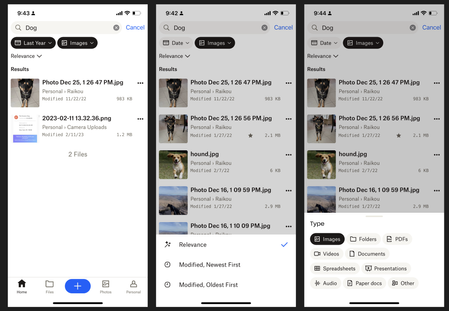
Hello! My name is Luke and I work on the Mobile app team at Dropbox. We're excited to share some updates that we've made to the Search experience on the Android and iOS apps. Here's what's new: Larger Result Thumbnails Modified Dates in search results File Sizes in search results Snippets for keyword matches within files Sorting results by newest or oldest Filtering results by File Type or 'Modified Date' We hope that these changes will help you retrieve your files more quickly and easily! We'd love to hear what you think -any feedback is welcome.4.5KViews7likes3CommentsDropbox Basic: Learn the Basics
If you are reading this, chances are you are new to Dropbox. Welcome! Many of us begin our Dropbox journey with a Basic Account, which has so many perks, and of course, it is free! The basics of your Basic account: Users and Space The Dropbox Basic account allows for 1 user. This means you are the only person that can use this account. But don’t worry, one user doesn’t just mean one device - you can have 3 different devices connected to your Dropbox account. I connected my dropbox account to my phone, tablet, and laptop. When I was in Ghana, I was able to access all of my files from my phone, and to upload some photos. Want to learn more about connecting your mobile devices? Discover how to make the most of your mobile access to Dropbox. Using your Dropbox Basic account: So to get started, you can upload almost any file type to your Dropbox account and keep your important files safe! Whether it’s music files, pictures, media, documents, simply upload and you can access your files anytime, anywhere! With a Dropbox Basic plan you have 2GB of space to use. And of course, we keep your files safe! Dropbox uses multi-factor authentication to ensure that all of your files are secure. Check out how Dropbox uses encryption to provide security for your files. When I received my first multi-factor message I said to myself, “Come on Safety”. Dropbox Basic tools you might not know about: The tools within Dropbox are the real secret sauce. Here are some Dropbox features and products you might not know about, check them out below and find out if they can help you to make plans, organize files and save time! Dropbox Paper is a collaboration tool with endless possibilities! Charts, headings and formatting is made easy with one click, LITERALLY. This program is great for creating proposals, project plans and just quickly taking notes. The best part of it is that it takes up very little space in your Dropbox account. Trust me, I make paper docs for all of my todo lists, to plan family trips and to organize any personal projects. Paper has truly become one of my favorite products to use. HelloSign allows you to send 3 documents for eSignature per month. In the digital world we live in, this is a perfect way to get a signature from someone you may not see in person. Explore HelloSign, a simple and easy way to get documents signed securely online. I recently needed a contractor to sign a document that I drafted to fix my home and the document was signed and sent back to me within minutes. And of course, the signed docs are safe and secure too! Dropbox Capture is a tool used to Capture the attention of the person you‘re chatting to. With Capture you can share your thoughts with screenshots, GIFs, or simple videos recorded right on your screen. The upside is that you can clearly say what you mean without scheduling another meeting. Learn more about how to use Dropbox Capture. Having a Dropbox Basic account is more than just a space to store your information. Use Dropbox to manage and organize your files, whether it’s for a project, sharing memories or connecting with others. 😁 Will you use these tips to make the most of your Dropbox Basic account?8.9KViews6likes1CommentHow To Check If Your Space Is Being Used By A Shared Folder and How To Leave A Shared Folder
Shared folders are one of the easiest ways to collaborate with others while using Dropbox. Having a shared space makes everything simpler when you’re working on a project, sharing family photos or keeping your teams files all organised. But you might be wondering: Does this shared folder take up space in my Dropbox account? And what if I no longer need access - how do I leave it? Does a Shared Dropbox Folder Count Toward My Storage? It depends on how the folder was share with you and what level of access you have. Here’s how to check: Sign in to dropbox.com and click All files. Look for folders with a two-person icon 👥 - these are shared folders. Hover over the folder name and click the “…” (More) menu. Choose Share → then Settings. You’ll see one of these options: Can edit → the folders contents do take up space in your Dropbox account Can view → the folders contents don’t count toward your space Tip: You can also check shared folders directly from the Dropbox desktop app - the 2 person icon works the same way there too. How to Leave a Shared Dropbox Folder I No Longer Need If you see “Can edit” and you no longer need access, it’s really easy to remove yourself from the folder. Here’s how: Go to dropbox.com and sign in. Click Shared in the left sidebar. Find the folder you want to leave. Click the “…” (More) button next to it. Select Leave folder → and confirm. Once you leave: The shared folder and its files are removed from your Dropbox. They’ll no longer count toward your storage. Other members will still have access as usual. If you originally created the shared folder, you’ll need to transfer ownership before leaving. To do that: Open the folder’s Share settings. Click the dropdown beside another member’s name. Select Make owner → then leave the folder. That way, everyone who needs it still has access and the ownership transfers smoothly. And that’s it! Keeping your Dropbox account organised is a simple way to make more room for what matters most - your ideas, projects and memories. If you ever change your mind and want back into a folder in the future, just ask the owner to share it with you again. Got questions about shared folders? Drop them in the comments below or visit our shared folders FAQs. How do you organise and manage your shared folders? Join the conversation and let us know!1.4KViews5likes0Comments