Our Community is in read-only mode until April 8th, learn more here. You can still search existing threads or get help via Dropbox Support, the Dropbox Help Center, or Learn.
Dropbox Paper
19 Topics
Migrate from Evernote to Dropbox Paper
Dropbox Paper is an ideal candidate to replace Evernote. Here's what would need to happen, I believe, for many folks to make the switch. In order of priority: Import Evernote (.enex) data (Dropbox Paper is perfect for this, because each Paper doc can contains notes, attachments, and links like Evernote notes do.) Webclipper Email to Dropbox Paper ---- Why Dropbox Paper would be better than Evernote: Active development Beautiful UI/UX Better collaboration Dropbox is *already* where I keep everything else! Way better device apps, with killer features like scan to document. Dropbox's bulletproof sync and backup. (But if I can't get started by moving my data from Evernote to Dropbox Paper, then this is all moot!)28KViews75likes9Comments
Thoughts and feedback on the new release of Dropbox Paper
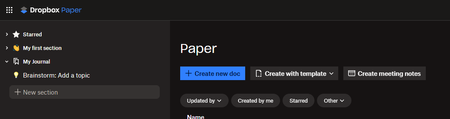
This idea was already suggested many years ago and closed for inactivity. The old Dropbox Paper was easy to use, simple and was "what you see is what you get". The new Dropbox Paper introduces lots of new concepts that don't necessarily align I think with how many people have used Dropbox Paper in the past. It could just be me, but seems unlikely. Paper was a useful tool for me to organize my thoughts, write notes, journal ideas, etc... I don't usually like tools in general that try to push me to organize my life into someone else's perspective of how one should operate. I realize that other users may like that, I don't. I don't want "to-dos", "alerts", "notifications", "channels", etc... I like the "sharing" capability, and perhaps some very basic "collaboration", but to turn Dropbox Paper into a complete "Team" solution for ideating is way way beyond what I want to use it for, and I feel a little like the new version of Paper is intended to force users into a way of journaling and writing that maybe isn't what or how they are comfortable operating. Maybe these features could be useful, but on an as-needed basis, without taking away the simplicity that existed prior. It would be great if we could just have something that gives us the old Paper capabilities, with the advantage of treating a "Paper" document just like a dropbox document (which is what I thought the new implementation was all about and I was excited for). Here's the new Dropbox Paper UI. How is this intuitive? "Sections" on the left. "Create new doc" on the main page. Shouldn't I be navigating documents on the left, and each document have sections? Where am I right now? Where are all my paper documents? How do I get to them? What is a section? When I click on "My first section", nothing happens, it doesn't go anywhere. "Brainstorm: Add a topic". What's a topic? I don't brainstorm in Dropbox paper, why is that important? How would you then browse topics? Or is topics part of brainstorming? Is that a document or a "thing" thing in the new Paper application. Do the icons mean each thing on the left is a type of thing, or is it just a clever emoji you can prefix your titles with. What is "Starred" for? If I have 1000 paper documents, why am I starring them like that? Or should it just be maybe "Recent documents". Is "Starred" going to be a new virtual directory tree or a list of starred documents. I feel like it's a bit of a mess of ideas and concepts and terminology. Besides "Create new doc", nothing else makes sense to me. Maybe I am the wrong user. Maybe it was never intended to be used as a simple repository of notes, journals, etc... What's the grand old vision for Paper? Where is it heading and trying to take us as users? I really don't know how to suggest a better idea without a better understanding of what Dropbox Paper is meant to accomplish for users going forward. Is it for the enterprise going forward? Who is Dropbox Paper trying to compete with, because I thought it was pretty unique before in its simplicity. I noticed there's a slack integration? Is the product management group for the application taking their cues from businesses, or are this going to also still be for regular retail-ish consumers. Maybe that can be explained clearly. And then I can decide if it's for me or not, but as-is, I'm not sure how this is going to work for me.2.4KViews4likes20Comments
Ditching Evernote for Dropbox Paper - 2023 edition
Hey all, so evernote is jacking their pricing up again, and I'm just not sure why I keep letting them do this to me. I'm considering moving to paper. Mind you, evernote got pretty fancy from a UI/UX end, and I have been using it for YEARS. I'm pissed I have to consider leaving, but I'm also asking myself why I keep spending money when I already pay for dropbox. Have you all found a way to move files from evernote to paper easily? Am I going to have to rebuild the library again? Have you found a better alternative to evernote and/or paper?4.3KViews4likes2CommentsPaper by Dropbox to be discontinued?
I'm seeing a number of posts across social media speculating that Dropbox Paper is to be discontinued. As there has been no Paper by Dropbox app update for 2+ years (since Version 262.2), and because of general user discontent regarding the infamous 2020 update, this rumour seems to be gathering momentum. Could somebody confirm what we should expect (and when) before I start scouting for alternative platforms? Many thanks!Solved2.5KViews2likes23Comments
How to upgrade from Legacy Paper?
I found other forum discussions about how to update from Legacy Paper to the "2020 release"... so that we can have our files all organized in Dropbox (storage)... versus the Paper file system. Those discussions suggest that there was not a way to manually upgrade... BUT, since those discussions are 3 or 4 years old... I figure there must now be a way to do it... Right? There is a way to upgrade now, right? (Insert "Anakin / Padme meme here)Solved2.7KViews2likes8CommentsAbility to attach Dropbox files to email in Mail app on Ipad has disappeared
I have regularly been able to attached documents from Dropbox when creating an email on OSX Mail app. However, now I am not able to. Steps that fail are below: Create email on iPad with Mail. Tap on the paper clip icon OR tap in the body to get banner of options, including Add Attachment Window opens with file access options; under LOCATIONS, find ICloud Drive, On My IPad, and Recently Deleted. No Dropbox option. No MORE... button anywhere to add Dropbox as a choice for Mail to attach documents. I have looked in Settings for a way to tell either Dropbox to allow access or Mail to get access to Dropbox. No success yet. Please, any solution? I have found discussion of problem with Outlook and referral to Microsoft, but there is no MS Office involvement in this issue. Thanks in advance.Solved29KViews2likes20CommentsMissing floating toolbar in Dropbox Paper
The floating toolbar with formatting tools that appears when selecting text is now missing in Dropbox Paper. Granted, I can still do some of the formatting using the keyboard but the toolbar was much more convenient. It was still there two days ago (Friday) but now it's gone! I haven't made any changes to my computer or browser (Windows/Chrome) since then. What's even worse, the Ctrl+K shortcut doesn't work anymore either so it's now impossible to add links! Please fix ASAP!Solved3.3KViews1like1Comment
Dropbox Paper has gone all weird
Anyone else had Dropbox paper go weird on them? Logged in and suddenly all the folder system and gone, I had no files showing on the main tab - and all paper files have been migrated into a document called "Migrated Paper Files". Has dropbox paper gone?2.4KViews1like11Comments
Dropbox Paper freezes on Chrome.
For the past month, I cannot use my Dropbox Paper account in my Chrome Browser on my PC running Windows 11. Anytime I open Paper in Chrome, it immediately crashes Chrome and freezes the whole browser. (Says "not responding" in the top bar). It takes 10-30 minutes to stop on its own to then allow me to close the Paper tab (once the tab is closed all other tabs work as normal), otherwise I need to end task Chrome, close it down and reopen it. It doesn't happen in the browsers Edge or Firefox - works perfectly there. I have cleared cache, deleted cookies, cleared history, etc. that does nothing. Any help would be appreciated, I use DB Paper a lot for work.Solved8.6KViews1like29Comments
No "Edit" icon on Microsoft Office files in Dropbox mobile app
According to Dropbox support article, I should see an "edit" icon (pencil-and-paper icon) when I open a Microsoft Office document from within the Dropbox Mobile app on my iPad Pro. I don’t see the icon. I can open and save Office files stored in Dropbox by opening them from within the Word, Excel, etc. app. I just can’t open them into Word from the Dropbox app. Suggestions will I’ll be appreciated.Solved8.7KViews1like5Comments