Our Community is in read-only mode until April 8th, learn more here. You can still search existing threads or get help via Dropbox Support, the Dropbox Help Center, or Learn.
Dropbox Pro
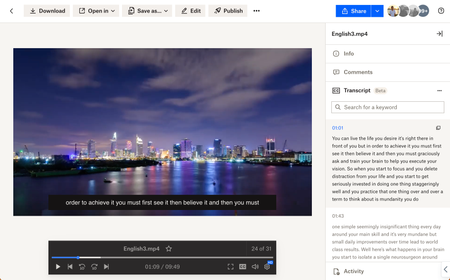
5 TopicsWeb Videos now supports auto-generated Video Transcriptions + Closed Captioning
Hey folks! My name is Derrick and I work on a team that improves the file preview and viewing experience at Dropbox. We are excited to announce two features on Dropbox.com to enhance your video viewing experience: video transcriptions and closed captioning. Here’s how to use: Simply upload your video to Dropbox and voila! Your videos will have auto-generated transcripts and closed captioning at your disposal with a click of a button. Even more so - watch videos shared from your colleagues - and copy transcribed segments to instantly quote them in a presentation. Tell me about your experience with our new features! We are all ears. Help Center Article URL: https://help.dropbox.com/view-edit/transcript-closed-captions12KViews9likes9Comments
Tell us what you think of the mobile search improvements
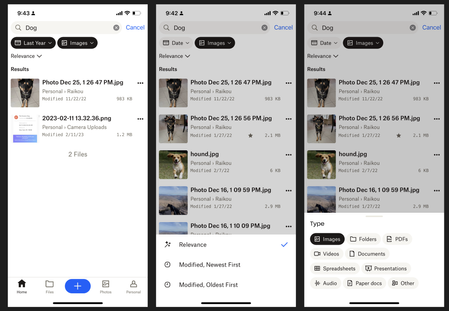
Hello! My name is Luke and I work on the Mobile app team at Dropbox. We're excited to share some updates that we've made to the Search experience on the Android and iOS apps. Here's what's new: Larger Result Thumbnails Modified Dates in search results File Sizes in search results Snippets for keyword matches within files Sorting results by newest or oldest Filtering results by File Type or 'Modified Date' We hope that these changes will help you retrieve your files more quickly and easily! We'd love to hear what you think -any feedback is welcome.4.5KViews7likes3Comments
Retrieve your content more quickly with our new advanced search operators!
Hi Dropbox community! I'm a product manager at Dropbox working on the search experience on dropbox.com. Paid users already have access to advanced search features like full-text search, OCR (searching for text within images), full-text search, and image search (searching for objects within images). However, this can often return a lot of results leading to a poor experience having to wade through and find exactly what you're looking for. So, we're happy to announce that we're adding a few new operators to help you retrieve your files/folders more quickly: title:(new lead) => See results with only the specific words in title of the file title:"new lead" => See results with exact phrase match in title of the file. Note that quotes only work with title searches and can't be used to match on content type:image => Filter results by a certain types like image, video, document, spreadsheet, etc. type:jpg => Filter results by a certain types like file extension like jpg, png, docx, etc. before:2022-01-01 => Allows you to see all content before a certain date. Uses YYYY-MM-DD format. after:2022-01-01 => Allows you to see all content after a certain date. Uses YYYY-MM-DD format. lead AND new => AND operators will show results that contain both words. lead OR new => OR operators will show results that contain either words. To use these operators, login to Dropbox.com, click on the searchbox at the top, and start typing your query. You can learn more about our operators on our help center article here: https://help.dropbox.com/view-edit/search Note that there are some limitations: - This feature is Web only (for now) - Searches may return inaccurate results for contents of a file, certain images, and Paper docs if you're using the old release of Dropbox Paper. - Quotes will only work on file titles, not matches on content (for now) Try it out and let us know what you think! Thanks for your patience as we ship new features to improve your overall Dropbox experience! Rhut4.5KViews7likes2Comments🌟🤝Community Spirit Badge 🤝🌟
Hey everyone! 🌟 It’s Theresa here. You’ve probably seen me hanging out in the Community, jumping into conversations and joining discussions (if you haven’t seen me before, well, hello 👋). And while doing that, I’ve noticed something pretty great (well, we all have here on the Dropbox Community Team) – so many of you are out here making this Community an amazing place. Whether you're helping others, sharing useful tips, or just bringing good vibes ✨, your contributions really stand out. To recognise and celebrate this, we’ve created a brand-new badge… This badge is all about celebrating the people who make this space feel like home. It’s for those who do more than just answer questions – the ones who offer a helping hand 🤝, share great tips 💡, and keep the good vibes flowing. Whether you're solving tricky problems 🧩, sharing useful resources 📚, or just making the Community a fun place to hang out 😃, we see you and we appreciate you. The Community Spirit Badge is a one-time award 🏆, so if you earn it, you know you're doing something special. It's a little extra recognition for those who truly bring the Community to life. We’re so excited 🎊 to launch this new badge and can’t wait to start recognizing the amazing individuals who truly bring the spirit of this Community to life. And if you spot someone who you think deserves the Community Spirit Badge, don’t hesitate to tag me Theresa within the thread. T 💙 (Dropbox Community Manager)856Views5likes0Comments