Our Community is in read-only mode until April 8th, learn more here. You can still search existing threads or get help via Dropbox Support, the Dropbox Help Center, or Learn.
Dropbox Replay
55 Topics
Scheduled Versions - Dropbox Replay
This has been requested already.. but I truly think it could be a indispensable feature if implemented. - - Suggesting that the ability to schedule version uploads would be a huge benefit when uploading a new version to an existing project similar to scheduling a email. Currently when posting a new version on Dropbox Replay, it instantly posts and uploads it. When working with clients, sometimes it would be ideal to schedule a post before it goes live. When going to post a 'new version' it would be nice to have a pop up which then asks when you would like for the new version to be posted. That way, clients who revisit the link won't be prompted with the latest version without you notifying your client. Similar to sending a scheduled email, or text message.51Views2likes0CommentsIntegrated Video Publishing & Distribution Platform
Dropbox already holds our video files. Dropbox Replay already lets us collaborate on them. The missing piece? A clean, professional way to publish and distribute them. The Vision Imagine approving a final cut in Replay and publishing it directly to a branded, ad-free video player—hosted right from your existing Dropbox storage. No re-uploading. No third-party platforms eating into your budget. Just seamless delivery. Core Features Ad-Free Branded Player Custom player controls, your colors, your logo. Professional presentation without the clutter of platform ads or recommended videos pulling viewers away. Native Replay Integration Approve a video in Replay → publish with one click. The workflow stays inside Dropbox from raw footage to final delivery. Social Distribution Bridge Push to YouTube, Instagram, Vimeo, LinkedIn, and others from a single dashboard. Stop downloading, reformatting, and manually uploading to five different platforms. Unified Analytics View counts, engagement, and performance metrics across all platforms in one place. No more hopping between native analytics tools. Bandwidth-Based Pricing This is key. We're already paying for storage. Charging again for the same bytes doesn't make sense. Price tiers based on monthly bandwidth or views would be far more logical and competitive. Why This Makes Sense for Dropbox You've built the storage. You've built the collaboration layer with Replay. Video hosting is the natural third pillar — and it keeps users inside the Dropbox ecosystem rather than pushing them to Vimeo, Wistia, or others. For creators, agencies, and businesses already using Dropbox for video workflows, this would be a compelling reason to consolidate even further. Submitted by a Dropbox user who's tired of paying for storage twice.119Views2likes3CommentsSee Video Stats - who's watched and how many times for each video
Originally posted by Tim B, with 50 votes at time of migration. I used to use YouTube for Client video versions. I really liked that I could see if the video had been viewed as well as how many times it had been viewed. Please add being able to see video views to Replay :)499Views4likes1Comment
Include previous comments in comparison mode on Replay
G'day, I'm new to replay, so perhaps I just don't know how to do this, but I think having all the comments from a previous version pop up / be visible as you compare it to the new version you have just uploaded would be very useful so that you can check the changes (even though sync might be out due to changes)90Views0likes1Comment
Custom Version Numbers/strings
It'd be great to edit version numbers/strings so the dropdown contains custom text. In many naming conventions, versions aren't always whole numbers, and aren't always sequential. If version 3 was just internal and never uploaded, for example, it'd be lovely to have the version numbers sync up with external filenames in Replay, so you could skip version 3 and have versions jump from 2-4. Or if auditioning music for a video, the versions could be called something like "ambient" "acoustic" "energetic" etc ... but still switchable from a simple dropdown menu.104Views0likes1CommentTimecode offset
When working on longform projects (feature films) it's pretty common to upload scenes/sections that have embedded timecode. Currently every dropbox replay comment starts at 0:00.000. It'd be very helpful (especially for comment export) to have a timecode offset for each uploaded file. So if I'm uploading a section of a film that starts at timecode 02:10:11:18, for example, the comments will begin at that timecode rather than at 00:00:00:00 Ideally, dropbox replay could reference the timecode embedded in the uploaded files to find this offset, or even read a portion of the screen (often timecode is embedded in the image) to figure out the offset. But even having a manual offset would be lovely.105Views2likes1CommentSeamless end-to-end encryption, Microsoft Co-Authoring, new Dropbox Replay features and more
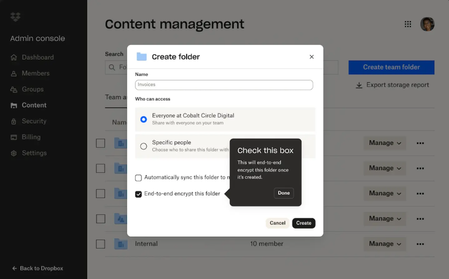
You might have already spoken to some of the team at Dropbox who build Dropbox here on the Community forums, and we are so happy to be able to update you when they have some updates to share! The team have been busy and here are some updates on end-to-end encryption (which we know you’ve been looking forward to), Replay, integrations, Dash and more. Keep reading and don’t forget to let us know what you think! Advanced data protection features add extra layers of security to confidential content with seamless end-to-end encryption and advanced key management If you’ve been using the Dropbox Community for any length of time, you might have seen requests for end-to-end encryption and we have excellent news! It is here! New advanced data protection features from Dropbox provide businesses with sole control over how their data is secured. End-to-end encryption and advanced key management make it easy to protect sensitive and confidential files in Dropbox team folders. This means that no one—including Dropbox—can gain access to their files. Activating end-to-end encryption is as simple as creating a shared team folder and selecting the new encrypted folder option, requiring no technical expertise from the admin or account owner. Files are encrypted when added to the folder and decrypted when a team member is added to the encrypted folder. Only users who have been invited to an encrypted folder can access the files stored within it. Team members quickly get access by invitation to the shared team folder, similar to sharing a regular Dropbox folder. Files are end-to-end encrypted on the team member’s device before they are securely synced with Dropbox servers. No one—including Dropbox—can decrypt the file or access your private key. With advanced key management, teams can set up a unique encryption key as an added layer of security to ensure only members of their organization can access Dropbox files and protect against threats. Keys are automatically rotated every 12 months, and admins can rotate or revoke the key as needed. Dropbox Trust Center also launched today to streamline and accelerate risk assessments of Dropbox products with self-serve, anytime access to our security, reliability, privacy, and compliance information. Prospective and existing customers can streamline internal reviews, audits and risk assessment processes to get value from Dropbox products faster. We know you’ve been asking, so if you want to dive deeper into the security benefits of Dropbox, you can check out https://www.dropbox.com/security. Fast-track video, image, and audio reviews with new features in Dropbox Replay You already know we are Replay’s biggest fans, so if you want to learn more about Replay, we’ve got you too - Replay enables teams to easily share and collaborate on projects from anywhere, including with real-time live reviews and transcriptions—all in one place. With today’s announcement, new functionality helps teams accelerate the feedback process and finish projects faster: Dynamic watermarking: Keep proprietary content protected and prevent unauthorized use by placing watermarks on work shared with collaborators. Watermarks include recipient email, IP address, date, and time of when the file is opened. Added rich media support: Use Replay to review and approve more types of rich media including PDF and PSD files. Custom branding: Configure custom images, banners, logos, and colors within Replay project workspaces. Avid integration: Integration with Avid Pro Tools enables teams to review and approve audio files directly within the Avid platform. For more tips and advice, check out how Calvin uses Dropbox to get feedback here. Find and get to work on content with quick view, quick access, suggested actions, and more on the Dropbox web experience We know, the surface you see when you use Dropbox is very important to you, and now you will see an update to the Dropbox web experience, some small but mighty changes that will improve your day-to-day processes, to help you quickly find what they need and get work done faster. Expect to see changes that include: Dynamic filters that automatically organizes content, for example by project name or theme Quick view to preview files in list layout and smart suggestions related to files being reviewed Favorite files and folders added to an updated left navigation bar for easy access Suggested quick actions for files—such as editing a PDF—that change based on how you work. We know you’ll see these changes, and we want to hear from you about this too, so share your feedback in the comments. Stay organized with new Dropbox integrations with Microsoft 365 and say goodbye to conflicting copies Customers want tools that meet them where they’re working—and it should be seamless to bring the tools they use most into our products. That’s why we recently launched an improved integration with Microsoft Teams that lets you search, preview, upload, and share content stored in Dropbox without leaving Microsoft 365. With this update, you can also use our plugin extension for Copilot for Microsoft 365 to answer questions and generate summaries. Today, we're building on this with even more Microsoft integrations designed to simplify work for teams. Real-Time Co-Authoring (beta): One of Dropbox’s most-requested features ever, Co-Authoring allows multiple team members to collaboratively edit Word, Excel, and PowerPoint files from desktop, web, and mobile, natively within Dropbox. You can also see who’s in the document and where they’re editing in real-time, so everyone is working off the latest version. Now teams can finally put an end to conflicting copies. Dropbox Replay for OneDrive: Bring media files from OneDrive directly into Replay for reviews and approvals. Manage sensitive documents securely and get real-time deal insights with DocSend Advanced Data Rooms DocSend Advanced Data Rooms streamline the entire deal process, from pitching to diligence to signing. Offering the perfect blend of ease, control, and security for deal professionals of all types. DocSend Advanced Data Rooms reduce time spent on administrative tasks and the complexity of your deals, allowing you to focus on closing deals faster. Conduct due diligence with confidence and control: Features like group permissions, visitor verification, and built-in NDAs give you precise control over your most sensitive information. Empower your team with real-time deal insights: Comprehensive data room analytics and page-by-page insights let your team make data-driven decisions. Create and organize your Virtual Data Rooms in minutes: Quickly put your best foot forward with features like data room templates, auto-indexing, and custom branding. With transparent pricing and unlimited data rooms, DocSend is the preferred choice for those seeking a trusted and secure software solution for their deal-making needs. Find what you need instantly across your digital workspace with Dropbox Dash, AI-powered universal search You’ve definitely heard us talking about Dropbox Dash already, but in case you’re new here, Dropbox is building for an AI-first future—not only with Dropbox files, but with everything that makes up the digital workspace. Dropbox Dash (beta) is your AI-powered universal search tool, designed to simplify your workday and give you more time for the work that matters most. Dash instantly searches your connected apps, files and more to find anything across your entire digital workspace in seconds. Ask a question, and Dash can analyze your content to find the answer, summarize key findings from your docs, and much more. Now, Dropbox is improving search and adding new capabilities based on customer feedback: Increased access to Dash: Dash is just a click away on desktop and web. And with an improved Desktop app, it’s easier for customers to find, organize, and share content. Redesigned Start Page: The Start Page, a single dashboard that lets you access universal search, view Stacks—smart, shareable collections of content, and get shortcuts to recent work, offers a new experience that makes it simple to find content, fast. Dash now automatically groups different types of content into Stacks and displays them in a central hub. New connectors: Dash now connects to more than 20 tools and apps customers use for work, including popular new additions like Microsoft OneNote and Zendesk. Dropbox Dash is currently in beta and only available in the U.S. in English. Features will be available on a rolling basis. To learn more, visit https://dash.dropbox.com That was a lot of information in one update, so expect some more updates and tips from us, but if you have anything in particular you’d like to hear from us, tell us!10KViews8likes0CommentsShow comments in version comparison
Originally posted by Nicholas D, with 13 votes at time of migration. It would be helpful to see comments from a previous version when using the version comparison mode. This would allow reviewers to easily go through previous comments and see how they were incorporated into a later version.132Views2likes1Comment