Our Community is in read-only mode until April 8th, learn more here. You can still search existing threads or get help via Dropbox Support, the Dropbox Help Center, or Learn.
Folders
20 Topics
I deleted some files, but they still appear on my Dropbox account online.
Operating System/Browser (if using the web) (Windows 11) Dropbox App Version (if using the app) 244.4.6580 Question or Issue Using basic plan and got he prompt to remove files. I deleted the folder that was share to public and the files are still there. There is no back up. Under shared those files are not listed there. Under shared links , visited links, the link to main online page is there.66Views0likes5Comments
Un-syncing DELETED/MOVED folders instead of "un-syncing"!?!
I initiated a sync change on one our computers, un-syncing about 50% of various top level folders (and their contents) to that device. Then I noticed on our OTHER computers/devices those folders and MANY others were now missing!? Maybe Dropbox accidently "un-synced them everywhere" ... which it shouldn't have! I next logged into our Dropbox directly via browser and sure enough our entire directory structure was riddled with missing/incomplete/relocated folders I have opened a support case for this, #26124591. But to date, only partial restorations have been made. I have since requested that our ENTIRE directory structure be correctly restored prior to March 5th, as that's the only way to resolve this huge mess Dropbox made of our files and ensure we get ALL our data back. Does not instill confidence in Dropbox ... a caution to those of you un-syncing files/folders. Hope you have a recent backup of your own making at hand. If Dropbox can't restore your account folders/files accurately (or at all) your data be gone :-(147Views0likes9Comments
Is there an easy fix for accidentally dragging folders to different locations?
Device HP Z2 Tower G4 Operating System/Browser (if using the web) Windows 10 Dropbox App Version (if using the app) 241.4.4795 I have an ongoing issue with folders in our Dropbox Plus account. We use dropbox for our small company and we have a top level dropbox folder for each of our projects. All folders are owned by my boss (not me). Once in a while I will accidentally drag a top level folder into another folder. Dropbox for some reason allows this drag. But when I go to undo it, then Dropbox tells me that I don't own the folder and I can't move it back! The folder is then stuck in another folder! The only solution I have found to fix this so far is to move the folder back on the website. However this breaks the sharing for the folder so that my boss and any collaborators no longer have access to the folder! I then have to re-share the folder every time I accidentally drag them! This seems very silly, if I don't own the folder and can't move it back, why does Dropbox let me move it in the first place! Is there some better way to fix this?155Views0likes2Comments
How can I organize the files inside my folders?
Device HP Desktop Operating System/Browser (if using the web) (Windows 11, MS Edge Browser Question or Issue I create a unique Folder for each of my consulting clients. Is there a way to organize the content of a folder using headers or category separations, e.g., "New Submissions" or "In Progress"?
I renamed one of my folders and now all of its files have disappeared.
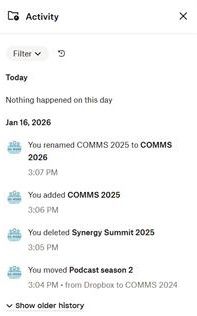
Question or Issue On Fri 16 Jan 2026, I was organising Dropbox and instead of creating a new folder for Comms 2026, I renamed a current folder called Comms 2025 to Comms 2026. Now I can't find the files in that Comms 2025 folder. There are no files in Deleted Files and Activity isn't showing deletion of these files. When viewing all the Dropbox folders, Comms 2026 shows a drop-down sub-folder but I can't click on it. What can I do to find / recover / restore the file? I'm on a Dropbox Plus account.How to delete the Dropbox folder on hard drive without deleting those files elsewhere?
Hi there, I have only been able to find examples opposite of my situation so I apologize if this is frequently asked. Basically, I have around 200gb + and counting everyday of files in a shared company Dropbox with our work emails. I made the mistake of downloading the app and syncing the files to my Mac before realizing what I had done. Since then I have signed out from the application and uninstalled it but still have the Dropbox folder of everything (I believe up to that day) on my computer. Am I safe to delete this folder now that I have deleted the application? I want to make sure it doesn't remove all of the shared files from the company dropbox that others need. The folder on my hard drive says it was last modified over a couple weeks ago which I believe is when I un-synced the application, and there have been things posted to dropbox since then. I appreciate any help or insight I can get here, thanks.Solved30KViews0likes13CommentsDeliberate omission of critical folders for Basic accounts.
I would like to bring to your attention a concerning practice that appears to affect free-tier users. Dropbox is not any more secure without external backup. It has become evident that certain shared folders (which are visible and accessible in read-only mode under a single account) are intentionally excluded from backups and event logging for users on the free plan. This omission makes it effectively impossible to track or recover any changes or deletions, as: Backup history is almost not available for free accounts. Event and activity logs are retained for only 30 days in the free tier. No relevant events or actions appear in the logs, even when changes or deletions are suspected. This issue has been reported and discussed by multiple users across various forums and communities, with many suspecting that folders are being deliberately hidden or removed in free accounts as a way to pressure users into upgrading to a paid subscription.106Views0likes2Comments
How can I move a shared folder I don't own out of my root directory?
I have clicked on a link to see a shared folder for which I have editing privilege. The folder is in my dropbox in the root directory, but it is no use to me there, I need it in another place in the directory structure. I cannot see how to move it, I can move the directories inside the main folder, but then it will disappear form the other peoples dropbox. I do not mind having two copies of it all as I have the space, but need to find a way to either move the main directory or the sub directory's to a different location within my dropbox without causing an issue to the person who shared with me and keep two way link enabled. I am doing this online in the web application, I do not use the desktop application, Thank you189Views0likes4Comments