We're making some changes to the Dropbox Community 👩💻 - Find out more here.
Install
488 Topics
I downloaded the desktop app on my Windows, but can't install it.
Device (MSI) Operating System/Browser (if using the web) (Windows 11) Desktop app stopped working. Tried downloading several months ago and it seemed to have worked but the desktop app disappeared again. Tried to download the standard version as well as the offline version, didn't work. Tried tuning off security, antivirus, firewall, etc., still didn't work. The installing sign will appear but then nohting happens. Sometimes it asks me to log in, but when click on log in, it opens up the same page again and again. It's very frustratining not being able to use Dropbox on my laptop unless I log in using the web version. Please advise. thank you.15Views0likes1Comment
macOS File Provider: Dropbox cannot relink to existing CloudStorage folder
Application Affected Dropbox on Windows PC and iMac Sequoia Device Windows PC and iMac Sequoia Operating System/Browser (if using the web) Latest Windows, iOS 15.7.4 After a routine restart, the Dropbox desktop app lost its login state and now cannot relink to the existing File Provider folder at ~/Library/CloudStorage/Dropbox; instead the installer tries to create a new Dropbox folder. I have been successfully using Dropbox with the macOS File Provider configuration (CloudStorage location) for several months. My Dropbox folder has consistently been located at: /Users/xyz/Library/CloudStorage/Dropbox I did not reinstall the Dropbox application and I did not intentionally sign out or attempt to relink my account. The issue appears to have started after a routine computer restart, at which point the Dropbox desktop client seemed to lose its login state. When I start the app now, the first thing I see is a “Welcome to Dropbox” message and the menu bar icon indicates that the application is “Waiting to be linked to a Dropbox account.” My existing Dropbox folder remains intact. The folder at /Users/xyz/Library/CloudStorage/Dropbox still contains all my files. The .dropbox marker file is present in that folder. All files are also visible and intact on dropbox.com. When I attempt to sign in through the desktop app, the following occurs. The app asks me to sign in with Dropbox. After signing in, the setup process shows the message “There’s already a folder named Dropbox.” If I select “Choose Another Location” and point to the existing folder, the dialog says “A folder named ‘Dropbox’ will be created inside the folder you select.” This suggests the installer is trying to create a new Dropbox folder rather than adopt the existing File Provider folder. Because of that message I have not proceeded, since it appears it would create a nested structure such as: /Users/xyz/Library/CloudStorage/Dropbox/Dropbox Currently the Dropbox icon appears in the menu bar but is greyed out and the client shows the state “Waiting to be linked to a Dropbox account.” To summarize: I was already using the CloudStorage/File Provider location successfully for months. I did not reinstall Dropbox. I did not intentionally unlink the account. The existing Dropbox folder and files are still present and intact. The client appears unable to relink to the existing File Provider folder and instead tries to create a new one. During the setup flow the client also displayed the message that the desktop app cannot sync over 500,000 files. I am not sure if this is related. However, only about 150–200k files are synced locally on my iMac. I also discovered the identical situation on my Windows PC starting at about the same time, which suggests this may be related to my Dropbox account rather than the individual devices or operating systems. Could someone advise how to safely relink the Dropbox client to the existing File Provider folder at: /Users/xyz/Library/CloudStorage/Dropbox without creating a second Dropbox folder? I rely heavily on Dropbox for daily work, so I would greatly appreciate guidance. Thank you.82Views0likes5Comments
Dropbox apt infrastructure relying on unsecure SHA1
When one update its software list with apt on Debian Trixie at least, he gets this error: Err:13 http://linux.dropbox.com/debian sid InRelease Sub-process /usr/bin/sqv returned an error code (1), error message is: Signing key on 1C61A2656FB57B7E4DE0F4C1FC918B335044912E is not bound: No binding signature at time 2026-01-16T19:39:14Z because: Policy rejected non-revocation signature (PositiveCertification) requiring second pre-image resistance because: SHA1 is not considered secure since 2026-02-01T00:00:00Z (...) Warning: OpenPGP signature verification failed: http://linux.dropbox.com/debian sid InRelease: Sub-process /usr/bin/sqv returned an error code (1), error message is: Signing key on 1C61A2656FB57B7E4DE0F4C1FC918B335044912E is not bound: No binding signature at time 2026-01-16T19:39:14Z because: Policy rejected non-revocation signature (PositiveCertification) requiring second pre-image resistance because: SHA1 is not considered secure since 2026-02-01T00:00:00Z Error: The repository 'http://linux.dropbox.com/debian sid InRelease' is not signed. Notice: Updating from such a repository can't be done securely, and is therefore disabled by default. Notice: See apt-secure(8) manpage for repository creation and user configuration details. Notice: Some sources can be modernized. Run 'apt modernize-sources' to do so. This issue was already reported in an unrelated apt issue thread (now closed for replies) in https://www.dropboxforum.com/discussions/101001016/openpgp-signature-verification-failed-with-debian-trixie-/835761/replies/842767 by steinarb Looks like you're signing with SHA1 and that will be forbidden by debian APT policy in a year from now. at which it was replied that Debian Trixie is not officially supported... But the support tells Ubuntu 64 bits : 18.04 ou version ultérieure please see the process to switch to SHA256 in (there might be better options since because this process is from 2016): https://github.com/mxe/mxe-apt/issues/2 and this page tells that the support for SHA1 was removed in Ubuntu in release 16.04 and https://wiki.debian.org/Teams/Apt/Sha1Removal tells that dropbox switched to SHA256 long ago. I believe that recently one of your admin switched back your apt repository signing to SHA1 which is broken on Debian Trixie but also on all Ubuntu above 16.04 so this bug lies in your "offical support". CheersSolved465Views1like7Comments
Dropbox icon is not available on Tahoe 26.3.1
Application Affected Dropbox Device Macbook Pro M5 Operating System/Browser (if using the web) Apple eTahoe 26.3.1 Dropbox App Version (if using the app) Latest offline and online installers Question or Issue The GUI for DropBox / menu bar icon are not available to use. The application is running according to the Activity Monitor, but no way to open preferences etc. Been trying to make dropbox work properly for the last 2 hours. Actions taken: - Restart - Drag application to trash, and download the online installer - Restart - Quit DropBox and all associated applications using the Activity Monitor - Drag application to trash, do search through user and main libraries for anything dropbox related - Download offline installer and reinstall - Do all trashing of findable files - Go to ~/user/Library/Cloud Storage and delete Dropbox folder there - Reinstall from offline Installer - Quit Dropbox to log out from account - Run installation wizard and log back in Same problem still exists265Views2likes14CommentsFix: Dropbox Finder Extension (Smart Sync / Right-Click Menu) Permanently Disabled on macOS
Hey all, I've been beating my head against the wall for a week now trying to figure out why my Dropbox Finder extension wasn't working. I don't have File Provider and really didn't want to set it up, plus I'm apparently not a candidate. I'm not sure exactly what caused this state. It was either a recent update or some aborted FileProvider migration. What I do know after much troubleshooting (thanks Claude Code, who wrote the breakdown below which I edited) is what the broken state looks like and how to fix it. Follow these instructions at your own peril. The Problem The Dropbox Finder extension stops working and can't be re-enabled: No sync status badges (green checkmarks, blue sync icons) in Finder No right-click context menu options ("Make Available Offline", "Make Online Only", "Copy Dropbox Link", etc.) Smart Sync is unusable — you can't toggle files/folders between online-only and local The extension toggle in System Settings > Login Items & Extensions keeps turning itself off immediately after you enable it Running pluginkit -e use -i com.getdropbox.dropbox.garcon (even with sudo) doesn't stick Reinstalling Dropbox doesn't fix it You may also see "Dropbox Finder Extension" listed as a File Provider extension in System Settings, which is wrong — it should be a Finder Sync extension The Broken State A ghost FileProvider domain registration gets stuck in ~/Library/Application Support/FileProvider/. You can confirm this is your issue: # Check if garcon is disabled pluginkit -mDAD -p com.apple.FinderSync 2>/dev/null | grep dropbox # Shows: - com.getdropbox.dropbox.garcon (the - means disabled) # Check if a ghost FileProvider domain exists plutil -p ~/Library/Application\ Support/FileProvider/com.getdropbox.dropbox.fileprovider/Domains.plist 2>/dev/null If the Domains.plist exists and shows something like: "Disconnected" => true "DisconnectionReason" => "This is an unlinked Dropbox" "Path" => "FPFS_SHOULD_NOT_BE_USED" "Enabled" => true ...then you have a ghost domain. It's registered and "Enabled" but completely non-functional. What this causes: When Dropbox starts, it sees a FileProvider domain is registered and enabled. It assumes FileProvider is handling Finder integration, so it deliberately disables garcon (the Finder Sync extension). But the FileProvider domain is broken/disconnected, so neither system works. You get no Finder integration at all. Why reinstalling doesn't fix it: This directory is managed by macOS, not by Dropbox. Uninstalling and reinstalling Dropbox — even Dropbox's "advanced reinstall" that removes ~/.dropbox, ~/Library/DropboxHelperTools, etc. — does not touch this directory. The ghost domain persists, and the next Dropbox install sees it and disables garcon again. You may also see ghost mounts appearing in ~/Library/CloudStorage/ (e.g., Dropbox-YourTeam or conflicted copies with timestamps in the name). These reappear even after deletion because the FileProvider domain is still registered. The Fix Make sure Dropbox is completely quit before starting. # 1. Quit Dropbox osascript -e 'tell application "Dropbox" to quit' 2>/dev/null sleep 2 pkill -f Dropbox sleep 2 # 2. Remove the ghost FileProvider domain registration # This is the key step that a normal reinstall misses rm -rf ~/Library/Application\ Support/FileProvider/com.getdropbox.dropbox.fileprovider/ # 3. Kill the FileProvider daemon so macOS picks up the change sudo killall fileproviderd # 4. Disable the FileProvider plugin, enable garcon sudo pluginkit -e ignore -i com.getdropbox.dropbox.fileprovider sudo pluginkit -e use -i com.getdropbox.dropbox.garcon # 5. Optionally clean up ghost CloudStorage mounts # (replace "Dropbox-YourTeam" with your actual mount name) sudo rm -rf ~/Library/CloudStorage/Dropbox-YourTeam*/ # 6. Start Dropbox open /Applications/Dropbox.app Verify after ~30 seconds: pluginkit -mDAD 2>/dev/null | grep dropbox Expected output: + com.getdropbox.dropbox.garcon(...) # + means ENABLED - com.getdropbox.dropbox.fileprovider(...) # - means disabled (what we want) + com.getdropbox.dropbox.TransferExtension(...) Your right-click Smart Sync options and sync badges should be back, and should survive Dropbox restarts. How We Figured This Out I had Claude compare the plugin state between two Macs — one where Dropbox Finder integration worked and one where it didn't: Working Mac: garcon + (enabled), fileprovider registered but not active, no FileProvider domain in Application Support, no CloudStorage ghost mounts Broken Mac: garcon - (disabled), fileprovider + (active), FileProvider domain present showing "Disconnected" and "unlinked Dropbox", ghost CloudStorage mounts that kept reappearing The working Mac had Dropbox syncing to an external drive, where FileProvider can't operate. So no FileProvider domain was ever created, and garcon worked fine. The broken Mac had Dropbox on the internal drive, and at some point a FileProvider domain was registered. Even though it was in a broken/disconnected state, its mere existence caused Dropbox to disable garcon on every startup. Removing the ghost domain registration was the fix. This is something a normal Dropbox reinstall (or even Dropbox's "advanced reinstall") does not do. Notes This keeps Dropbox in "legacy" mode (syncing to a folder in your home directory rather than through ~/Library/CloudStorage/). This is preferable for workflows that need files to stay reliably local — for example, video editing with Premiere Pro, where FileProvider can silently evict media files and cause "media offline" errors. If Dropbox attempts another FileProvider migration in the future, the ghost domain could return. If garcon stops working again, check ~/Library/Application Support/FileProvider/com.getdropbox.dropbox.fileprovider/ first. Tested on macOS Tahoe 26.x with Dropbox Business v244.4.6580 on Apple Silicon, but the issue isn't version-specific — the ghost domain mechanism has been the same since macOS introduced FileProvider.81Views0likes2CommentsI don't know if I'm using the Dropbox desktop app or not
I am using an iMac running OS 14.1.2. I downloaded the Dropbox desktop app. It shows up in my application folder, and I have an icon in my dock. However, if I click on the Dropbox app icon in my dock, all I get is a regular Mac window that says Dropbox at the top, and includes two files. One is a .url item, and the other is a .pdf item, both about getting started with Dropbox. I never get the word Dropbox in the upper lefthand corner of my finder. I never have Dropbox menu items. The only time I have interfaced with Dropbox at all is while in Safari. Am I using this app? I don't think so, and I don't know why. Things I see mentioned regarding the app are nowhere in sight. Somehow, while in Safari, I did manage to get a backup going. Based on the progress so far, my 750 GB of data is going to take about 15 days to upload. Does that seem right? All input will be most appreciated.Solved1.5KViews0likes2CommentsDropbox installer removes my Windows Defender Firewall rule
Application Affected (Dropbox) Operating System/Browser (if using the web) (Windows 11) Dropbox App Version (if using the app) (244.3.6525) Question or Issue I previously reported this issue about a year ago, but the same problem still occurs in the current version, so I am reporting it again. I am using Windows Defender Firewall with strict outbound filtering, which blocks connections that do not match an existing rule. I created a firewall rule to allow the Dropbox process. However, every time Dropbox is installed or updated, this rule is automatically removed. If the rule is removed, Dropbox cannot connect to the network because outbound connections are blocked by default in my firewall configuration. As a result, Dropbox becomes unusable until the rule is recreated manually. Steps to reproduce Create an outbound rule called "Dropbox" in Windows Defender Firewall. Configure the rule to allow the following process: C:\Program Files (x86)\Dropbox\Client\Dropbox.exe Install or update the Dropbox desktop application with administrator privileges. Actual result The firewall rule is removed after the installation or update. Expected behavior The Dropbox installer should not remove existing user-created Windows Defender Firewall rules. Additional notes Since this rule is user-created and not managed by the installer, it should remain unchanged during installation or updates. https://www.dropboxforum.com/discussions/101001016/dropbox-installer-remove-windows-defender-firewall-rule/765999/replies/766006107Views0likes4Comments
Not getting 6 digit code to set up Dropbox on new iPad
Application Affected Dropbox Device iPad Pro Operating System/Browser (if using the web) iPad OS 26.3 Dropbox App Version (if using the app) trying to set it up on this iPad, I have it on my other devices (all apple) Question or Issue In trying to set up Dropbox on this iPad, it says to log in and then it will email my primary email a 6 digit code. I am not getting the coded and I am getting other emails from Dropbox79Views0likes4Comments
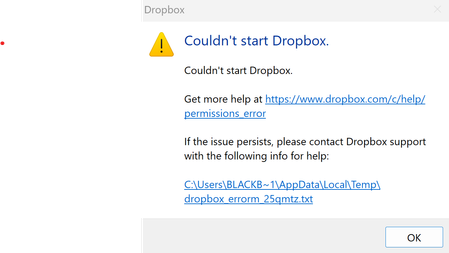
I get an error that the Dropbox app can't start after installing it on my Windows device.
The error file is as follows: bn.BUILD_KEY: Dropbox bn.VERSION: 243.4.6956 bn.constants.WINDOWS_SHELL_EXT_VERSION: 90 bn.is_frozen: True machine_id: fb77be58-97d3-4be1-8b70-5fb248364473 pid: 18096 cwd: 'C:\\Program Files (x86)\\Dropbox\\Client' real_path='C:\\Program Files (x86)\\Dropbox\\Client' mode=0o40777 uid=0 gid=0 parent mode=0o40777 uid=0 gid=0 HOME: None appdata: 'C:\\Users\\Kimpan\\AppData\\Local\\Dropbox\\instance1' real_path='C:\\Users\\Kimpan\\AppData\\Local\\Dropbox\\instance1' not found parent not found dropbox_path: None not found parent not found sys_executable: 'C:\\Program Files (x86)\\Dropbox\\Client\\Dropbox.exe' real_path='C:\\Program Files (x86)\\Dropbox\\Client\\Dropbox.exe' mode=0o100777 uid=0 gid=0 parent mode=0o40777 uid=0 gid=0 trace.__file__: 'C:\\Program Files (x86)\\Dropbox\\Client\\243.4.6956\\python-packages.zip\\dropbox\\client\\ui\\common\\boot_error.pyc' real_path='C:\\Program Files (x86)\\Dropbox\\Client\\243.4.6956\\python-packages.zip\\dropbox\\client\\ui\\common\\boot_error.pyc' not found parent not found TMP: C:\Users\BLACKB~1\AppData\Local\Temp TEMP: C:\Users\BLACKB~1\AppData\Local\Temp tempdir: 'C:\\Users\\BLACKB~1\\AppData\\Local\\Temp' real_path='C:\\Users\\BlackBook Pro 17\\AppData\\Local\\Temp' mode=0o40777 uid=0 gid=0 parent mode=0o40777 uid=0 gid=0 Traceback (most recent call last): File "desktop/dropbox/client/main.py", line 10670, in main_startup File "desktop/dropbox/client/main.py", line 3231, in initialize File "desktop/dropbox/client/main.py", line 2040, in startup_low File "desktop/dropbox/client/main.py", line 1586, in safe_makedirs File "desktop/dropbox/fsutil.py", line 783, in safe_makedirs File "desktop/dropbox/overrides.py", line 165, in makedirs File "desktop/dropbox/overrides.py", line 178, in makedirs PermissionError: [WinError 5] Access is denied: 'C:\\Users\\Kimpan\\AppData\\Local\\Dropbox' I have tried unistalling, re-installing... everything and nothing works. I just can't get DropBox App to run on my computer. I need helpSolved134Views0likes4Comments
Can't start the Dropbox app on my new Windows device. Nothing happens.
Application Affected Dropbox Device HP generic, new, laptop Operating System/Browser (if using the web) Windows 11 Dropbox App Version (if using the app) Can't really tell since it won't start Question or Issue Have been using Dropbox for years. Recently had to get a new laptop because of work issues. I downloaded the app from dropbox.com. It installs just fine. When I start it and press the login button, it very briefly starts a hidden terminal session. The terminal closes almost instantly without displaying its window (therefore I can't see what it tries to do) and then nothing more happens. It will not even display the login window (username/password). Tried reboots and starting the application with administrator privilegies. Doesn't work. No error messages. Works just fine on my other computers, but this is the one I travel with which is a problem. One thought is that the installer tries to access the Edge browser or its dependencies, which I don't have installed (optional in the EU). Please help!144Views0likes10Comments