Our Community is in read-only mode until April 8th, learn more here. You can still search existing threads or get help via Dropbox Support, the Dropbox Help Center, or Learn.
Microsoft Office
188 Topics
I don't want to link Dropbox with Office 365. How can I stop this pop up?
Hi everyone. From my end, it's still showing the very same problem. Eeeeevery time I try to access any office file in Dropbox, this annoying pop up appears... Is there any way to stop this? And no, I don't want to relate my Onedrive account to Dropbox account. Thanks.93Views0likes5Comments
Excel files missing data after a Dropbox update and cannot find it in version history
Application Affected (Dropbox) Operating System/Browser (if using the web) (Windows 11) Dropbox App Version (if using the app) (244.4.6580) Question or Issue Since the recent update a folder which contains some excel files is missing some of the data from the excel file since it was updated on Mon 23rd March 2026. Some cells still have the data and others are blank. This has never happened before and i cannot see anything saved in the older version when I look at trying to restore the file. Basically the 'restore function' does not even show an older version beyond Feb so it has just vanished. Can you help asap? Thanks Neil43Views0likes1CommentMy recently edited Microsoft Excel files are suddenly missing.
Device Mac mini, Macbook air Operating System/Browser (if using the web) OSX tahoe Dropbox App Version (if using the app) not sure Question or Issue two commonly-edited (except not the past 30d) excel files are suddenly missing. They were not deleted and were present on multiple machines/devices as recently as early January. The only thing I changed was how I log in to Office 365 (changed from corporate license to university license). I haven't got it backed up in one place so am at a loss re how to recover them.166Views0likes8Comments
Embedded Word documents will not open in Excel when using the Android mobile app.
Integration Affected Excel Device (Dell 2 in 1 16 inch laptop model DB06250 Operating System/Browser (if using the web) Windows 11, Home and Chrome Dropbox App Version (if using the app) V 242.4.5815 Question or Issue Hello, I cannot open embedded word documents in Excel spreadsheet, in Dropbox on my Samsung S24 Mobile phone. The spreadsheet is fully workable on my mobile, excepting when I press the cell containing the embedded (not linked) word document., it only identifies the cell (eg B2) rather than open the embedded fileit says "This version of Excel doesn't support interacting with embedded files" When I open the offline folder it works perfectly on my laptop Also, sometimes when I open the file on my mobile, it comes up with "open with" and when I press that, it goes straight into the spreadsheet. The screen shot shows an unfilled circle, whereas the others are all filled? I cannot find in Dropbox application, where I can upload a newer version of Excel? Hope you can help, please Kind regards Doug115Views0likes3CommentsDropbox app crashes and won't work with the Microsoft Word app on Android
Dropbox files will not open, except occasionally, in word on my s25ultra phone. Got a message from phone. "dropbox app keeps crashing. put to sleep to avoid excess battery use.' I need to use the dropbox app. When the docment in dropbox does occasionally open in word after an eternity, then it will not close and you have to clear all active apps to get it too close. Word works perfectly with my one drive files.329Views0likes19Comments
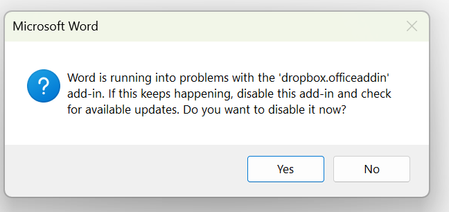
"Word is running into problems" error when trying to open Office files
Application Affected Word Excel etc Device ASUS VIVOBOOK Operating System/Browser (if using the web) Windows 11 Dropbox App Version (if using the app) No app Question or Issue When I try to open a word or excel file I get this error Word is running into problems with the 'dropbox.officeaddin' I also face issues with files not opening occasionally100Views0likes2Comments
Changed password on Excel file, now I get Decryption Failed error on latest iOS
Hi everyone. This is with the latest version of iOS. I have an existing Excel File that is encrypted with a password. It works fine with Dropbox. I change the password and save it, and now I get the error Decryption Failed when I open it on the iPhone with the password. The worksheet works fine on PC. I've even tried changing the password back to the old one and it still doesn't work. Is there some encryption setting in Excel that may be affecting this? I am using Office Professional 2019. Thank you.191Views0likes9Comments
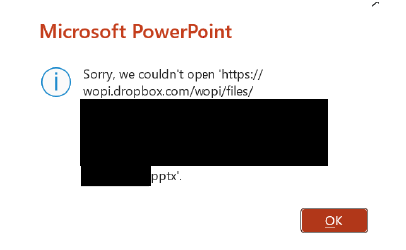
Microsoft Office files won't open for a specific user with an error
Integration Affected Microsoft Office Device Surface Laptop 5 Operating System/Browser (if using the web) Windows 11 Dropbox App Version (if using the app) 238.4.6075 Question or Issue One of our employees is experiencing an issue with opening files saved in Dropbox intermittently. Others are able to open the files and the user can usually open the file after a few minutes have passed. This happens both when a file was just modified by another user and when a file has not been modified in days and no one else has the file open. It also occurs if a file is saved with "Autosave" toggled on or toggled off. The user can open the file via the File Explorer context menu to open the file in Dropbox.com and then in PowerPoint/Excel/Word. Is there a way to fix this as the work around takes time and interferes with the employee's workflow.135Views0likes3Comments
Set Dropbox as the default saving place for Word
Hello! I've recently moved from Microsoft to Dropbox as my cloud storage and I've noticed that my files are not autosaving anymore and even though I deleted my one drive app I still can't make dropbox my default saving place and whenever I tried to do it it doesn't change the settings it's like it doesn't take them because for the next file I try to save it goes back to OneDrive. Thank you everybody!290Views0likes4CommentsCannot open Word documents in Dropbox
I am synced to open Dropbox documents in the online-only mode on my Surface Pro since it doesnt have a ton of hard drive memory. That has worked well for several years. Recently, my Surface Pro has been unable to open Word documents stored stored in Dropbox. Instead, I get the "Unspecified Error" message. I can open pdf files stored in Dropbox without a problem. What changed? How do I resolve this? I have updated my Windows and Dropbox apps. Thanks.Solved12KViews2likes7Comments