Our Community is in read-only mode until April 8th, learn more here. You can still search existing threads or get help via Dropbox Support, the Dropbox Help Center, or Learn.
Quota
30 Topics
Rechercher et trier fichiers par taille dans l'ensemble d'une dropbox ?
Afin de libérer de l'espace sur notre espace dropbox en ligne, bientôt saturé, j'aimerais faire une recherche de fichiers dans l'ensemble des dossiers et sous dossiers dropbox, en indiquant un critère de taille, comme c'est possible de rechercher des fichiers sur un disque dur, par taille, sous Mac OS et Windows, afin de supprimer les fichiers inutiles.Est-ce possible de le faire sur dropbox.com ? Une recherche dans le dossier dropbox de mon disque dur ne m'apporterait que des résultats partiels, car précisément nous stockons les fichiers les plus volumineux et anciens en ligne, plutôt qu'en local.100Views0likes3Comments
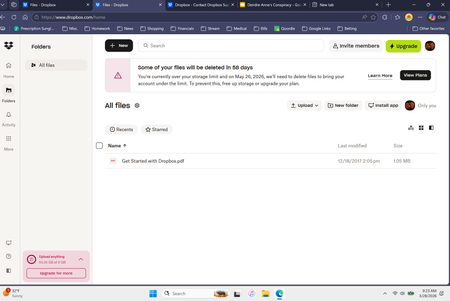
Dropbox est plein même sans aucun fichier.
Je reçois fréquemment des e-mails m'indiquant que je n'ai plus d'espace dans mon Dropbox, et que j'ai utilisé tout l'espace disponible, mais quand je l'ouvre, il est complètement vide : aucune photo, aucun fichier, rien... Que devrais-je faire?138Views0likes1Comment
Dropbox pleine sans fichier
Bonjour, Je reçois des notifications quotidiennement indiquant que mon compte est saturé, et effectivement rien ne se charge, alors que j'ai 0 fichier enregistré et qu'il est bien indiqué dans mon compte que 0% et 0octet sont utilisés. Comment débloquer mon compte ou éventuellement retrouver ces fichiers fantômes ? Merci d'avance !112Views0likes1Comment
Compte Dropbox est vide et pourtant il m'annonce 76 mo utilisés .
Bonjour, Je n'ai aucun fichier dans ma Dropbox. Je n'ai pas fait de partage (étant bien incapable de comprendre comment ça fonctionne de toute façon). La fonction backup est désactivée. J'ai supprimé définitivement tous les fichiers qui étaient présents dans la corbeille (en remontant jusqu'au début de mon utilisation de Dropbox) Malgré cela il m'annonce encore 76.02mo utilisés. Pouvez-vous corriger ce bug ? Merci.Solved178Views0likes3Comments
Limite de stockage à 2Go sans avoir créé le dossier
Bonjour, j'ai été invité à transférer des photos dans un dossier Dropbox, et après transfert de quelques photos je reçois en permanence des alertes de limites de stockage de "mon" Dropbox alors que je n'ai fait que transférer quelques images. Le créateur de ce dossier de partage arrive bien à ajouter des photos dans le dossier. Je n'arrive pas à les visualiser avec le message "Les fonctionnalités d’aperçu sont limitées car vous dépassez votre limite de stockage" Je ne comprends donc pas du tout comment cela est possible? Merci par avance pour votre aide.123Views0likes1Comment
Euh, what? Avez-vous honte parfois?
En règle générale, je m'abstiens de formuler des commentaires sur les applications ou services numériques. Cependant, des pratiques récentes méritent une analyse objective. 1. Limitations architecturales du stockage L'allocation de 2 Go de capacité de stockage dans les offres d'entrée de gamme soulève des questions sur la viabilité technique pour un usage contemporain. Une séquence vidéo basse résolution (exemple : enregistrement d'événement familial) peut saturer jusqu'à 25% de cette capacité, réduisant drastiquement l'utilité opérationnelle du service. 2. Interface utilisateur et expérience client Le système de notifications persistant concernant l'extension de stockage présente plusieurs problématiques : · Alertes déclenchées avec un seuil de 75% d'utilisation de capacité · Absence de personnalisation des paramètres de notification · Caractère intrusif indépendant du volume d'espace libre résiduel 3. Gestion des paramètres de confidentialité Des comportements systématiques de réinitialisation des préférences de confidentialité après les mises à jour logicielles ont été observés. Ces modifications unilatérales remettent en cause : · Le consentement éclairé de l'utilisateur · La stabilité de la configuration · La transparence des processus de mise à jour 4. Considérations stratégiques L'expérience avec les écosystèmes Microsoft et Google a démontré plusieurs incompatibilités avec les exigences professionnelles : · Manque de contrôle granulairesur les paramètres système · Restrictions artificielles sur les fonctionnalités de base · Modèle économique basé sur la vente incitative de services complémentaires Conclusion et migration technique Cette évaluation conclut à la nécessité d'une transition vers des solutions open source (Linux, Debian, Ubuntu) qui offrent : · Un contrôle administratif complet · Une allocation des ressources transparente · L'absence de restrictions commerciales sur les fonctionnalités essentielles · Une stabilité configurationnelle préservée entre les cycles de mise à jour164Views1like1Comment