Our Community is in read-only mode until April 8th, learn more here. You can still search existing threads or get help via Dropbox Support, the Dropbox Help Center, or Learn.
Third Party Integrations
34 Topics
Trouble with Epson Connect
Using Epson WF-7710 and Trying to Scan to Cloud to Dropbox Folder Getting Error: Error(Access Denied) Followed by an email with the following message: Your scan data was received, but not transferred to Dropbox. Product name: WF-7710 Display name: Dropbox Documents Destination: Dropbox : /090 My Scans/2020 Scans Received Date/Time: 08/07/2020 09:55:39 PDT CAUSE: Epson Connect cannot access your Dropbox folder. SOLUTION: 1. Sign in to https://www.epsonconnect.com/user/ , and then edit the destination. 2. Sign in to Dropbox and allow Epson Connect to access your online folder. Where can I tell Dropbox to allow Epson Connect to acces my folders?Solved10KViews0likes9Comments
Excel for web file won't open
Hello! I'm using Google Chrome for Windows to open a MS Excel file using "excel for web" via the dropbox.com page. When I click through to the "excel for web" option, a "dead" paper icon (reminds me of old-school Mac icon) appears, and the file doesn't open... This file opens normally on other computers at my business. Thanks in advance for help.Solved9.6KViews1like8Comments
I get an error when trying to load some files. Any ideas why and what to do?
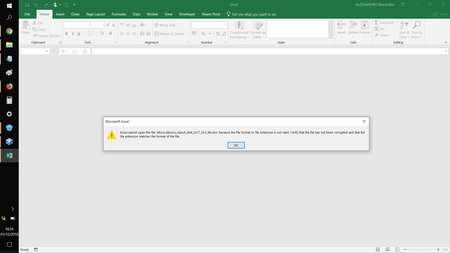
Hi, since few weeks I'm getting an error on some files in my Dropbox. I use Dropbox tipically from 2 different Laptops. Typically I use Dropbox from 2 different laptops. Now it happens that some files that up to the day before I can open regularly, suddenly at the time of opening give me an error (Error loading), which I am attaching a screenshot. In addition, on all files with which I get this error I find the file name changed with all lowercase letters, while up to before the error I had specifically created them with both uppercase and lowercase. Now I'm really afraid of losing all my files and not being able to access them anymore. Please tell me if exist a Fix or a workaround to avoid that error.Solved9.6KViews0likes7CommentsExcel file changes not being saved
Hi, I use an Excel file saved to a folder in my Dropbox. This is accessed by two colleagues both of whom use Office for Mac as do I (Office 365 in two cases, not sure if one is standalone Office for Mac or 365) In any event, though I successfully save changes to the file, when one of my colleagues accesses the file later it's as if I've never edited it at all. I see from a 2018 community post/reply that Excel files in Dropbox can only be edited successfully using Office online. Is this still true? If this is the case, I'm disappointed that this is not made clear in some way for users of DropBox (perhaps an alert for any .xls or .xlsx files saved) because I suspect that a lot of people have lost data as a result. So I guess the question is, is the problem of not being able to edit Excel files with the desktop version of Excel still true? Cheers Iain7.5KViews2likes15CommentsDrop Box Files Opening in New Tab
I have been using Dropbox for a few years now and always when I click on a word document it will ask... "Open With" Then there is a drop-down list and I am able to choose Microsoft Word Online. It has always opened up in the same tab in my browser until around June 11th, 2019 all of a sudden it started opening in a new tab on my Chrome Browser. I want it to go back to it opening on the same tab and am unsure how to find this setting? Please help and let me know step by step how If I click on a word document or an excel file in my dropbox files I can get it to open in the same tab and not open in a new tab. Thank you in advance...6.5KViews2likes12Commentssuperduper and smart-sync problem
I am using "superduper" for years to make a 1:1 backup of my macbookpro's SSD. It's in addition to TimeMachine and allows me to work (nearly) without interruption if the computer or it's drive fails. Since I enabled Dropbox smart-sync on my dropbox business account, it looks like that superduper is also trying to backup online-only files. That means, that I will need more storage on the backup volume than the actual size of the macbookpro's SSD. Moreover, it will not be possible to restore an exact 1:1 copy, because this will not fit on the SSD again. Any suggested solution from the community? Kind regards, ChristianSolved6.5KViews0likes9CommentsNeed to separate pages within a document in DB
I am trying to pull pages from a 44 page document in a DB folder and move them to a subfolder. For the life of me I can not figure out how to do so. I have saved it and tried to copy individual pages but it does not allow me to do so. (This is a PDF) Any suggestions would be greatly appreciated!Solved6.4KViews0likes2CommentsRestoring files deleted by accident using Overleaf via Dropbox
I'm using Dropbox in combination with overleaf in order to sync my LaTex projects from overleaf to my Dropbox folder. About two weeks ago, I accidently removed the files from an overleaf project from my dropbox. This implies that the files were also deleted on the overleaf site. I thought I would be able to restore the deleted files through dropbox backup mechanism, however when I look for the files in my dropbox folder, I can only find back one tex file from the approximately 10 files that were originally in the project. How can I recover these files, given that it hasn't been 30 days yet since i removed them?6.3KViews0likes9Comments
3ds Max & Dropbox
Hi Been using Dropbox for the past 5 years with no real issues until recently. Now we can no longer open any 3ds Max file saved on any Dropbox folder. Copy the file to a local drive an it works fine. We have GB of file that we can now lo longer access, please help. Tested with 3ds Max 2018,2019,2020 & 2021 and the file names have no special characters and are less than 256 long Regards5.3KViews1like14Comments