Our Community is in read-only mode until April 8th, learn more here. You can still search existing threads or get help via Dropbox Support, the Dropbox Help Center, or Learn.
Third Party Integrations
60 Topics
Spotlight Search Doesn't Link to Files in Dropbox in macOS 13 Ventura
After upgrading to macOS Ventura, I was prompted to upgrade to "Dropbox for macOS 12". I proceeded with that, it moved my Dropbox folder to ~/Library/CloudStorage and confirmed all was successful. Now when using Spotlight to search (I often type something like 'drawings folder' to open a folder called Drawings) the results in Spotlight show the Dropbox app icon beside the name of the item I want (rather than a Finder icon for folder or file). Hitting Enter or clicking on the result switches to Finder and does nothing, or sometimes will open the Applications folder and show the Dropbox app. It's not linking me to the actual file in ~/Library/CloudStorage. I have done the following and the problem is not solved: Restarted Ensured all files are available for offline access Rebuilt the spotlight index Unlinked Dropbox from this Mac, did a complete clean install of dropbox, performed the upgrade to v159.4.5870 and synced just one folder to begin Nothing works. Any suggestions??Solved62KViews20likes398Comments
I can't open Word/Excel files on iPad/iPhone
Hi. I've searched the forum/web and can't seem to find any answer to this problem. Until a couple of weeks ago I could edit in all Office-files in Dropbox via both iPad and iPhone. Then earlier this week I suddenly can't do this, and I'm asked to log-in with a 365 subscription. Has there been a change I haven'r been awere of, and do I now have to have an active 365 subscription? I use Dropbox basic, and the files are .docx and .xlsx. Thank you for your time. Regards /Mogens Østergaard, DenmarkSolved53KViews0likes12Comments
Unable to 'Save to Files' on iOS
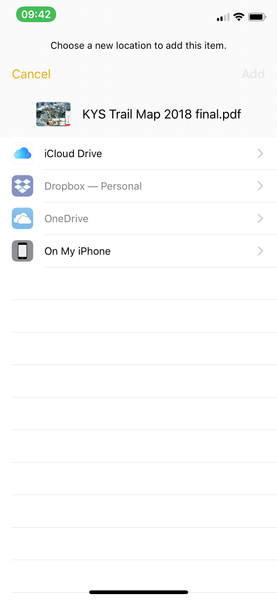
Hey Dropbox Hive Mind, . I've thus far been unsuccessful at trying to save a file to Dropbox on my iPhone. For example, when looking at a PDF (email attachment or a PDF in the iOS Notes App) or a photograph in Photos, I click the share button, navigate to "Save to Files" on the bottom row of icons, and then get to the following screen (see below) where Dropbox is greyed out. How do I fix this and get Dropbox to NOT be greyed out so that I can save files to Dropbox? Thanks for the help!Solved37KViews4likes2Comments
Dropbox and Files App Issues (iOS 11)
Hello I am having issues using Dropbox with the Files App. When trying to attach a file to an email I can browse and select the file but when I select the file the round 'downloading' icon appears but it never completes. The square 'cancel' icon at the centre of the circle is unresponsive. When browsing Dropbox within the Files App some (but not all) folders display "To view the items in this folder, you need to authenticate". When I click the button to authenticate the screen briefly flickers but nothing happens. I cannot browse Dropbox within Files unless I disable my Dropbox pass-code/touch ID. A few days ago this was working. The search feature within Files does not return any of the Dropbox files. I have tried the following steps to remedy the situation: Cleared Dropbox cache. Deleted the Dropbox App and then restored it to the latest version (64.3) Rebooted my iPhone 7. Tried another device (iPad Mini 2). None of these actions have made any difference. I would appreciate any help that you can offer. Thank you.Solved28KViews0likes45Comments
iOS 11 Files App iPad - waiting to download
Using the Files App on iOS 11 - on my 11.2 iPhone 7 Plus everything works perfectly. From the Files App I see thumbnail representation of Dropbox files, I tap the file (e.g. a PDF) and it downloads and opens. On my 9.7 iPad Pro also running 11.2 - same Dropbox account - same files - no thumbnails, and every file tap results in “Waiting to download” and a spinning circle forever. Cleared cache, no Dropbox pin, turned off 2FA, deleted and reinstalled both Dropbox and Files App and same result. Contacted Dropbox Support and got boilerplate “use our app instead of Apple’s” mindless response. Apple support says it is a Dropbox issue. I just want it to work like it does on the phone. Any suggestions?Solved27KViews1like31Comments
Add Dropbox as a place in Office 365 for Mac OSX
Hello, I'd like to add Dropbox as a place in Office 365 for Mac. I've found these instructions for windows (and here) but the corresponding options don't show up in the Mac version and, unfortunately, I haven't been able to track down any instructions for Mac. Does anyone know how do this? Is it possible? Thanks, Christopher P.S. Please let me know if there is a btter place to be posting this.Solved27KViews2likes35Comments"Sprig Electron View" holds up shutting down on Windows 10.
Ever since I upgraded to Windows 10, and apparently dropbox changed from program to "app" (hate them vs. full programs), every time I shut down my computer, it sits and waits for a half minute or more for something called Sprig Electron View, and finally shuts down. Apparently this has something to do with dropbox. If I manually quit dropbox before shutting down, then shutdown works almost instantly. I want that instantly. So, what is this program, can I remove it and still use dropbox, if so, how. Or how do I get it to stop holding up the shutdown command? Thanks.Solved20KViews4likes9Comments