Our Community is in read-only mode until April 8th, learn more here. You can still search existing threads or get help via Dropbox Support, the Dropbox Help Center, or Learn.
Third Party Integrations
32 Topics
When opening LibreOffice my files give me an error, and fail to download.
Integration Affected LibreOffice Device Fujitu desktop Operating System/Browser (if using the web) Windows 11 Dropbox App Version (if using the app) I'm uing the desktop version. Question or Issue I had to have a change of computer as my other one died. My other computer ran on Linuz, but my replacement one uses Windows 11 and Firefox. I have LibreOffice installed on this computer. I logged into Dropcox and tried to open my spreadsheet in LibreOffice Calc, but it failed to download and showed an error meaage.221Views0likes8Comments
I linked my account to my Oculus Quest headset but none of my files are showing
Ive linked my account to the headset but none of my files are showing even though they are supported file types. i asked oculus and was told to ask here because they said it wasnt an issue with the headset but with the service.Solved21KViews0likes26Comments
Can I download folders from Dropbox to my Android without a third party app?
This is SO frustrating. I have a real need to download entire folders to my android device. For some years I have used the FILE DOWNLOADER FOR DROPBOX from Play Store. I had to reset my android device and now I find the app is no longer available. No other third party apps seem to do this. So anyone know whether I can do this from Dropbox these days (without accessing dropbox .com) or of a third party app?32KViews3likes13Comments
Pdf not opening in Adobe when using Dropbox online
I have installed adobe acrobat reader DC, linked my dropbox account to it, and change the default program to open pdf files to adobe, but when I try to open a pdf from Dropbox online, it still opens in my edge browser (windows 10.)Solved22KViews1like10CommentsMy files are available offline, but I can't open them from OneDrive.
Hello I really hope someone can help me with this! I had all of my files I Dropbox in the desktop app on my Microsoft (Windows 10) computer. I had chosen to save files online and not local due to the fact the my computer doesn’t have enough GB. I then choose to move to OneDrive (also in the desktop app) and just cut and pasted my entire folder with all of the folders and files in it. It then took a long time of course to move it all and now the desktop Dropbox folder is empty and everything should then be in the OneDrive desktop folder. OneDrive said that it was done syncing but when restarting the computer it continued. I have restarted the computer several times since yesterday and it happens every time. I had just about 200 GB worth of files in the Dropbox and everything is moved but only about 60 GB of the files can open in OneDrive and the rest of them is not able to open. I have googled and found out that this method can be used but I should probably have saved it to the local desk and not only as online files according to google. When I open Dropbox.com now I see my files and I tried to download one folder to the local desk as a zip file but it wasn’t able to open. Now I am really not sure what to do or how to get all of my files to OneDrive so I can open them all. As mentioned my local hard drive doesn’t have space for it all and on top of that I’m not sure if Dropbox has still saved all of my files online and if they are even saved there since I deleted them in the Dropbox desktop app. Dias anyone have a good advice and a solution for me so I will not loose any files? I am in the middle of an exam so it is very urgent. Thanks in advance!Solved26KViews1like5CommentsBroken links in InDesign files on macOS Monterey 12.3.1
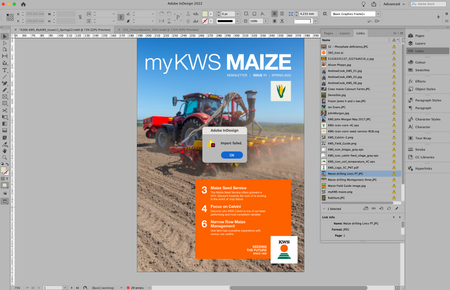
Hi there, I've been happily working with Indesign files in Dropbox for a year now where my files are all stored Online Only. It used to be the case that Dropbox would automatically relink all the supporting files that are stored on Dropbox.com and I would be able to edit the InDesign file. Recently, upon opening an InDesign file all the links to picture files etc are broken. Added to that, when I try to relink the files through InDesign I get a message that reads: Import Failed! (see attachment). My Dropbox App says that the files I am trying to relink are all Zero Bytes. When I access my account at Dropbox.com the files are all good. The only way I seems that I can relink my files is if I download them to my iMac. I'm currently using Mac OS Monterey 12.3.1. Any ideas?Solved20KViews6likes71Comments
Can't open encrypted files via Boxcryptor
W11: not possible anymore to open encrypted files via good (old) boxcryptor. no matter which filetype and when it was last changed. Was possible without any problems before the update for the last 8+years Installing non beta 185 doesn't solve this. Moving the encrypted folder out of dropbox everything is fine again. Maybe related to problem in mac, since there is no preview of files either https://www.dropboxforum.com/t5/Dropbox-desktop-client-builds/Beta-Build-186-3-6103/td-p/7222822.4KViews0likes13Comments
Adobe Acrobat and Adobe Reader fail at opening online pdf files
Hello, Some context Using DropBox on MacOS 12.7.4 with FileProvider, beta version v198.3.7526. New files default to online. I had to reinstall DropBox recently and most of my files are now online. My problem The only way for me to open online PDF files with either Adobe Acrobat or Adobe Reader is to double-click them in the finder. - If I use Files>Open or Recent files from within Acrobat to open an online file, it won't open and I see no error message, Acrobat just sits there if it was already launched or opens to the recent files list, - If I use any other mean : LaunchBar (an application launcher) or ForkLift (a file manager), Acrobat starts but fails silently at opening the file. What I tried - I repaired hard-link - I repaired authorizations Thanks for any idea.Solved5KViews0likes2Comments